10.1 Memory Compression
What it is: A trick (Windows calls it the "Memory Compression" store, part of its memory manager since Windows 10). Instead of sending a rarely used page straight to the slow pagefile (Section 5.3), the operating system first tries to compress it (squeeze it smaller, like zipping a file) and keeps it in RAM, in compressed form, in a special area.
Without memory compression:
Idle page → write full-size page to pagefile on disk (slow)

With memory compression:
Idle page → compress it → store compressed version in RAM
            (much smaller, still in RAM, no disk access needed)
            (only fall back to the pagefile if RAM pressure is severe)
Why it helps: Compressing and decompressing a page inside RAM is far faster than writing or reading it on storage (even an SSD). Decompression runs at RAM speed (nanoseconds), not storage speed (microseconds to milliseconds). So a PC under moderate memory pressure can often avoid disk paging (and the slowdown from Section 5.5) completely. The price is a small amount of CPU time spent compressing and decompressing.
Analogy: Instead of carrying winter clothes to a far-away storage unit (the pagefile), you vacuum-pack them and keep them in your wardrobe. They take less room, and they are still close.
10.2 Non-Uniform Memory Access (NUMA)
The problem: In PCs with several physical CPU sockets (common in servers and high-end workstations), each CPU usually has its own bank of RAM fitted close to it. A CPU reaches its own nearby RAM quickly. But reaching RAM that belongs to a different CPU has to cross an interconnect (a link between the two CPUs), and that is measurably slower.
┌──────────────┐         Interconnect          ┌──────────────┐
│    CPU 0     │◄─────────────────────────────►│    CPU 1     │
│ (fast local  │                               │ (fast local  │
│  RAM access) │                               │  RAM access) │
└──────┬───────┘                               └──────┬───────┘
       │                                              │
  ┌────▼─────┐                                   ┌────▼─────┐
  │ RAM bank │                                   │ RAM bank │
  │ (local   │◄── CPU 0 accessing this: FAST     │ (local   │
  │ to CPU0) │◄── CPU 1 accessing this: SLOWER   │ to CPU1) │
  └──────────┘  (must cross the interconnect)    └──────────┘
Why this matters: It is called Non-Uniform Memory Access because — unlike the simple single-socket picture used earlier in this chapter — the access time now really depends on which memory bank is used, compared with which CPU is asking. NUMA-aware software (and NUMA-aware OS schedulers) try to run a thread on a CPU close to the memory it uses, and to give a process memory from the bank local to the CPU it runs on. That avoids the cross-socket delay. This mostly matters for multi-socket servers. Typical desktops and laptops have only one CPU socket.
| Local RAM | Remote RAM (other socket) | |
|---|---|---|
| Path | Straight to the CPU's own bank | Across the interconnect first |
| Speed | Fast | Measurably slower |
10.3 Persistent Memory
What it is: A newer kind of memory (Intel Optane Persistent Memory is the best-known example). It aims to sit between normal volatile RAM and normal non-volatile storage. Its speed is much closer to RAM, but it still keeps its contents without power, unlike the DRAM from Section 2.1.
Traditional hierarchy:          With persistent memory:
RAM (fast, volatile)            RAM (fast, volatile)
   │                               │
   ▼                          Persistent Memory
Storage (slow,                (near-RAM speed,
non-volatile)                  but non-volatile)
                                   │
                                   ▼
                              Storage (slow, non-volatile)
Why it is interesting: It blurs the sharp line this chapter has drawn between "RAM (fast, temporary)" and "storage (slow, permanent)". A system with persistent memory could, in principle, keep a database's whole working set instantly available even after a power loss or reboot, without the usual reload time (seconds to minutes) from normal storage. It is a specialized, fairly niche technology today (mostly in servers and data centers), but it shows how the classic memory-versus-storage divide may change.
10.4 Heat Spreaders and Speed Profiles (XMP / EXPO)
Fast RAM gets warm. Many desktop sticks therefore carry a metal plate called a heat spreader that helps the chips shed heat.
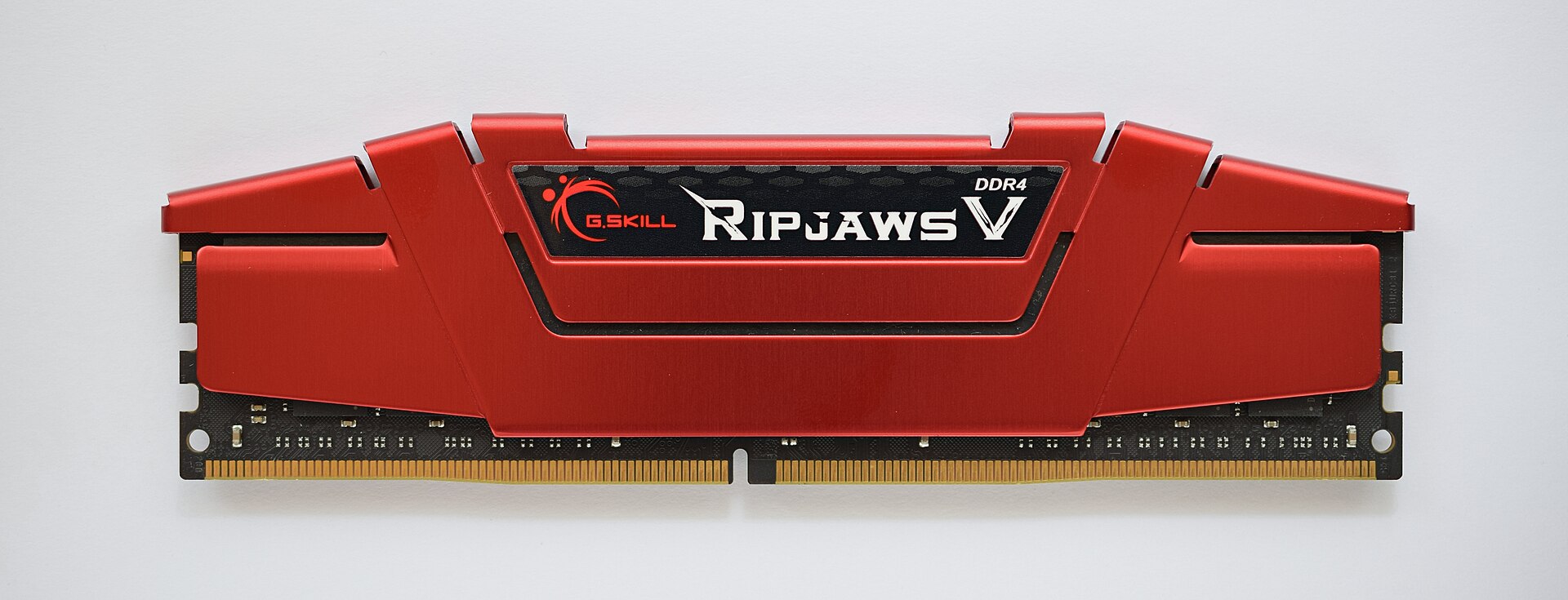
Figure 3.6 — A desktop DDR4 stick with a heat spreader. The red metal plate covers the memory chips underneath, much like the black chips you could see on the laptop stick in Figure 3.2. Only the gold contacts and the notch at the bottom are left uncovered. Photo: ElooKoN, CC BY-SA 4.0, via Wikimedia Commons.

Faster RAM often also comes with an XMP (Intel) or EXPO (AMD) profile. This is a ready-made set of faster settings stored on the stick. If it is not switched on in the BIOS, the RAM may run slower than its rated speed (the lab below checks for this).
Key takeaway for this section: Memory compression, NUMA-awareness and persistent memory are all refinements of the same theme as this whole chapter: getting more speed and more usable capacity out of the RAM layer by being smarter about how it is used, rather than just adding more of it.
Summary
| Topic | Remember this |
|---|---|
| Memory compression | Squeeze idle pages in RAM instead of writing them to the pagefile; much faster than disk |
| NUMA | With several CPU sockets, local RAM is fast and remote RAM is slower |
| Persistent memory | Near-RAM speed but keeps data without power; niche, mostly servers |
| Heat spreader | Metal plate that helps cool the RAM chips |
| XMP / EXPO | Stored faster settings; must be enabled in BIOS to reach rated speed |