The Big Picture: Where Does the PC Remember Its Settings?
You change the boot order, set the clock, turn on a memory profile. You turn off the PC, and the next day everything is still set. How? The firmware needs a place to write things down that survives power-off. This section explains the two places: the old CMOS memory (with its coin battery) and the modern NVRAM (inside the firmware flash chip).
7.1 CMOS Memory
What it is: CMOS is a tiny block of memory that stores the BIOS settings and the date and time. The name comes from the chip technology it was first built with: Complementary Metal-Oxide-Semiconductor, a type of circuit that uses very little power. (Almost all chips today are CMOS, so the name is just history.)
The history:
| Time | Detail |
|---|---|
| 1984 | The IBM PC/AT adds a clock chip (the Motorola MC146818 RTC, Real-Time Clock) with a small block of battery-backed RAM |
| Original size | About 64 bytes, with part used by the clock itself |
| Later | 128 bytes (and more on some boards) |
| Today | The CMOS RAM and the RTC are built inside the chipset (PCH) |
What is stored there:
| Stored item | Example |
|---|---|
| Date and time | Kept by the RTC (it counts using a 32.768 kHz crystal, from Chapter 4) |
| Basic settings | Boot order, disk types, "boot with keyboard error" |
| A checksum | A number that proves the data is not damaged |
| Passwords (some systems) | Setup passwords |
How the CPU talks to it: Through two I/O ports (Chapter 4). Port 0x70 takes the address of the byte you want, and port 0x71 reads or writes it. That is all! The old Award and AMI BIOS used this to save the settings you see in the setup screen:
CPU ── OUT 0x70, index ──►  CMOS chip   (choose which byte)
CPU ── IN  0x71        ◄──  CMOS chip   (read that byte)
The checksum. The BIOS adds up all the settings bytes and stores the total. On the next boot, it adds them again. If the totals differ, the data was damaged (usually because power was lost), and the BIOS shows "CMOS checksum error" and loads the defaults.
Look at the screen in Figure 5.7. On a classic Award screen, the menu Standard CMOS Features is the place for date, time and drives, and Load Fail-Safe Defaults or Load Optimized Defaults replaces all your settings with factory ones. Save & Exit Setup (key F10) writes your changes into the CMOS.
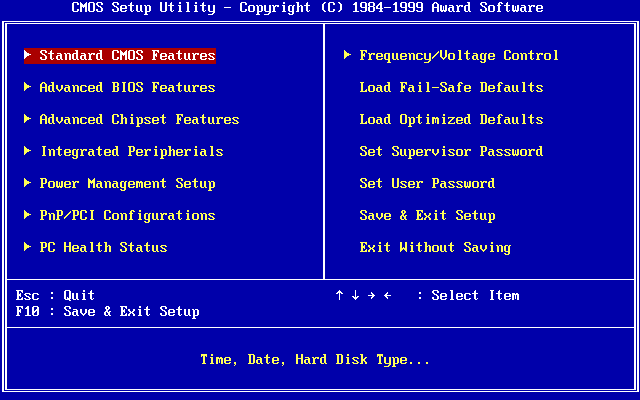
Figure 5.7 — The same classic Award "CMOS Setup Utility". On the right, Load Fail-Safe Defaults, Load Optimized Defaults, Set Supervisor Password, Set User Password and Save & Exit Setup are the items that read and write the settings memory. Screenshot: Award Software International Inc., recreated by User:Kephir, public domain, via Wikimedia Commons.

7.2 NVRAM
What it is: NVRAM means Non-Volatile RAM: memory that keeps its data without power. In a modern UEFI PC, this is an area inside the SPI flash chip (Chapter 4). It is not powered by the coin battery. Flash simply remembers by itself.
| CMOS RAM | NVRAM (UEFI) | |
|---|---|---|
| Technology | Small battery-backed RAM | Flash memory area |
| Needs a battery? | Yes | No |
| Size | 64 – 256 bytes | Tens or hundreds of kilobytes |
| Stores | Old BIOS settings, the clock | UEFI variables (settings, boot entries, keys) |
| Loses data if the battery dies? | Yes | No |
UEFI variables. Each stored item is a variable: a name, a vendor GUID, some attributes, and a value. The attributes say how it can be used:
| Attribute | Meaning |
|---|---|
| NV (Non-Volatile) | Keep it after power-off |
| BS (Boot Services) | Visible during boot |
| RT (Runtime) | Still readable and writable by the OS |
| Authenticated | Can only be changed with a valid signature (Secure Boot keys use this) |
What lives in NVRAM:
- The boot entries and
BootOrder(Section 5.5) - The Secure Boot keys (PK, KEK, db, dbx)
- Firmware setup choices (many makers keep these as variables)
- Capsule update flags, and vendor data
Windows can read these variables (with the right privileges), which is how Windows tools set the boot order or restart into firmware: shutdown /r /fw sets a variable and restarts.
Wear. Flash cells wear out after many writes, so the firmware does not write NVRAM constantly. It writes when something changes.
7.3 Storing Boot Settings
What it is: The boot settings are the boot order and the boot entries. How they are stored depends on the firmware kind.
| Legacy BIOS | UEFI | |
|---|---|---|
| Where | In CMOS | In NVRAM variables |
| What is listed | Device types in order (floppy, CD, hard disk, USB) | Named entries with a path to an .efi file |
| How you edit it | Setup screen only | Setup screen, plus OS tools (bcdedit, efibootmgr on Linux, installer programs) |
| Who may change it | The user | The user and installed operating systems |
Why an OS can change your boot order (UEFI). When Windows installs, it creates a new boot entry ("Windows Boot Manager") and puts it first. When you install Linux next to Windows, its installer adds an entry too. That is why dual-boot menus can appear.
Other settings that live in NVRAM or flash:
| Setting | Stored as |
|---|---|
| Fast Boot, CSM, Secure Boot state | Firmware variables |
| Memory profile (XMP/EXPO) choice | Settings and saved training data |
| TPM and security options | Firmware settings |
| Date and time | In the RTC (not NVRAM; the battery keeps it) |
What clearing does:
| Action | Effect |
|---|---|
| Load Optimized Defaults (in setup) | Rewrites the settings to the maker's defaults |
| Clear CMOS (jumper, button or battery) | Resets the settings, clears the clock and often resets the firmware settings to default |
| Update the firmware | May reset settings (write them down first) |
(Boot entries may or may not survive a CMOS clear. If Windows disappears from the boot menu, re-adding it with the Windows recovery tools or a "browse for .efi file" option in setup usually fixes it.)
Windows tip: Reading the entries:
bcdedit /enum firmware
(Run in an Administrator Command Prompt.)
7.4 Battery Backup
What it is: The CMOS battery is a coin cell that keeps the clock (and on older boards the CMOS RAM) running while the PC is unplugged. It is usually a CR2032, 3 volts.
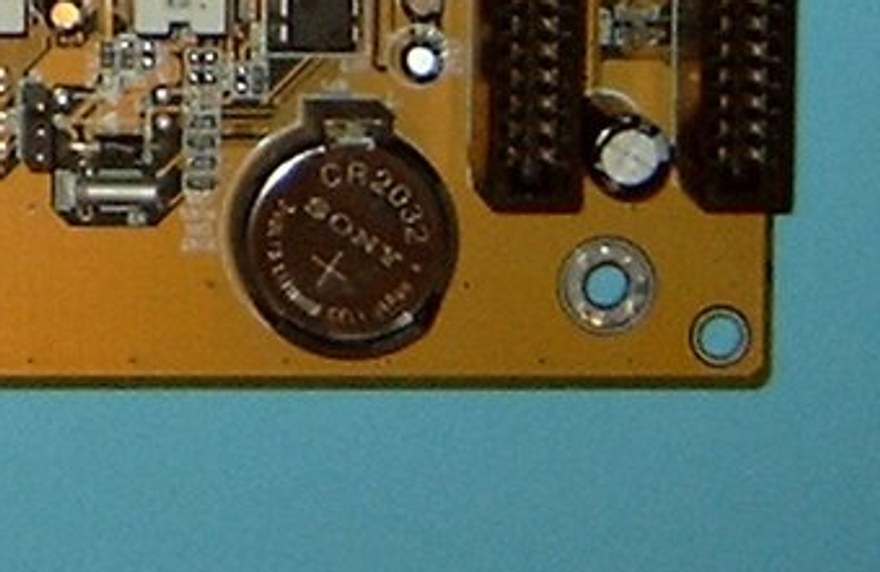
Figure 5.8 — The round silver coin is a CR2032 battery in its holder on a motherboard. Photo: Arnulf zu Linden, CC BY-SA 3.0, cropped from a motherboard photo, via Wikimedia Commons.

| Item | Detail |
|---|---|
| Type | CR2032, a 3 V lithium coin cell (not rechargeable) |
| Draw | A few microamps: tiny |
| Typical life | Several years (3 to 10, depending on use and PC) |
| Powers | The RTC (date and time) and, on old systems, the CMOS RAM |
| When it matters | Only when the PC is fully off and unplugged. While the PSU is plugged in, the board takes standby power from it. |
Symptoms of a dying battery:
| Symptom | Why |
|---|---|
| Clock resets to an old date (like 2000 or 2009) | The RTC lost power |
| "CMOS checksum error" | Old settings memory was lost |
| Settings forgotten at each power-off | Same reason |
| Web pages warn about certificate dates | The wrong clock confuses secure sites |
| "Press F1 to continue" at every boot | The firmware keeps loading defaults |
How to replace it safely:
- Shut down and unplug the PC. On a laptop, power off and disconnect the charger (many laptops have the battery hidden under the case; consult the maker's guide).
- Touch bare metal on the case to discharge static electricity.
- Gently push the retaining clip aside and lift the old coin out. Note which side faces up (the + side, usually up).
- Put in a new CR2032, + side up. Click it in.
- Start the PC. Set the date and time, and set any settings (boot order, XMP/EXPO).
Clear CMOS (reset to default). If a bad setting stops the PC from starting:
| Method | How |
|---|---|
| Button | Press Clear CMOS on the rear panel or board (power off first) |
| Jumper | Move the jumper on pins marked CLR_CMOS for a few seconds |
| Battery | Unplug, remove the coin for about a minute, put it back |
Note on UEFI PCs: A dead battery on a modern PC often only affects the clock (and a "settings lost" warning). Boot entries stored in flash NVRAM stay, so the PC may still boot Windows correctly.
Summary
| Term | Plain meaning |
|---|---|
| CMOS | A small memory for settings and the clock; also the name of a circuit type |
| RTC | Real-Time Clock: counts the date and time |
| Ports 0x70 / 0x71 | The address and data ports used to access CMOS |
| Checksum | A total that shows if the data is damaged |
| NVRAM | Memory that keeps data without power (a flash area in UEFI PCs) |
| UEFI variable | A named, stored setting (name + GUID + attributes + value) |
BootOrder | The stored list of boot entries |
| CR2032 | The 3 V coin battery |
| Clear CMOS | Reset the settings to the defaults (jumper, button or battery) |
| Load Optimized Defaults | Setup option that restores the maker's settings |