The Big Picture: A Recipe and a Kitchen
A program is like a recipe in a cookbook. It is just words on paper. It does nothing by itself. A process is what happens when someone actually cooks the recipe: there is a kitchen, ingredients on the counter, a cook, and a clock ticking.
Two people can cook the same recipe at the same time, in two kitchens. Same recipe, two separate cooking sessions. In a computer it works the same way: you can open Notepad twice, and you get two processes from one program file.
 PROGRAM (on disk)                PROCESSES (running, in RAM)

 +---------------+                +-------------------------+
 | notepad.exe   |  -- run -->    | Process A: Notepad #1   |
 | (a recipe)    |  -- run -->    | Process B: Notepad #2   |
 +---------------+                +-------------------------+
 Just a file.                     Each has its own memory,
 Does nothing.                    its own settings, its own ID.
1.1 Definition
What it is: A process is a running program, together with everything the operating system (Windows) keeps to manage it. It is a container of resources. The word "process" means "the program, alive".
What a process owns:
| Part | Plain meaning |
|---|---|
| Private memory | Its own address space (its own "view" of memory, see Chapter 3 and Section 4 of this chapter) |
| The program's code | The instructions copied from the file on disk |
| One or more threads | The workers that actually run the code (see 1.3) |
| Handles | Tickets that point to things it has opened: files, events, other processes (Section 5) |
| A security identity | Who is running it (your user account) and what it may do |
| A PID | Process ID: a number that names it (Section 5) |
| Other settings | Environment variables, working folder, command line (Section 6) |
Where Windows keeps this: inside the kernel (the core, protected part of Windows), every process has a record called an EPROCESS (Executive Process block). It is a data structure that holds the process's ID, its memory map, its handle table, its list of threads and more. Programs cannot touch it directly. Tools like Task Manager ask Windows for a safe copy of the facts.
Two things a process is NOT: it is not the CPU's time (that goes to threads), and it is not the file (that is the program).
1.2 Process vs Program (the .exe File)
What it is: A program is a file on disk, such as notepad.exe. On Windows it uses a layout called PE (Portable Executable). It holds machine code and data, but it is passive: it just sits there until someone runs it.
A process is active and temporary. It appears when you start the program and disappears when the program ends.
| Program | Process | |
|---|---|---|
| Where | On the SSD or hard drive | In RAM (plus CPU time) |
| State | Passive: just a file | Active: has memory, threads and handles |
| Lifetime | Until you delete it | From start to exit |
| Copies | One file | Many processes can come from one file |
| Example | chrome.exe | Each of the many Chrome entries you see in Task Manager |
Two important points:
- One file, many processes. Start a program twice and you get two processes. Each has its own copy of its changing data. The read-only code can be shared in RAM to save space (Section 4).
- One process, many files. A single process also loads many other files called DLLs (Section 8). So a process is built from more than just its
.exe.
1.3 Process vs Thread
What it is: A thread is a single line of running instructions inside a process. The process is the house; threads are the people living in it doing jobs. All the people share the same rooms (memory), but each person has their own place in their own task (their own position in the code).
| Process | Thread | |
|---|---|---|
| Job | Owns resources (memory, handles) | Runs code on a CPU core |
| Memory | Own private address space | Shares its process's memory |
| Count | Many on a PC | At least one per process, often many |
| Cost to create | Heavier | Lighter |
| If it crashes | Only that process dies | Usually the whole process dies |
| Scheduled by Windows? | No | Yes: threads are what the scheduler gives CPU time to |
The CPU cores are shared among threads, not processes. A process with no running threads does nothing (and Windows ends it).
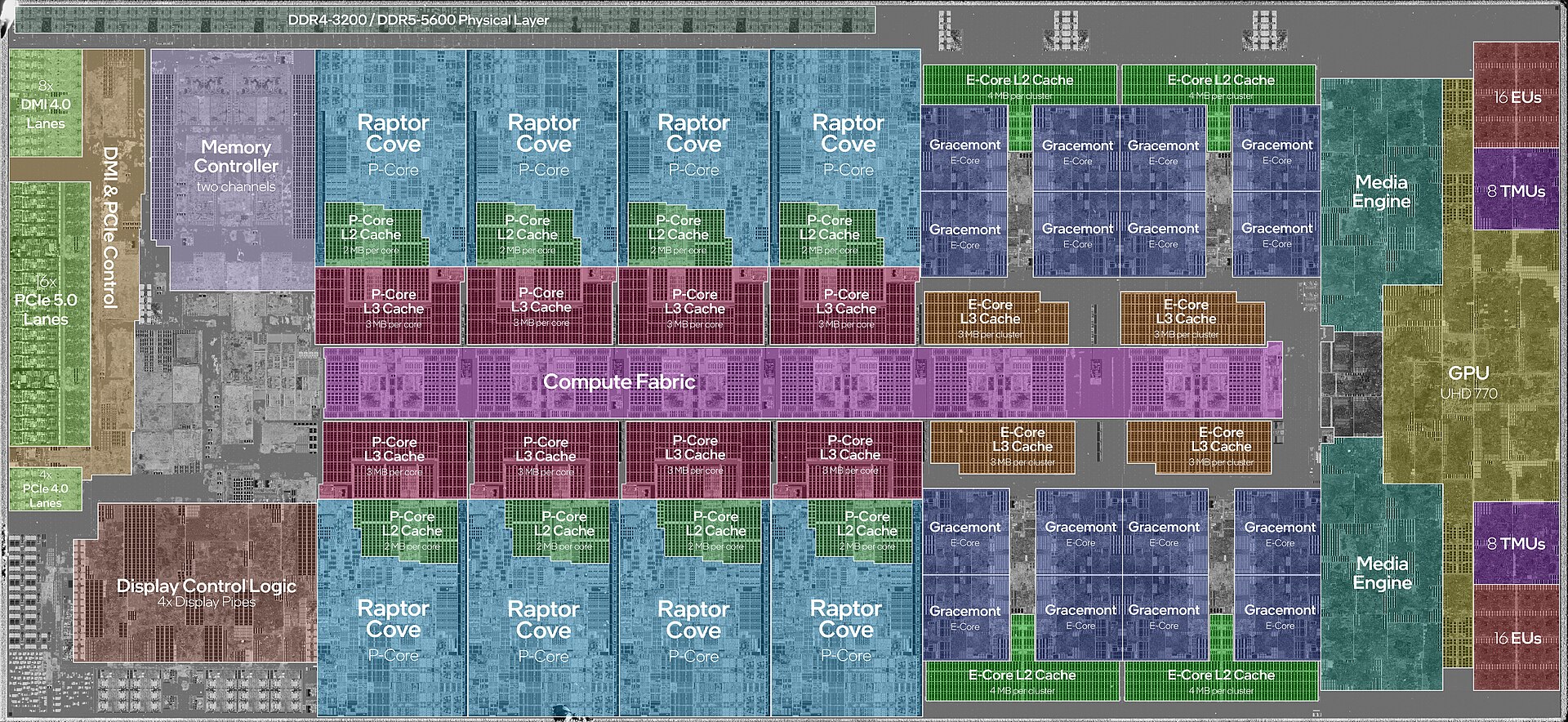
Figure 9.1 — The silicon of a modern CPU with its cores marked (8 big P-cores and 16 small E-cores). Hundreds of threads from many processes take turns on these few cores, so fast that everything looks simultaneous. Photo: JmsDoug and Fritzchens Fritz, CC0, via Wikimedia Commons.

        PROCESS (the house)
 +--------------------------------------+
 |  Shared: memory, handles, files      |
 |                                      |
 |  Thread 1    Thread 2    Thread 3    |
 |  (own stack) (own stack) (own stack) |
 +--------------------------------------+
You can see this in Task Manager: on the Details tab, right-click a column header, choose Select columns, and tick Threads. Even a simple program like Notepad usually shows several threads. (Threads are covered in depth in the next chapter.)
1.4 Isolation Concept
What it is: Isolation means each process lives in its own bubble. One process cannot see or change another process's memory just by asking. This is the most important idea about processes.
How Windows does it: every process gets its own virtual address space (Chapter 3). The addresses a program uses are not real RAM positions. They are "pretend" numbers that Windows and the CPU translate. Address 0x1000 in Notepad and address 0x1000 in Chrome point to different places in real RAM.
  Process A's view         Real RAM          Process B's view
  +--------------+      +-------------+      +--------------+
  | 0x1000 ------+----> | A's data    |      |              |
  |              |      | ...         |      |              |
  |              |      | B's data    | <----+--- 0x1000    |
  +--------------+      +-------------+      +--------------+
        Same number, different real places.
Why isolation matters:
| Benefit | Example |
|---|---|
| Stability | If a game crashes, your document in Word is untouched |
| Security | A web page's code cannot read your password manager's memory |
| Simplicity | Every program can pretend it owns the whole machine |
| Cleanup | When a process ends, Windows frees all its memory at once |
Isolation is not total:
- Processes may talk on purpose using IPC (inter-process communication, Section 9).
- A process with enough rights (a debugger or an admin tool) can open another process by its PID and read its memory. A normal program cannot do that to processes it has no rights for.
- The kernel and drivers are shared by all processes and can see everything. That is why a driver bug can crash the whole PC (the "blue screen").
Summary
| Term | Plain meaning |
|---|---|
| Program | A file on disk (a recipe) |
| Process | A running program plus its resources (the cooking session) |
| EPROCESS | The kernel's record about one process |
| Thread | One line of running code inside a process; the thing that gets CPU time |
| Isolation | Each process has its own private memory bubble |
| PE | The file layout of Windows .exe and .dll files |