The Big Picture: One Kitchen, Several Cooks
Think of a process as a restaurant kitchen. The kitchen has a fridge, pots, a stove and a recipe book. These are the resources. But a kitchen with nobody in it cooks nothing.
A thread is a cook working in that kitchen. One kitchen can have one cook or many. All the cooks share the same fridge and the same pots (the process's memory and files). But each cook has their own cutting board and their own place in the recipe (the thread's own stack and registers).
        PROCESS  (the kitchen)
  ┌─────────────────────────────────────────────────┐
  │ Shared by all cooks:                            │
  │   memory (heap, code, data)                     │
  │   open files and handles                        │
  │                                                 │
  │ Cook 1           Cook 2           Cook 3        │
  │ (thread 1)       (thread 2)       (thread 3)    │
  │ own stack        own stack        own stack     │
  │ own registers    own registers    own registers │
  └─────────────────────────────────────────────────┘
In Chapter 9 you learned what a process is. This chapter is about what runs inside it.
1.1 Definition: The Unit of Execution Inside a Process
What it is: A thread is the smallest unit of work that the operating system (OS) can give to a CPU core. It is one single path of instructions being run, one after another.
Every thread has these things of its own:
| Part | Plain meaning |
|---|---|
| Thread ID (TID) | A number that names the thread. Windows shows it as a "Thread ID". |
| Registers | The CPU's tiny working slots (Chapter 2). They hold where the thread is right now, including the instruction pointer (which line is next). |
| Stack | A private area of memory for the thread's function calls and local variables (Chapter 3). |
| Priority and state | How important the thread is, and whether it is running, ready or waiting (Sections 4 and 5). |
And every thread shares these things with the other threads in its process:
| Shared part | Plain meaning |
|---|---|
| Code | The program's instructions. All threads can run the same function. |
| Heap | The big pool of memory used for data that lives a long time (Chapter 3). One heap per process. |
| Global variables | Data that any part of the program can reach. |
| Handles | The "tickets" to open files, windows, network connections and other OS objects. |
| Address space | The process's whole private view of memory (Chapter 3). |
A key link to Chapter 3: each thread has its own stack, but they all use the same heap. This is why threads can pass data to each other so easily, and also why they can get in each other's way (Section 8).
Windows detail: A thread in Windows is a kernel object called an ETHREAD inside the kernel. The OS keeps one for every thread. You do not need to remember the name; just know that the OS tracks each thread as its own object.
1.2 Thread vs Process
What it is: A process is a container of resources. A thread is a runner that uses those resources. A process always has at least one thread. A process with zero threads is dead.
| Process | Thread | |
|---|---|---|
| Main job | Owns memory, handles, security rights | Runs instructions on a CPU core |
| Own memory space? | Yes, private | No, shares the process's |
| Own stack? | Not directly | Yes |
| Own registers? | Not directly | Yes |
| Cost to create | Heavy (set up a whole new address space) | Light (a stack and a few records) |
| Talking to others | Needs special tools (pipes, shared memory) | Can just read and write shared data |
| If it crashes | Other processes keep going | Usually the whole process goes down |
| Scheduled by the OS? | No: the OS schedules threads | Yes |
The last row is important. Windows does not schedule processes. It schedules threads. A process is only the owner.
Process A (Notepad)              Process B (Browser)
 ┌───────────────┐                ┌──────────────────────────┐
 │ memory A      │                │ memory B                 │
 │ [thread 1]    │                │ [thread 1][thread 2][t 3]│
 └───────────────┘                └──────────────────────────┘
   A cannot see B's memory.         Threads inside B can see all of B's memory.
Crash example: If one thread in a program writes to a bad memory address, Windows ends the whole process. All its threads die together. Two separate processes protect each other better; two threads do not. That is one reason browsers run each tab in its own process.
1.3 Why Processes Have Threads
What it is: Early programs had one path of instructions. That is simple but it has two big problems.
Problem 1: waiting. If the only thread asks the disk for a file, it must wait. The program freezes. With more threads, one thread can wait for the disk while another keeps the window responsive.
Problem 2: many cores. A modern CPU has many cores (Chapter 2). A program with one thread can use only one core at a time. The other cores sit idle. A program with several threads can use several cores at the same moment.
ONE THREAD                        FOUR THREADS (4 cores)
core 0: ██████████████            core 0: ███ ← thread 1
core 1: (idle)                    core 1: ███ ← thread 2
core 2: (idle)                    core 2: ███ ← thread 3
core 3: (idle)                    core 3: ███ ← thread 4
 takes 4 time units                takes about 1 time unit
(In real life, the speed-up is never perfect, because threads must also share and wait for each other.)
Common reasons programs use several threads:
| Reason | Example |
|---|---|
| Keep the screen responsive | A thread draws the window; another downloads a file |
| Use many cores | A video editor splits a frame into parts, one per thread |
| Handle many users | A web server gives each request its own thread (or a pool of them, Section 9) |
| Do things in the background | An antivirus scans files while you work |
Threads vs processes for this job: You could use many processes instead, but threads are lighter, faster to start, and share data without copying. That is why they are everywhere.
1.4 Where Threads Run: Cores and Hyper-Threading
A thread is only a list of instructions. It needs a core to run on. The OS picks which thread goes on which core (Section 3).
Remember hyper-threading (SMT, Chapter 2): one physical core can pretend to be two logical processors. It keeps two threads' registers ready at once and switches between them in tiny gaps. Windows sees each logical processor as a place to run one thread.
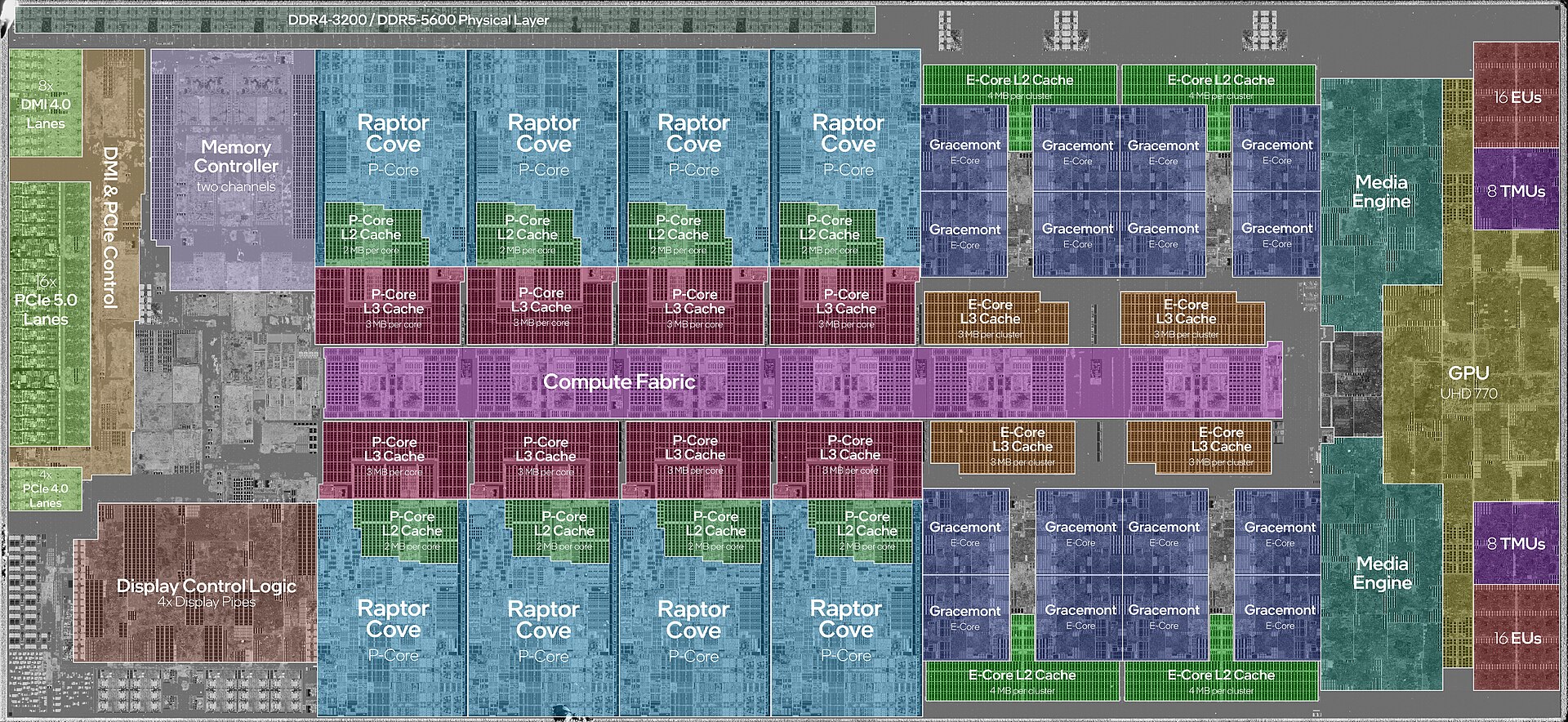
Figure 10.1 — The silicon inside an Intel Core i9-13900K. Look for the 8 big "P-core" blocks and the 16 smaller "E-core" blocks in groups of four. Threads are what Windows places onto these cores: each P-core can run two threads at once (hyper-threading), each E-core runs one. That is 8×2 + 16 = 32 threads at the same instant. Photo: JmsDoug and Fritzchens Fritz, CC0, via Wikimedia Commons.

Yet your PC probably has thousands of threads alive. Most are asleep, waiting for something. Only as many as you have logical processors can run at the same moment. The OS rapidly swaps the others in and out, so it feels like everything runs together. That swapping is context switching (Section 6).
Try it: open Task Manager, go to the Performance tab and look at Threads under the CPU graph. A normal Windows 11 desktop often shows well over 1,000.
1.5 Terms You Will Meet
| Term | Plain meaning |
|---|---|
| Concurrency | Many tasks making progress during the same period, maybe by taking turns |
| Parallelism | Many tasks running at the exact same instant on different cores |
| Multithreading | A program that uses more than one thread |
| Kernel thread | A thread the OS itself manages. Windows threads are all like this. |
| Fiber | A very light Windows "thread" that the program (not the OS) switches by hand. Rare. |
Concurrency is not the same as parallelism. One cook swapping between two dishes is concurrent. Two cooks each making one dish is parallel.
Summary
| Term | Plain meaning |
|---|---|
| Thread | One path of running instructions; the unit the OS gives to a core |
| Process | The container that owns memory and handles |
| Own per thread | ID, registers, stack, priority, state |
| Shared by threads | Code, heap, globals, handles, address space |
| Why threads | Stay responsive while waiting, and use many cores |
| Windows schedules | Threads, never whole processes |
| Hyper-threading | One core handles two threads at once (logical processors) |