The Big Picture: One Plug, Thousands of Different Machines
A wall socket in your home works with a lamp, a kettle and a phone charger. They all agree on one standard: the plug. Computer hardware is not like that. Every chip has its own registers (tiny control boxes), its own commands and its own quirks. A driver is the piece that hides those differences.
This section gives three reasons drivers are needed: diversity (too many devices), abstraction (simple view for programs) and security (a safe checkpoint).
2.1 The Hardware Diversity Problem
What it is: A single PC has many chips and cards. Each one was designed by a different company, and each one is controlled in a different way.
Here is a real motherboard again (the same one you met in Chapter 4). Look at how many different chips and connectors there are. Each of them needs software that knows how to run it.
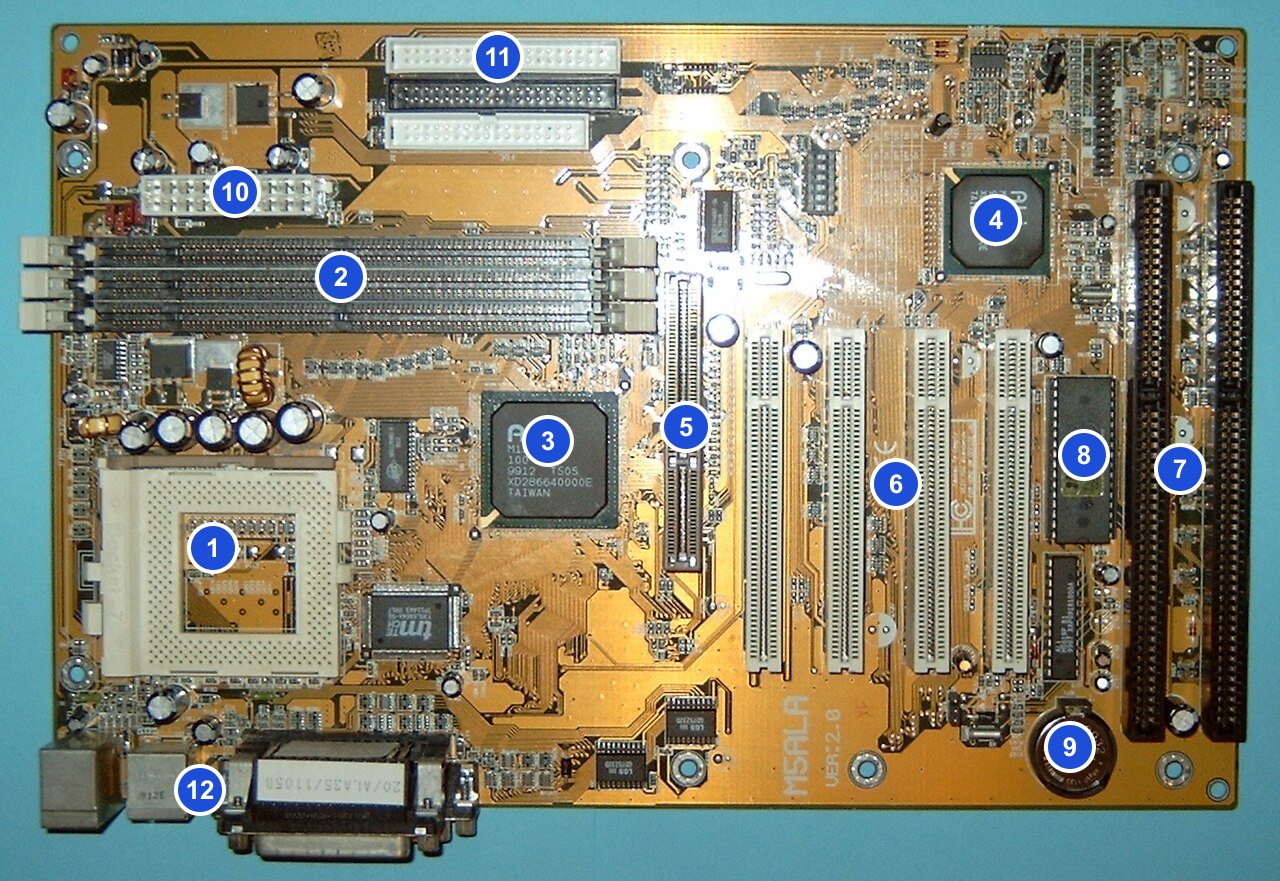
Figure 13.1 — A real motherboard with 12 parts numbered. The chipset chips (3, 4), the PCI slots (6) with their cards, the disk connectors (11) and the ports (12) all need drivers. Photo: Arnulf zu Linden, CC BY-SA 3.0, numbers added, via Wikimedia Commons.

Think of the combinations:
| Device type | Many makers, many models | Why one program can't know them all |
|---|---|---|
| SSD / hard disk | Samsung, WD, Kingston, Crucial... | Different controllers, different commands |
| Network card | Intel, Realtek, Broadcom, Wi-Fi chips... | Different registers and different radio hardware |
| Graphics card | NVIDIA, AMD, Intel | Hugely different designs |
| Printer | Hundreds of models | Different page languages |
| Keyboard / mouse | Countless shapes, extra buttons | Different extras and report formats |
And new hardware appears every month. Windows (released years ago) cannot possibly contain knowledge of devices that did not exist yet.
The solution: let each maker write the translator. The people who build the device know it best. They write the driver. Windows only defines the rules the driver must follow (a standard way to plug in). New hardware then works with old Windows, just by adding one new driver.
   Windows says:  "Here are the rules for a disk driver."
                         │
      ┌──────────────────┼──────────────────┐
      ▼                  ▼                  ▼
 Maker A's driver   Maker B's driver   Maker C's driver
      │                  │                  │
   SSD type A         SSD type B         SSD type C
2.2 Abstraction for Applications
What it is: Abstraction means hiding messy details behind a simple view. When you drive a car, you use a steering wheel and pedals. You do not need to know how the fuel injection works. The steering wheel is an abstraction.
For programs, Windows gives simple, standard operations:
| What the program wants | The simple call it uses | Hidden detail (driver's problem) |
|---|---|---|
| Read a file | ReadFile | Which sectors, which commands, which queue |
| Show a window | Graphics API calls | Chip-specific instructions |
| Play a sound | Audio API calls | Which sound chip, which format |
| Send data on the network | send | Which network card, which radio |
| Read a key press | Input messages | Which keyboard, which wire |
The same program therefore works on millions of different PCs. A programmer who writes "save this file" does not care whether it ends up on an NVMe SSD, a SATA drive or a USB stick. The driver for each takes care of it.
Classes of devices. To make this easier, Windows groups devices into classes (disk, keyboard, network adapter, printer...). For each class, the system defines a common set of requests. Many devices follow a class standard (for example HID for keyboards and mice, or USB mass storage for flash drives), so that a single class driver from Microsoft works for all of them. That is why many USB devices work the moment you plug them in, with no download.
2.3 Security Enforcement Point
What it is: A driver is not only a translator but also a checkpoint. All access to hardware must pass through the kernel, so Windows can enforce its rules there.
Why does this matter?
| Threat | How the driver/kernel layer stops it |
|---|---|
| A program reads another user's files straight from the disk | Programs cannot talk to the disk. They must ask Windows, which checks permissions first |
| A program reads RAM that belongs to another program | Only kernel code can touch hardware like the memory controller; the CPU rings (Chapter 2) block everything else |
| Two programs fight over a device | The kernel and driver share the device in an orderly way |
| A rogue device (for example a malicious USB gadget) tries to take over | Windows picks a driver for the device by its ID and class. Drivers must be signed (Section 8) |
  ┌────────────┐   request    ┌──────────────────────┐   OK?    ┌──────────┐
  │ Application│─────────────►│ Windows kernel       │─────────►│  Driver  │──► Hardware
  │  (ring 3)  │              │ checks permissions   │          │ (ring 0) │
  └────────────┘              └──────────────────────┘          └──────────┘
        ▲ no direct line to the hardware  ✗
The flip side: drivers are also a risk. Because most drivers run in ring 0 with full power, a buggy driver can crash the entire PC, and a malicious driver can take over the system completely. This is why Windows demands signed drivers (Section 8), tests them strictly (Section 14), and moves more and more drivers out of the kernel into user mode (Section 3). So the driver is both the guard and the weak spot of the system.
Why drivers matter to attackers and defenders. Security tools, antivirus programs and anti-cheat programs often install their own drivers, because only ring 0 can see everything. Malware wants the same power. That is exactly why signing and kernel protections exist.
Summary
| Reason | One-line meaning |
|---|---|
| Diversity | Thousands of devices, each with its own language, new ones every month |
| Abstraction | Programs use simple standard calls; the driver hides the ugly details |
| Security | The kernel/driver layer is the only door to hardware, and a checkpoint |
| Class driver | One Microsoft driver for a whole standard class (for example keyboards) |
| Risk | A ring 0 driver is powerful, so a bad one can crash or compromise the PC |