The Big Picture: The Hotel Receptionist
When a guest arrives at a hotel, the receptionist asks who they are, looks up the booking, gives a room key and tells the porter where to take the bags. Nobody has to restart the hotel.
Plug and Play (PnP) is Windows' receptionist for hardware. When a device appears, PnP finds out who it is, picks the right driver, hands out resources (memory ranges, interrupts) and tells the driver to start. When the device leaves, PnP tidies up. All of this happens while the PC is running.
Before PnP (in the 1990s), you set tiny switches ("jumpers") on cards and typed numbers into config files, and conflicts were common. PnP replaced all that with automatic setup.
7.1 PnP Manager Role
What it is: The PnP Manager is a part of the Windows kernel (inside the Executive, Chapter 8). It is the boss of devices. It does not talk to hardware itself. It coordinates the drivers that do.
| Job | Meaning |
|---|---|
| Discover | Learns which devices exist (with the help of bus drivers) |
| Build the device tree | Keeps a tree of all devices, who is plugged into what |
| Pick a driver | Matches each device to the best driver (7.3 and 7.4) |
| Assign resources | Gives each device memory ranges, ports and interrupts without clashes |
| Send events | Tells drivers: start, stop, remove, "device removed suddenly" |
| Tell programs | Sends a notification so Explorer can show "USB device connected" |
You see the PnP Manager's result in Device Manager: the list of all devices and their state. (Device Manager itself is only a viewer; the real work is done in the kernel plus a user-mode helper service.)
                      ┌───────────────────────────┐
                      │       PnP MANAGER         │
                      └──┬──────────┬──────────┬──┘
           "who is there?"│          │          │ "start now"
                          ▼          ▼          ▼
                     Bus drivers  Driver Store  Function drivers
                     (find devices)(find driver) (run the device)
7.2 Device Enumeration (Bus Drivers Report New Devices)
What it is: Enumeration means "counting what is there." A bus driver is responsible for one bus (PCIe, USB, etc.). It knows how to ask the bus "who is connected?" and reports each answer to the PnP Manager.
The root of the tree. At boot, the first piece is the ACPI driver (Chapter 4, Section 5). It reads firmware tables and reports the built-in parts of the PC: the PCI Express root, timers, power buttons and so on. Next, the PCI bus driver scans the PCIe bus (the enumeration described in Chapter 4, Section 6) and reports every card and chip it finds. Then, for each USB controller found, the USB bus drivers scan the ports.
This creates a device tree:
 ACPI x64-based PC
  └─ Microsoft ACPI-Compliant System
      └─ PCI Express Root Complex
          ├─ PCI Express Graphics Controller
          ├─ NVM Express Controller         (your SSD)
          ├─ USB xHCI Host Controller
          │    └─ USB Root Hub (USB 3.0)
          │         ├─ USB Composite Device
          │         │    └─ HID Keyboard Device
          │         └─ USB Mass Storage Device
          └─ Network adapter
Each bus driver creates a PDO (Section 4.4) for every child it finds, and PnP then loads the right drivers on top.
Here are real PCIe slots. A card in one of them is found by enumeration: the PCI bus driver asks each slot "is anyone there, and what are you?"
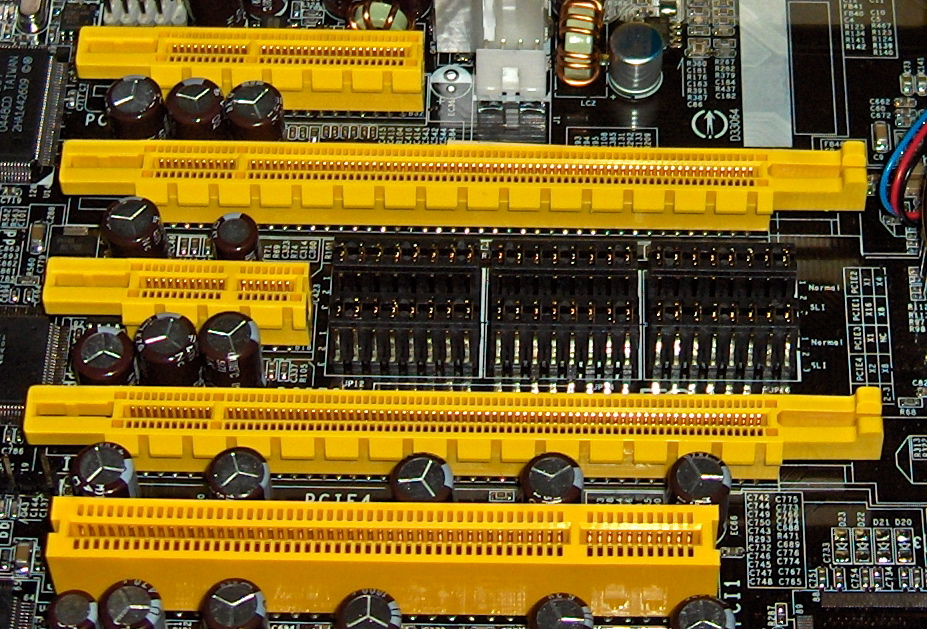
Figure 13.2 — Slots on a motherboard (PCIe x4, x16, x1, x16, plus old PCI slots). Whatever card sits in a slot is discovered by the PCI bus driver at start-up or when it is hot-added. Photo: snickerdo, CC BY-SA 3.0, via Wikimedia Commons.

See the tree on your PC: Device Manager → View → Devices by connection. This is exactly the device tree.
Device instance path. Each device in the tree has a unique name, the device instance path, such as USB\VID_046D&PID_C31C\6&2a1b3c4d&0&2. In Device Manager: Properties → Details → Device instance path. It is also the name of the device's registry key under HKLM\SYSTEM\CurrentControlSet\Enum.
7.3 Hardware ID / Compatible ID Matching
What it is: How does Windows know which driver fits a device? Every device carries identity labels. The bus driver reads them from the device and gives them to PnP.
| Kind | Meaning | Example |
|---|---|---|
| Hardware IDs | A list of IDs from most specific to less specific for this exact device | USB\VID_046D&PID_C31C&REV_6400, then USB\VID_046D&PID_C31C |
| Compatible IDs | Generic IDs saying "I follow this standard", used as a fallback | USB\Class_03&SubClass_01&Prot_01, USB\Class_03 (HID, keyboard) |
What the parts mean:
| Part | Meaning |
|---|---|
| VID (Vendor ID) | Number of the maker (assigned to companies; for USB by the USB-IF) |
| PID (Product ID) | Number of the product, chosen by the maker |
| REV | Revision of the product |
| VEN / DEV | The PCI versions of vendor and device number (PCI\VEN_xxxx&DEV_xxxx) |
| Class codes | A standard "kind of device" (keyboard, mouse, storage) |
Think of a hardware ID as "I'm a Logitech model C31C" and a compatible ID as "I'm some kind of HID keyboard."
See it yourself: Device Manager → right-click a device → Properties → Details → choose Hardware Ids or Compatible Ids from the drop-down. You can also run in PowerShell:
Get-PnpDevice -PresentOnly | Select-Object -First 10 Status, Class, FriendlyName, InstanceId7.4 Driver Ranking and Selection
What it is: Several drivers may match a device. Windows must pick one by comparing a rank, a score for how good the match is.
The main rules (simplified):
- A match on a hardware ID is better than a match on a compatible ID. A specific driver beats a generic class driver.
- Among hardware IDs, the match that is higher in the list (more specific) is better.
- A signed driver is preferred over unsigned ones (and unsigned kernel drivers are not allowed on 64-bit Windows at all, Section 8).
- If still tied, the newer date and then higher version wins.
  Device says:  hardware IDs  [ USB\VID_046D&PID_C31C ]
                compatible IDs[ USB\Class_03&SubClass_01&Prot_01 ]

  Candidates:
   ① Maker's driver, matches hardware ID .......... BEST (specific)
   ② Microsoft "HID Keyboard" class driver, matches compatible ID .... fallback
   → ① is chosen if it is in the Driver Store; otherwise ② is used.
Where does Windows look?
- The Driver Store (packages already on the PC).
- Windows Update (if allowed and the device wants it).
- A driver you point to manually ("Browse my computer for drivers").
Why a generic driver often "just works": A plain keyboard only needs the HID class driver Microsoft already ships. That is why it works instantly with no download. A gaming mouse with special buttons gets the Microsoft driver first. The maker's extra software then adds features.
Try it: In Device Manager, open Properties → Driver → Update Driver → Browse my computer → Let me pick from a list. You will see all compatible drivers that Windows could use for that device. (Look, but do not change.)
7.5 Dynamic Device Arrival/Removal
What it is: PnP handles devices that come and go while the PC is on: USB sticks, headsets, docking stations, even PCIe cards in hot-swap systems.
Arrival:
 Device plugged in
      │
      ▼
 Bus driver sees it ─► reports to PnP Manager
      │
      ▼
 PnP picks a driver ─► AddDevice ─► resources ─► START_DEVICE
      │
      ▼
 Notification: "Device ready"  (the chime, the popup)
Removal:
| Case | What happens |
|---|---|
| Safe removal ("Eject") | PnP asks drivers to stop. Each finishes pending work (for example, writes to the disk) and says OK. Then you can pull the plug |
| Surprise removal | You just yank it out. The bus driver says "it vanished!" PnP tells every driver in the stack; they cancel pending requests and release the device. Drivers must be written to survive this |
Why "Safely Remove Hardware" still matters for storage. Windows caches writes to speed things up (Chapter 3 and Chapter 7). If you pull a flash drive too early, data may not yet be written. (Windows uses "Quick removal" by default for USB drives, which reduces this risk, but ejecting is still the safe habit.)
Power and sleep. PnP works together with power management (Chapter 4, Section 5): before sleep, drivers are told to save their state; when the PC wakes, they are told to restore it.
Summary
| Term | Plain meaning |
|---|---|
| PnP Manager | Kernel part that finds devices, picks drivers, hands out resources |
| Enumeration | Bus drivers asking their bus "who is connected?" |
| Device tree | Parent/child list of all devices (Device Manager → Devices by connection) |
| Hardware ID | Specific device label, such as USB\VID_xxxx&PID_xxxx |
| Compatible ID | Generic "I follow this standard" label; used as fallback |
| Ranking | Scoring candidate drivers: hardware match beats compatible match; signed, newer wins |
| Surprise removal | Device pulled without warning; drivers must cancel and clean up |