The Big Picture: The Driver Writes the Delivery Order
In Chapter 4 (Section 4) you learned that DMA (Direct Memory Access) lets a device move data to or from RAM without the CPU copying every byte. The hardware side is covered there: descriptors, rings, cache coherency and the IOMMU. Here we see who makes it all happen: the driver.
The device is like a delivery truck that can drive to the warehouse (RAM) by itself. But somebody has to tell it which address to go to. That somebody is the driver. If the driver gives the wrong address, the truck dumps its load in the wrong place, and the PC can crash or lose data.
Here is a real DMA controller chip from the early PC days. Old PCs had a separate chip like this one. Today the DMA engines are built inside each device (network card, SSD, graphics chip), which is called bus-master DMA. The idea is the same.
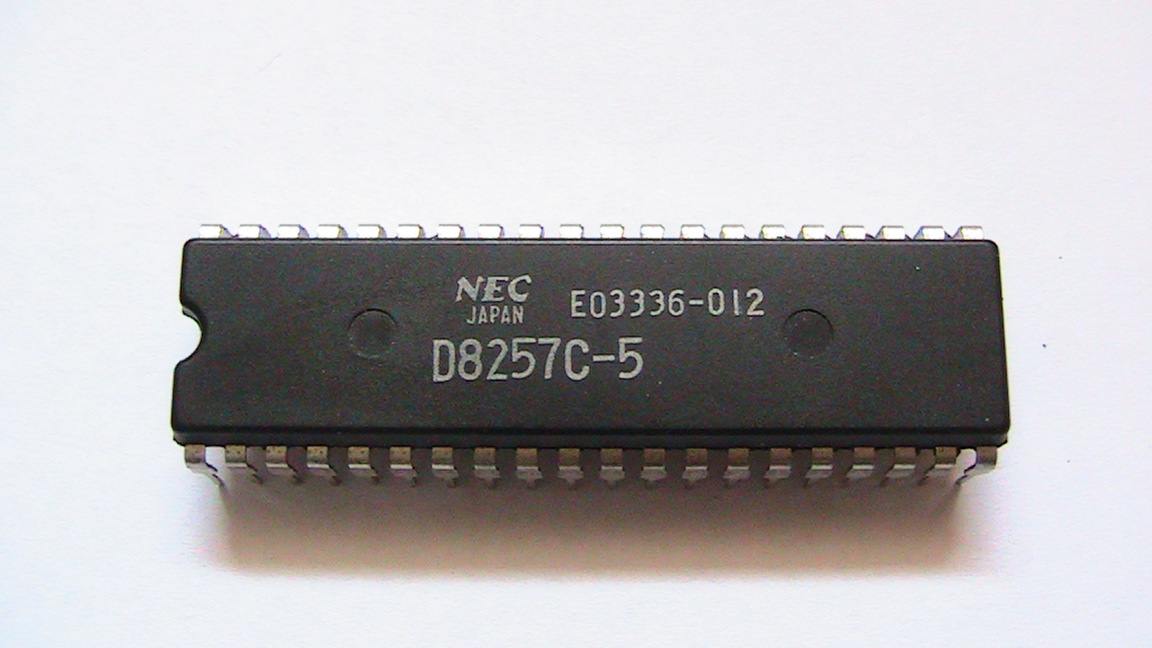
Figure 13.3 — A classic DMA controller chip (an NEC copy of the Intel 8257). The driver of that era had to program it with the memory address and the length of each transfer. Today's drivers do the same job with the device's own DMA engine. Photo: JWBE, CC BY-SA 3.0, via Wikimedia Commons.

11.1 DMA Setup by the Driver
What it is: Before a DMA transfer, the driver must prepare the memory and tell the device where it is.
A key idea: three kinds of addresses. This is the part that surprises beginners.
| Address type | Who uses it | Meaning |
|---|---|---|
| Virtual address | Programs and the driver's code | The "fake", tidy addresses from Chapter 3 |
| Physical address | The memory controller | The real position in RAM |
| Logical (device) address | The device | The address the device must use. Without an IOMMU it equals the physical address; with an IOMMU it is a translated one |
The device can't use virtual addresses (it knows nothing about the program's page tables). So the driver asks Windows to give it the device addresses for the buffer.
Steps in a typical DMA read (device → memory):
| # | Step | Who |
|---|---|---|
| 1 | Program asks to read; the I/O Manager makes an IRP (Section 9) with a buffer | I/O Manager |
| 2 | The buffer is locked in RAM so it can't be swapped to disk or moved during the transfer | I/O Manager / driver |
| 3 | The driver uses Windows' DMA support routines to obtain device addresses (and, if needed, to set up the IOMMU mapping) | Driver |
| 4 | It writes a descriptor (address + length + flags) into a ring in memory, and rings the device's doorbell register (MMIO, Chapter 4 Section 6) | Driver |
| 5 | The device reads the descriptor, then copies data straight into RAM | Device |
| 6 | The device raises an interrupt when finished | Device |
| 7 | ISR, then DPC: the driver checks the result, releases the mapping and completes the IRP | Driver |
   Driver                      RAM                           Device
     │  1. lock buffer          │                              │
     │  2. write descriptor ───►│ [addr | length | flags]      │
     │  3. ring the doorbell ─────────────────────────────────►│
     │                          │◄─── 4. device reads it ──────│
     │                          │◄─── 5. device writes data ───│  (no CPU copying)
     │◄──────────── 6. interrupt: "done" ──────────────────────│
     │  7. check result, complete the IRP                      │
The IOMMU's role (Chapter 4, Section 4.5). With an IOMMU (Intel VT-d / AMD-Vi, shown as Kernel DMA Protection in Windows), the device only sees the memory that the driver explicitly mapped for it. A buggy or hostile device can't scribble over the kernel. So the driver doesn't hand over raw RAM addresses, but IOMMU-translated device addresses. Windows' DMA routines handle this for the driver.
Common DMA mistakes in drivers (and what happens):
| Mistake | Result |
|---|---|
| Giving the device a virtual address | Data lands somewhere random in RAM; corruption or crash |
| Not locking the buffer | It is swapped out mid-transfer; corruption |
| Not handling cache coherency | CPU reads stale data (Windows' routines flush/sync as needed) |
| Forgetting to free the mapping | Resource leak; eventually the device stops working |
11.2 Scatter/Gather DMA
What it is: A program's buffer looks like one smooth block in virtual memory. But in real RAM, it is usually scattered over many separate pages (4 KB pieces) that are not next to each other (Chapter 3).
  Virtual view (the program sees one block)    Physical view (real RAM)
  ┌────────────────────────┐
  │ 12 KB buffer           │      ┌──────┐     ┌──────┐     ┌──────┐
  │ (one continuous block) │ ───► │ 4 KB │ ... │ 4 KB │ ... │ 4 KB │   (not next to each other)
  └────────────────────────┘      └──────┘     └──────┘     └──────┘
                                   page at      page at      page at
                                   0x1A000      0x57000      0x0C000
Without scatter/gather, the driver would need to copy everything into one continuous block first (a bounce buffer), which is slow.
With scatter/gather, the driver builds a list of pieces: "piece 1: address A, 4096 bytes; piece 2: address B, 4096 bytes..." The device follows the list by itself.
| Term | Meaning |
|---|---|
| Scatter | The device writes incoming data into several separate pieces |
| Gather | The device reads outgoing data from several separate pieces |
| Scatter/gather list | The list of (address, length) entries, built by the driver |
This is exactly the descriptor ring idea from Chapter 4: each descriptor is one piece. Modern network cards and NVMe SSDs rely on it. Windows hands the driver a ready-made scatter/gather list, called an SG list, when it prepares the DMA.
Benefits:
- No extra copying, so it is faster and uses less CPU.
- Big transfers work even though memory is fragmented.
- Devices that can't reach all of RAM (old 32-bit devices) can be given bounce buffers by Windows automatically, or can use the IOMMU to see high memory. This is hidden from the driver author when using the DMA routines.
11.3 DMA Completion Notification
What it is: How does the driver know a DMA transfer has finished? The device tells it, usually in one of two ways.
| Method | How it works |
|---|---|
| Interrupt (the usual way) | The device raises an interrupt (MSI/MSI-X). The ISR acknowledges it, the DPC finishes the work (Section 10) |
| Status in memory | The device writes a "done" flag into a completion ring in RAM. The driver reads these entries. NVMe SSDs do this (a completion queue) and also raise an interrupt to say "look at the queue" |
What the driver does when it learns the transfer is done:
- Check for errors: did the device report a problem?
- Flush/sync if the CPU needs to see fresh data (cache coherency).
- Release the DMA mapping (the device may no longer touch this memory, a security step with the IOMMU).
- Unlock the buffer.
- Complete the IRP, so that the waiting program gets its data (Section 9.4).
Interrupt moderation. At very high speeds, one interrupt per packet is too many. Many devices combine several completions into one interrupt ("interrupt coalescing"). The DPC then handles a batch. This trades a tiny bit of delay for a lot less CPU work.
Timeouts. What if the device never answers? A careful driver has a watchdog timer: if a transfer takes too long, the driver resets the device and returns an error. Windows also has a watchdog for graphics drivers (TDR, "Timeout Detection and Recovery"): if the GPU hangs, Windows resets the driver and you see "display driver stopped responding and has recovered," instead of a blue screen.
Why DMA drivers are hard: Several actors (CPU, device, IOMMU, caches) all touch the same memory at slightly different moments, and the driver must keep them in order. That is why DMA bugs are among the nastiest to find: data may be wrong only once in a million transfers.
Summary
| Term | Plain meaning |
|---|---|
| Driver's DMA job | Lock the buffer, get device addresses, write descriptors, ring the doorbell |
| Device address | The address the device uses; translated by the IOMMU if present |
| Descriptor / ring | Address + length entries in memory that the device reads |
| Scatter/gather | A list of separate memory pieces so no big copy is needed |
| Bounce buffer | A slow extra copy used only when needed |
| Completion | Interrupt (or a status entry) → ISR → DPC → complete the IRP |
| Interrupt coalescing | Joining many completions into one interrupt to save CPU time |
| TDR | Windows' watchdog that resets a hung graphics driver |