The Big Picture: The Bank Counter
In a bank, customers wait on one side of a glass wall. The staff and the vault are on the other side. A customer cannot reach over and take money. Instead the customer hands a slip through a small slot. A clerk behind the glass reads the slip, checks the customer's identity, fetches the money and slides it back.
A system call is that slot in the glass. Your program stands on the user-mode side. Windows and the hardware are on the kernel-mode side. The system call is the only approved way to pass a request through the glass.
 USER MODE (ring 3)        │glass│        KERNEL MODE (ring 0)
 Your program              │     │        Windows kernel, drivers
  "please read this file"  ─slot─►        checks, then does the work
                           ◄─slot─        result slides back
4.1 The Transition from User Mode to Kernel Mode
What it is: A system call (or syscall) is a request from user-mode code that asks the kernel to do something only the kernel is allowed to do. Reading a disk, creating a process and allocating memory all need one.
Why it is needed (a reminder from Chapter 2 and Chapter 7):
| Reason | Explained |
|---|---|
| The CPU has privilege levels | Ring 3 code cannot run special CPU instructions or touch hardware or other programs' memory |
| Protection | If any program could do anything, one bug or one virus could ruin the whole PC |
| Fairness | The kernel shares the CPU, memory and disk between all programs |
So the CPU needs a controlled way to switch from ring 3 to ring 0. Not "jump anywhere in the kernel." A jump to one fixed, safe entry point chosen by Windows when it started, which a program cannot change.
What happens during the switch:
| Step | Who | What |
|---|---|---|
| 1 | User code | Puts a service number and the inputs into CPU registers |
| 2 | User code | Runs the syscall instruction |
| 3 | The CPU | Raises its privilege level to ring 0 and jumps to the kernel's fixed entry point |
| 4 | Kernel | Saves the user program's state (its registers and its position) |
| 5 | Kernel | Checks that the inputs are safe: does the memory belong to the caller? is the handle valid? |
| 6 | Kernel | Does the work |
| 7 | Kernel | Restores the user program's state and returns to ring 3 |
Why it costs a little time. Each switch needs saving state and checking. A system call is much cheaper than a disk read, but costs more than a normal function call. This is why good programs avoid making tiny system calls thousands of times when one larger call will do. For example, reading a file in big blocks beats reading one byte at a time.
You can feel this cost: in PowerShell, Measure-Command { 1..100000 | ForEach-Object { } } against a loop that makes lots of file calls will show a big difference. (The exact times depend on your PC.)
Not every API call makes a system call. Many Win32 functions are handled entirely in user mode (for example some string and math helpers, or GetLastError). Only the ones that need kernel services go down.
4.2 The System Service Dispatch Table (SSDT)
What it is: Once the CPU enters the kernel, the kernel has to answer: "Which service did the program ask for?" The program put a service number in a register. The kernel uses that number to look up the right function in a table.
That table is called the System Service Dispatch Table, or SSDT. (In some places you may see the System Service Descriptor Table, which is the same idea.) Think of it as a phone book: the service number is the line number, and the entry holds where the matching kernel code is.
 service number   function that handles it (inside ntoskrnl.exe)
 ───────────────  ─────────────────────────────────────────────
      ...                   ...
      55      ────►   NtCreateFile (kernel version)
      56      ────►   (another service)
      ...                   ...
(The numbers above are made up for illustration. Real numbers differ between Windows versions, which is exactly why the Native API is not a safe thing for programs to depend on.)
The path in full:
 NtCreateFile (in ntdll.dll, user mode)
      │ puts service number in a register
      ▼
   syscall  ───── CPU switches to ring 0 ─────►  kernel entry point
                                                      │
                                                      ▼
                                              look up number in the
                                              dispatch table (SSDT)
                                                      │
                                                      ▼
                                         kernel's real NtCreateFile code
Important details (kept simple):
| Fact | Meaning |
|---|---|
| The table is inside the kernel | User programs cannot read or change it |
| It holds hundreds of services | The exact count differs between versions |
| There is a second table for graphics and window services | Those are handled by a separate part of the kernel (the "Win32k" part). The table for those is called the shadow table. |
| It is protected | Modern Windows has protections (for example PatchGuard on 64-bit) that stop programs from altering kernel tables |
Hedge: The SSDT is an internal structure. Its layout is not documented and has changed over time. For this course, you only need to know what it is for.
Before the lookup, the kernel checks. Before running any service, the kernel verifies that pointers given by the program point into the program's own memory. This stops a program from tricking the kernel into reading or writing the kernel's memory.
4.3 The syscall and sysenter Instructions
What it is: The CPU has special instructions built for the user-to-kernel jump. They are much faster than the older method.
| CPU instruction | Used by | Notes |
|---|---|---|
int 0x2E | Very old Windows (NT, 2000) | The software interrupt method. Slow. It used the interrupt table from Chapter 4, Section 3 |
sysenter | 32-bit Windows (from XP onward) | Intel's fast entry instruction |
syscall | 64-bit Windows (Windows 10 and 11) | The fast entry instruction for x64 CPUs |
For modern 64-bit Windows, you only meet syscall. A matching instruction sysret returns to user mode.
How syscall works:
| Detail | Explained |
|---|---|
| Set up beforehand | When Windows starts, the kernel writes the address of its entry point into a special CPU register (called an MSR, Model-Specific Register) |
| One fixed target | syscall always jumps to that address. A program cannot choose another one |
| Privilege change | The CPU changes from ring 3 to ring 0 as part of the same instruction |
| Saves the return place | The CPU stores where to return (in the rcx register) |
| Service number | Windows expects it in the eax register |
In plain words: the CPU is the gatekeeper. It will only open the gate for the syscall instruction, and it always sends you to the same place.
              ┌────────────────────────────────────────────┐
  CPU core    │  ring 3: your code  ──► executes "syscall" │
  (see Ch. 2) │                                │           │
              │            ring switch ◄───────┘           │
              │  ring 0: kernel entry ──► SSDT ──► service │
              │                                │           │
              │  "sysret" ──► back to ring 3 ◄─┘           │
              └────────────────────────────────────────────┘
What NtCreateFile looks like in machine code. On 64-bit Windows 10 and 11, the stub is only a few instructions. Roughly:
mov r10, rcx           ; copy the first input to a safe register
mov eax, <number>      ; the service number for NtCreateFile
syscall                ; CPU goes to ring 0
ret                    ; back in user mode with the result
(The <number> depends on the Windows version. Some Windows builds also add a small check around syscall. The idea is the same.) A program called a debugger can show this. You do not need one in this course.
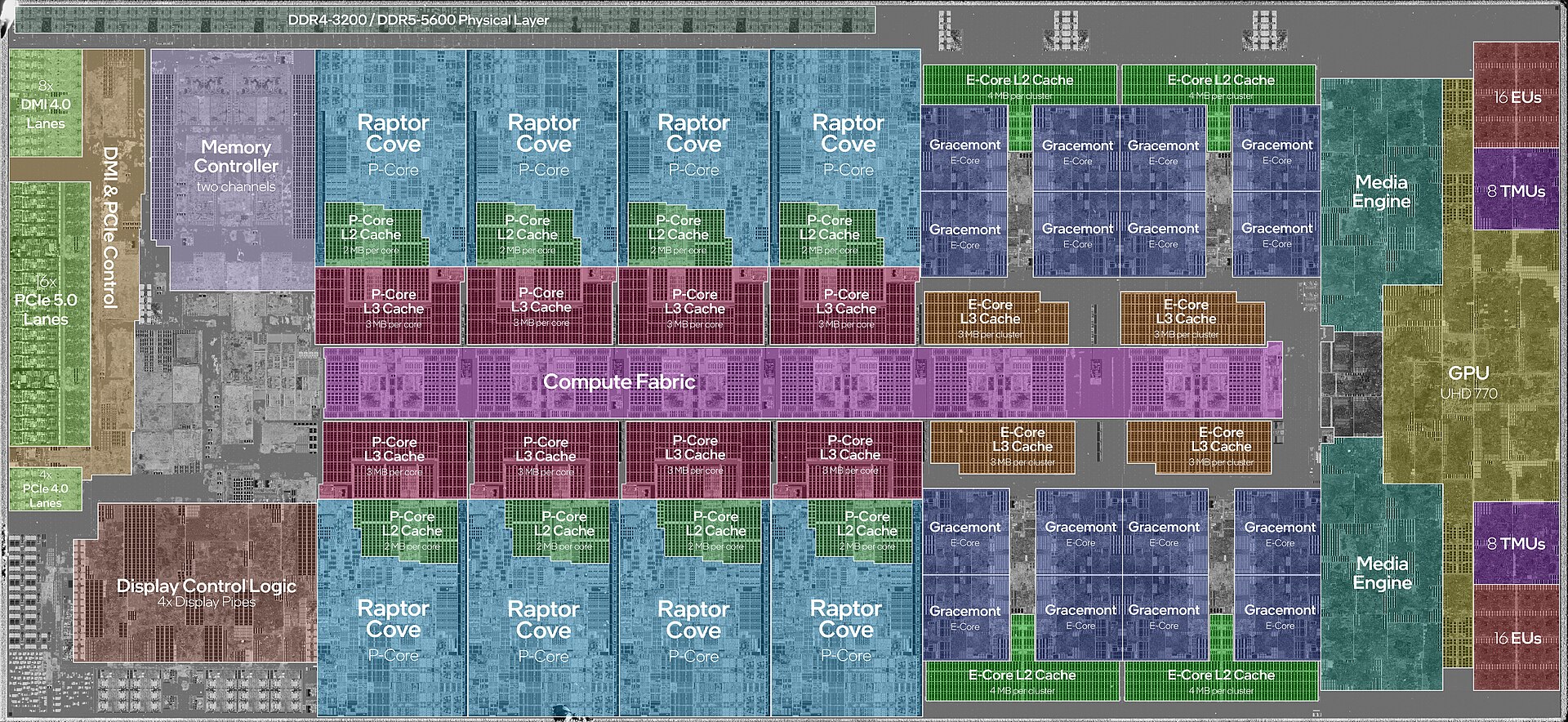
Figure 23.1 — A real CPU die. The ring change from user mode to kernel mode, and the syscall instruction that triggers it, are built into every core you see here. Photo: JmsDoug and Fritzchens Fritz, CC0, via Wikimedia Commons.

4.4 What the Kernel Does Next
What it is: After the SSDT lookup, the kernel runs the real service inside ntoskrnl.exe, the Windows kernel file. Most services are carried out by a group of kernel managers called the Executive. (Chapter 7 introduces them.) Each manager owns one job:
| Manager | Handles |
|---|---|
| I/O Manager | Files, disks, devices; sends requests to drivers |
| Memory Manager | Virtual memory, VirtualAlloc (Chapter 3 and Chapter 8) |
| Object Manager | Handles and named objects (Chapter 9) |
| Process and Thread Manager | Creating and scheduling programs |
| Security Reference Monitor | "Is this user allowed?" |
| Configuration Manager | The registry |
A kernel service always works the same way:
- Validate the inputs and the handle.
- Check security (does this user have the right?).
- Do the work, perhaps asking a driver.
- Return an NTSTATUS (Section 3.4).
4.5 Seeing System Calls on Your PC (Safe)
You cannot see raw syscall instructions without a debugger, but you can watch their effects:
| Tool | What it shows |
|---|---|
| Task Manager → Performance → CPU | A "kernel time" view: right-click the graph → Show kernel times. The dark part of the graph is time spent in kernel mode, much of it from system calls |
| Process Monitor (Microsoft Sysinternals, free) | Every file, registry, process and network operation that programs ask the kernel to do. Section 6 uses it |
Resource Monitor (resmon) | Which programs are making disk and network requests |
In the Task Manager CPU graph, light blue is the total and dark blue is the kernel part. A program that makes a great many system calls pushes up the dark portion.
Windows-specific tip. When an antivirus or security product watches a PC, it often watches these crossings from user mode into the kernel, because every important action must pass them. It is also why Microsoft protects the kernel tables so strictly.
Summary
| Term | Plain meaning |
|---|---|
| System call | A request through the only door from user mode to the kernel |
| Ring 3 to ring 0 | The CPU changes privilege level as part of the call |
| Service number | A number in a register saying which kernel service is wanted |
| SSDT | The kernel's phone book that maps service numbers to code |
syscall | The fast x64 CPU instruction for the jump (sysret returns) |
sysenter | The older 32-bit fast instruction |
int 0x2E | The very old, slower interrupt-based method |
| Executive | The kernel's managers (I/O, memory, objects, security ...) |
| Validation | The kernel checks every input before doing anything |