The Big Picture: The Phone Book of the Internet
You type example.com into a browser. But computers cannot send packets to a name. They need an IP address, such as 93.184.216.34. Something has to translate the name into the number, every time, in a few milliseconds.
That something is DNS (the Domain Name System). It is the Internet's phone book: you look up a name, you get a number.
4.1 Why DNS Exists (Names versus IPs)
What it is: DNS is a worldwide, shared database that maps names (like www.example.com) to data, most often an IP address.
Why we need it:
| Reason | Explanation |
|---|---|
| People remember names, not numbers | example.com is easier than 93.184.216.34 |
| Addresses change | A company can move its server to a new IP and just update the DNS entry. Everybody keeps using the same name |
| One name, many servers | A big site can answer with different IPs for different places in the world |
| No single phone book | The data is split over many servers, so no one computer holds (or can lose) everything |
Parts of a name. Read a domain name from right to left. Each dot-separated piece is a label:
   www  .  example  .  com  .
    │        │         │     └── the root (the invisible final dot)
    │        │         └──────── TLD  (Top-Level Domain: .com, .org, .in, .uk)
    │        └────────────────── domain (the part a company registers)
    └─────────────────────────── host or subdomain (a machine or service in the domain)
Where DNS sits in the layers. DNS is an Application layer protocol. A DNS question normally travels in a small UDP message to port 53. If the answer is too big for one UDP message, or for some special jobs, it uses TCP port 53 instead. (UDP and TCP are in Section 6, ports in Section 7.)
Record types. The DNS database does not hold only IP addresses. Each entry is a record with a type:
| Type | Name | What it holds | Example meaning |
|---|---|---|---|
| A | Address | An IPv4 address | example.com is at 93.184.216.34 |
| AAAA | "Quad-A" | An IPv6 address | example.com is at 2606:2800:... |
| CNAME | Canonical name | An alias pointing to another name | www.example.com is another name for example.com |
| MX | Mail exchanger | Where email for the domain goes | Mail for example.com goes to mail.example.com |
| NS | Name server | Which servers own the domain's records | example.com is run by ns1.example.com |
| TXT | Text | Free text, used for checks and email security | "This domain's owner verified this code" |
See the real thing. Here is a capture of a real PC asking DNS questions, taken with a free tool called Wireshark (a program that shows the packets going in and out of your network card):
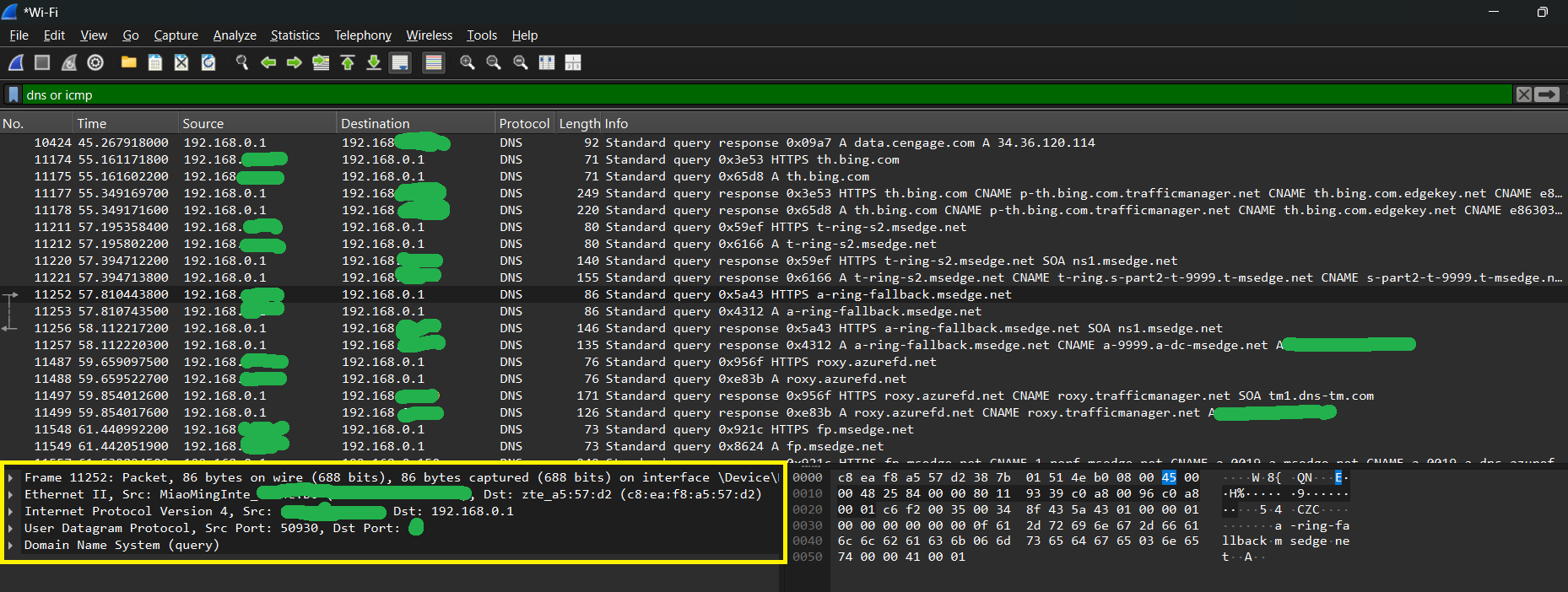
Figure 27.6 — Wireshark capturing on "Wi-Fi" with the display filter dns or icmp typed in the bar at the top (the filter hides every packet that is not DNS or ICMP). The packet list in the middle shows pairs of lines: a Standard query from the PC and a Standard query response from 192.168.0.1, the home router acting as the DNS server. The names asked about are things like th.bing.com and t-ring-s.msedge.net; several answers use CNAME records (an alias that points to another name). Some addresses are blotted out in green. In the bottom pane (the yellow box) one packet is expanded into its layers: Frame, Ethernet II, Internet Protocol Version 4, User Datagram Protocol (with Source Port 50930) and Domain Name System (query). On the right is the hex dump, the raw bytes of the packet. Screenshot: Oluwatobi TJ, CC0, via Wikimedia Commons.

Connect the screenshot to Section 1.5. The bottom pane is encapsulation made visible. Read it from top to bottom, outside layer to inside layer:
| Wireshark line | Layer | What it carries |
|---|---|---|
| Frame | The whole captured packet | Size and time stamp |
| Ethernet II | Link: MAC addresses | Who on the local network |
| Internet Protocol Version 4 | Internet: IP addresses | Your PC to the router |
| User Datagram Protocol | Transport: ports | Source port 50930 (random) to destination port 53 |
| Domain Name System | Application: the question | "What is the address of th.bing.com?" |
Notice the source port 50930: your PC picks a random high port for each question (an ephemeral port, Section 7). The destination port of the question is 53.
4.2 The Resolution Process (Recursive and Iterative Queries)
What it is: Resolution means turning a name into an answer. There is no single computer that knows every name, so the work is shared by a hierarchy (a tree) of servers.
The cast of characters:
| Who | Job |
|---|---|
| Stub resolver | A small helper inside Windows. It does not search; it just asks the next one up |
| Recursive resolver | A server (at your ISP, or a public one, or your router that forwards to one) that does the searching for you and remembers answers |
| Root servers | The top of the tree. They do not know example.com, but they know who runs .com |
| TLD servers | Know who runs each domain under one ending, such as .com |
| Authoritative server | The server that owns the records for example.com and gives the final answer |
Two kinds of question:
- A recursive query: "Find the answer for me, and come back with the final result." Your PC asks the recursive resolver this way.
- An iterative query: "Tell me the best you know, even if it is just who to ask next." The resolver uses this when it asks the root, TLD and authoritative servers.
The journey of www.example.com (nothing cached yet):
 Your PC ── "address of www.example.com?" (recursive) ──► Recursive resolver
                                                                 │
   (1) resolver ─► ROOT server: "www.example.com?"                │
       root ─► "I do not know, but ask the .com servers: (list)"   │
   (2) resolver ─► .com TLD server: "www.example.com?"             │
       TLD ─► "Ask example.com's own servers: ns1.example.com..."  │
   (3) resolver ─► AUTHORITATIVE server for example.com:           │
       "www.example.com?"                                          │
       auth ─► "It is 93.184.216.34  (TTL 3600)"                   │
                                                                 │
 Your PC ◄── "93.184.216.34" ────────────────────────────────────┘
After the answer: your PC now has an IP. It opens a TCP connection to it, and the web page loads. All the DNS work took a few tens of milliseconds, and it is repeated rarely thanks to caching (4.3).
Which DNS server does my PC use? Usually the one your DHCP server hands out (Section 5), which is often the router. The router then forwards to the ISP's resolver or a public one. You can see it in ipconfig /all under DNS Servers.
Tools to ask DNS yourself (read-only):
nslookup example.com
Resolve-DnsName example.com
Resolve-DnsName example.com -Type MX
Resolve-DnsName example.com -Type AAAA
| Tool | Notes |
|---|---|
nslookup | Classic command. The first lines show which DNS server answered (often your router), then the name and its addresses. "Non-authoritative answer" means the answer came from a cache, not from the owner |
Resolve-DnsName | The PowerShell version. It shows the record type, TTL and data in a table. -Type picks A, AAAA, MX, NS, TXT and so on |
Typical errors:
| Message | Likely meaning |
|---|---|
| "Non-existent domain" (NXDOMAIN) | The name does not exist (often a typing mistake) |
| "DNS request timed out" | The DNS server did not answer (network or server problem) |
Name fails but ping 8.8.8.8 works | The Internet works, DNS is the broken part |
4.3 DNS Caching
What it is: Doing the whole root-TLD-authoritative walk every time would be slow and would overload the servers. So every step remembers the answers it received. This memory is a cache.
Caches exist at several levels:
| Where | Who keeps it |
|---|---|
| The browser | Chrome, Edge and Firefox each keep a short list |
| The PC (Windows DNS Client) | One cache shared by every program on the PC |
| The router | Many home routers cache DNS answers |
| The recursive resolver | The big shared cache, used by many customers |
TTL: how long to remember. Every record has a TTL (Time To Live), a number of seconds. The owner of the domain sets it. When the TTL runs out, the cache throws the entry away and asks again.
| TTL | Seconds | Good for |
|---|---|---|
| Short (for example 60) | 1 minute | Sites that move often or need quick failover |
| Normal (for example 3600) | 1 hour | Most sites |
| Long (for example 86400) | 1 day | Records that almost never change |
Why caching matters:
- Speed: a cached answer comes back in about a millisecond instead of tens of milliseconds.
- Less load: the root servers are not asked billions of times a second.
- A side effect: when a site changes its IP, some users keep the old address until the TTL expires. This is why "DNS changes take time to spread" (called propagation).
Negative caching. "This name does not exist" answers are cached too, for a short time.
See the Windows DNS cache (read-only):
ipconfig /displaydns
Each entry shows a Record Name, Record Type (1 is A, 5 is CNAME, 28 is AAAA), a Time To Live that counts down in seconds and the Data.
Tip: The command
ipconfig /flushdnsempties the cache, but it changes your PC's state, so this course does not use it. Normally you do not need it.
Two DNS facts that surprise people:
- DNS questions are normally not encrypted. Anyone on the path can read which names you look up. Newer options (called DNS over HTTPS and DNS over TLS) exist and some browsers and Windows can use them, but they are optional.
- The hosts file (
C:\Windows\System32\drivers\etc\hosts) is a tiny local phone book Windows checks before asking DNS. Malware sometimes changes it. Leave it alone unless you know why.
Summary
| Topic | Remember this |
|---|---|
| Why DNS | Humans use names; packets need IP addresses; DNS translates |
| Hierarchy | Root, then TLD (.com), then the authoritative server for the domain |
| Resolver | The recursive resolver does the walk for your PC and caches the result |
| Record types | A (IPv4), AAAA (IPv6), CNAME (alias), MX (mail), NS (name server), TXT (text) |
| Transport | UDP port 53 normally; TCP port 53 for big answers |
| Caching | Every answer has a TTL in seconds; caches at browser, PC, router and resolver |
| Tools | nslookup, Resolve-DnsName; Wireshark shows the layers of a DNS packet |