The Big Picture: Windows' Own Phone Book Helper
The previous chapter explained DNS: the system that turns a name such as google.com into an IP address. But who on your PC asks the question? Programs do not talk to DNS servers themselves. They ask Windows, and a built-in service called the DNS Client does the asking for them, and remembers the answers.
5.1 Local Caching Resolver
What it is: A resolver is the part that turns a name into an address. A caching resolver keeps a copy of recent answers in memory, so the next question for the same name is answered instantly, without going out on the network.
Analogy: You look up a friend's phone number in a big directory (slow) and then write it on a sticky note on your desk (fast). Next time you check the sticky note first.
The lookup order on Windows (simplified):
 Program asks: "What is the IP of www.example.com?"
                    │
                    ▼
        ┌───────────────────────┐
        │ 1. hosts file         │  found? ──► answer (Section 9)
        └───────────┬───────────┘
                    │ not found
                    ▼
        ┌───────────────────────┐
        │ 2. DNS Client cache   │  found? ──► answer (instant)
        └───────────┬───────────┘
                    │ not found
                    ▼
        ┌───────────────────────┐
        │ 3. Your DNS server    │  asks over UDP port 53
        │   (from DHCP/settings)│  and stores the reply in the cache
        └───────────────────────┘
The order is simple to remember: hosts file, then cache, then the DNS server. (Windows can also use other name methods, such as LLMNR and mDNS for local names, when DNS has no answer. The details are beyond this course.)
TTL (Time To Live) again. Each DNS answer comes with a TTL, the number of seconds it may be kept. When the TTL runs out, the entry is removed from the cache and the next question goes to the server again. A short TTL lets a site move quickly. A long TTL saves traffic.
Negative caching. If a name does not exist, that answer can be cached too, for a short time, so the PC does not keep asking.
Commands to look at the cache:
| Command | What it does |
|---|---|
ipconfig /displaydns | Shows cached names, record types and remaining TTL |
Get-DnsClientCache | The same idea in PowerShell, as a neat table |
ipconfig /flushdns | Empties the cache (safe; the cache refills as you browse) |
Clear-DnsClientCache | PowerShell version of the flush |
nslookup google.com | Asks the DNS server directly (it does not use the Windows cache or the hosts file) |
Resolve-DnsName google.com | PowerShell lookup. It can show the record types too |
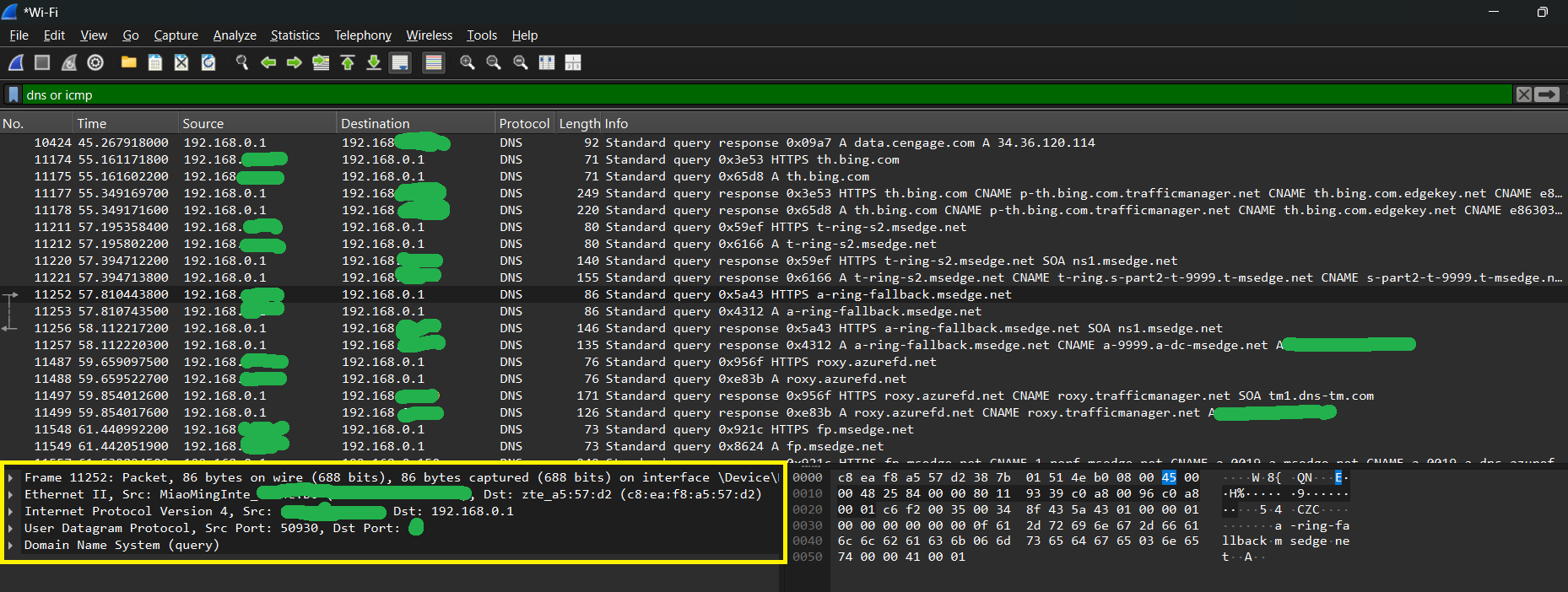
Figure 28.2 — A DNS question and answer captured on a real network. Look at the layers listed in the middle pane: Frame, Ethernet II, IPv4, UDP, DNS. When the DNS Client cannot answer from its cache, it sends a small packet like this to your DNS server and waits for the reply. Screenshot: Oluwatobi TJ, CC0, via Wikimedia Commons.

Windows tip: Why can
nslookupgive a different answer than your browser? The browser asks Windows (hosts file and cache first).nslookupskips both and goes straight to the DNS server. If the two disagree, check the hosts file and flush the cache.
Browsers have their own cache too. Chrome and Edge keep a small DNS cache of their own, and modern browsers may use DNS over HTTPS (DoH), which sends DNS questions inside encrypted web traffic instead of plain UDP port 53. When DoH is on, the Windows cache may be bypassed. Windows 11 can also use DoH itself (hedge: depends on the build and settings).
5.2 The Dnscache Service
What it is: The DNS Client is a Windows service. A service is a program that runs quietly in the background, with no window, usually starting with Windows. Its short name is Dnscache and its display name is "DNS Client".
| Fact | Value |
|---|---|
| Service short name | Dnscache |
| Display name | DNS Client |
| Runs inside | A shared svchost.exe process (a host process that carries several services) |
| Job | Keeps the resolver cache and resolves names for programs |
Looking at it:
Get-Service DnscacheYou can also open Task Manager → Services tab and find Dnscache. Its status should be Running.
More jobs of the DNS Client (hedge):
- It also tracks which DNS servers belong to which network adapter, and can choose between them.
- It supports a table called NRPT (Name Resolution Policy Table): rules such as "names ending in
corp.examplemust go to this special DNS server". It is used mostly by VPNs and company networks. - It registers your PC's own name with DNS on some networks.
Which DNS server is used? The address usually comes from DHCP (Section 6) or from your manual settings. See it with ipconfig /all (look for DNS Servers) or Get-NetIPConfiguration.
Tip: Do not stop or disable Dnscache to "fix" DNS. Many programs and other services rely on it. Flushing the cache is the safe fix.
Summary
| Term | Plain meaning |
|---|---|
| Resolver | The part that turns a name into an IP address |
| Cache | Saved recent answers, kept until the TTL ends |
| TTL | How many seconds an answer may be kept |
| Lookup order | hosts file, then cache, then the DNS server (UDP 53) |
Dnscache | The DNS Client service |
ipconfig /displaydns, Get-DnsClientCache | Show the cache |
ipconfig /flushdns, Clear-DnsClientCache | Empty the cache |
nslookup | Asks the server directly; skips the cache and hosts file |
| NRPT / DoH | Per-name DNS rules / DNS inside encrypted web traffic |