The Big Picture: The Famous Interview Question
"What happens when you type a web address and press Enter?" is one of the most famous questions in computing. The honest answer touches almost everything you have studied: the keyboard (Chapter 31 — Keyboard and Mouse Internals), processes and threads (Chapters 9 and 10), the network stack (Chapters 27 and 28), the browser (this chapter) and finally the graphics card and screen (Chapter 32 — Display and GPU).
Here is the whole chain in one picture. Read it from top to bottom; the rest of the section explains each box.
 ┌──────────────────────────────────────────────────────────────┐
 │ 1. YOU TYPE  https://www.example.com/  and press Enter       │
 └──────────────────────────────┬───────────────────────────────┘
                                ▼
 ┌──────────────────────────────────────────────────────────────┐
 │ 2. URL PARSING   scheme, host, port, path                    │
 └──────────────────────────────┬───────────────────────────────┘
                                ▼
 ┌──────────────────────────────────────────────────────────────┐
 │ 3. HSTS / CACHE CHECK   force HTTPS? already have the page?  │
 └──────────────────────────────┬───────────────────────────────┘
                                ▼
 ┌──────────────────────────────────────────────────────────────┐
 │ 4. DNS   name  ->  IP address                                │
 └──────────────────────────────┬───────────────────────────────┘
                                ▼
 ┌──────────────────────────────────────────────────────────────┐
 │ 5. CONNECT   TCP handshake   or   QUIC (UDP)                 │
 └──────────────────────────────┬───────────────────────────────┘
                                ▼
 ┌──────────────────────────────────────────────────────────────┐
 │ 6. TLS   certificate check, keys agreed, tunnel encrypted    │
 └──────────────────────────────┬───────────────────────────────┘
                                ▼
 ┌──────────────────────────────────────────────────────────────┐
 │ 7. HTTP REQUEST   GET / ...                                  │
 └──────────────────────────────┬───────────────────────────────┘
                                ▼
 ┌──────────────────────────────────────────────────────────────┐
 │ 8. HTTP RESPONSE   200 OK + HTML (bytes stream in)           │
 └──────────────────────────────┬───────────────────────────────┘
                                ▼
 ┌──────────────────────────────────────────────────────────────┐
 │ 9. PARSE HTML   build DOM; find CSS, JS, images              │
 └───────────────┬──────────────────────────────┬───────────────┘
                 │ more requests (steps 4-8)    │
                 ▼                              ▼
 ┌─────────────────────────────┐  ┌──────────────────────────────┐
 │ 10. BUILD CSSOM             │  │ 11. RUN JAVASCRIPT           │
 └──────────────┬──────────────┘  └───────────────┬──────────────┘
                └───────────────┬─────────────────┘
                                ▼
 ┌──────────────────────────────────────────────────────────────┐
 │ 12. RENDER TREE  then  LAYOUT (sizes and positions)          │
 └──────────────────────────────┬───────────────────────────────┘
                                ▼
 ┌──────────────────────────────────────────────────────────────┐
 │ 13. PAINT   drawing instructions, layers, raster to pixels   │
 └──────────────────────────────┬───────────────────────────────┘
                                ▼
 ┌──────────────────────────────────────────────────────────────┐
 │ 14. COMPOSITE   GPU process stacks the layers                │
 └──────────────────────────────┬───────────────────────────────┘
                                ▼
 ┌──────────────────────────────────────────────────────────────┐
 │ 15. GPU + DISPLAY PIPELINE   frame buffer -> cable -> screen │
 └──────────────────────────────────────────────────────────────┘
This is a simplified, ordered picture. In real life steps overlap: the browser starts parsing HTML while the rest is still arriving, and it loads many files at once.
7.1 URL Parsing
What happens: You type text into the address bar (a part of the browser process, Section 1). Pressing a key sends an interrupt that Windows turns into a keyboard message (Chapter 31). The browser must decide: is this a web address or a search? If it looks like a URL, the browser splits it into scheme, host, port, path, query and fragment (Section 4.1). If it is just words, it is sent to your default search engine as a URL.
If you typed example.com without a scheme, the browser tries https:// first (modern browsers). The host is converted to a standard form (international names become a safe ASCII form). Then the browser checks two quick things before touching the network.
7.2 Local Checks: HSTS, Cache and DNS Resolution
HSTS and preloaded lists. If the site is on the browser's built-in or remembered HSTS list, the browser upgrades http to https at once, without even a plain request.
Cache check. The browser looks in its HTTP cache (Section 4.4). If a fresh copy of the page exists, it can skip steps 4 to 8 completely.
DNS: name to IP address. Computers route by IP address (like 203.0.113.7), not by names. DNS (Domain Name System, Chapter 27 and Chapter 28) is the phone book. The lookup goes through caches, from nearest to farthest:
 browser DNS cache ─► Windows DNS Client cache ─► hosts file ─► your router /
                                                                  provider's DNS
                                                                  resolver ─► (asks
                                                                  other servers)
 Stop at the first place that knows the answer.
The question is usually a small UDP packet to port 53 on the DNS server (some setups use encrypted DNS, "DNS over HTTPS", chosen in browser settings). Here is such a packet capture, opened in the free tool Wireshark:
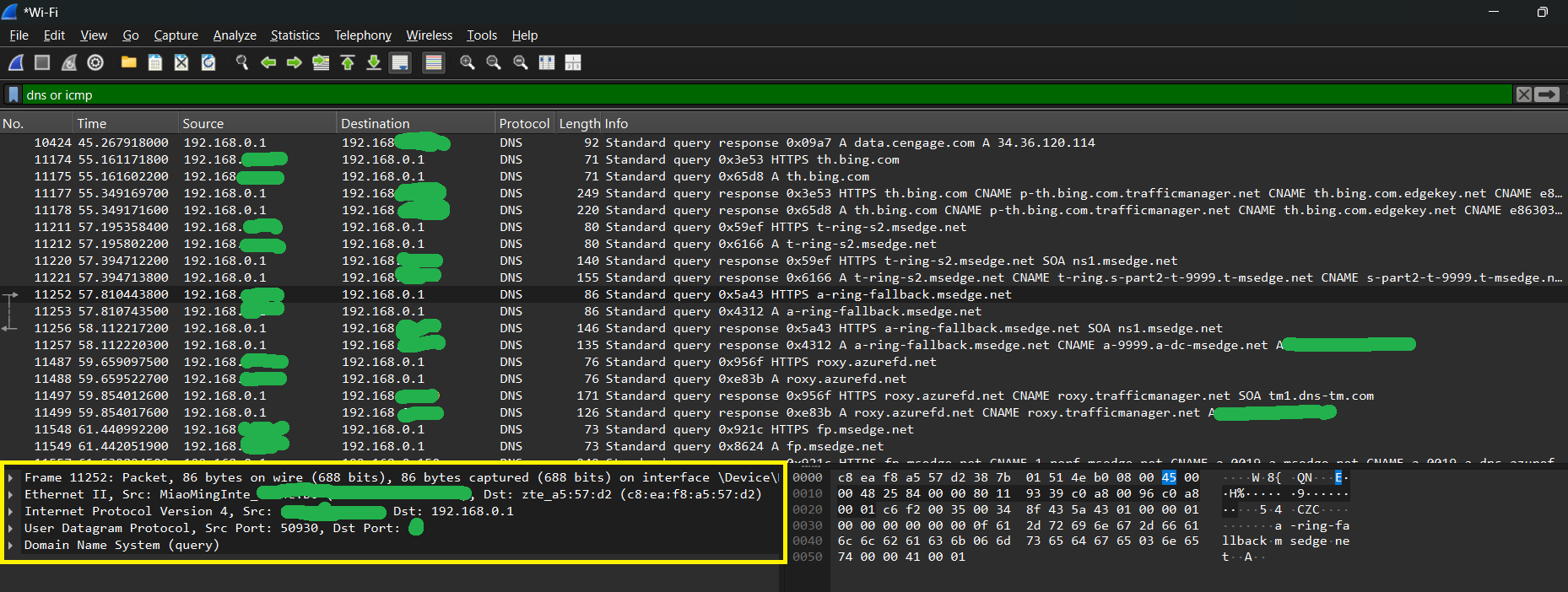
Figure 29.2 — A Wireshark capture of DNS packets. The top list shows the DNS queries and responses; the lower panel opens one packet into its layers (Frame, Ethernet II, IPv4, UDP, DNS), which is the layered idea from Chapter 27. Screenshot: Oluwatobi TJ, CC0, via Wikimedia Commons.

The answer might return several IP addresses (for load sharing, or both IPv4 and IPv6). The browser picks one and tries it, and may race several to find the quickest.
7.3 TCP or QUIC Connection, then TLS
With an IP address in hand, the browser (through its network service, Section 1) opens a connection to port 443:
| Path | Steps |
|---|---|
| HTTP/2 over TCP | TCP three-way handshake (1 round trip), then TLS handshake (about 1 more) |
| HTTP/3 over QUIC | One combined QUIC + TLS handshake over UDP (about 1 round trip) |
If an open connection to the same site already exists, it is reused (keep-alive) and these steps are skipped. During TLS the browser verifies the server certificate (Section 4.2). The padlock appears if all is well. At this point the first packet is leaving your PC: it goes through the network card driver, out of the Ethernet cable or Wi-Fi, through your router (Figure 29.1) and on to the internet. The data crossing the wire is encrypted: observers can see the IP addresses and sizes, but not the page contents.
7.4 HTTP Request and Response
Now the browser sends the request (Section 4.1):
GET / HTTP/2 (headers include: Host, User-Agent, Accept, Cookie ...)
The server runs its own software (maybe a database query, maybe just a file), then replies:
 200 OK
 Content-Type: text/html; charset=utf-8
 Cache-Control: max-age=600
 <!doctype html> <html> ... the page text ...
Other replies change the story: 301 sends the browser back to step 2 with a new URL; 404 shows an error page; 500 shows a server error. The bytes stream in; the browser does not wait for the end.
7.5 HTML Parsing and DOM Construction
The bytes are handed to the renderer process (Section 1) for that site. On its main thread (Section 3) the HTML parser turns text into tokens and nodes, building the DOM tree step by step (Section 2.1). As the parser reads, it discovers more things to fetch.
7.6 Resource Fetching (CSS, JavaScript, Images)
The page may say it needs a stylesheet, three scripts, a logo, fonts and a dozen photos. Each is another request that repeats the earlier steps (cache check, DNS if the host is new, connection, request). With HTTP/2 or HTTP/3 they travel in parallel on one connection. The browser also gives them priorities: CSS and scripts in the head come first, images later.
| Resource | Effect on the page |
|---|---|
| CSS | Render-blocking: nothing paints until it is parsed (Section 2.5). |
Plain <script> | Parser-blocking: HTML parsing pauses while it downloads and runs. |
async / defer script | Does not block the parser (Section 2.5). |
| Images, fonts | Do not block the first paint; they appear when ready (the layout may shift when they arrive). |
The CSS arrives and is parsed into the CSSOM. The JavaScript runs on the V8 engine (Section 3): it may read or change the DOM, ask for more files (fetch), start timers and register click handlers. All of this happens on the one main thread through the event loop.
7.7 Render Tree, Layout and Paint
When enough of the DOM and CSSOM exist, the engine combines them into a render tree (only visible things, Section 2.3), calculates the layout: each box's size and position for the current window width (Section 2.4), and then paints: builds drawing instructions and splits the page into layers. The first moment something visible appears is often called first paint; when the biggest content (such as a large picture or heading) is visible, it is often called largest contentful paint. Both are measured in DevTools' Performance tab.
If a script later changes the DOM or styles, the engine repeats style, layout and paint for the affected parts only (reflow or repaint, Section 2.4).
7.8 GPU Compositing
The painted layers are rasterised: turned into pixel images, mostly using the graphics card. The renderer process sends its layers to the GPU process, which composites them: stacks them in the right order, applies scrolling and animations that only need moving (transform, opacity) and produces one finished frame. Because the compositor can work without the busy main thread, scrolling can stay smooth even while JavaScript is busy (up to a point). This is why Section 3's "freeze" mostly stops clicks and animation of page code but sometimes still lets you scroll.
7.9 Pixels on Screen: The Display Pipeline
The finished frame lives in video memory (VRAM) on the graphics card (or in shared RAM on a CPU with built-in graphics, as you saw in the die photo of Chapter 2). The browser hands it to the Windows desktop window manager (DWM), which combines the browser's window with all other windows and the taskbar into the full desktop picture. Then the display engine of the GPU reads the picture out of memory about 60 times a second (or the refresh rate of your screen) and sends it over the cable (HDMI or DisplayPort) as a stream of pixel values. The monitor lights each pixel with the right colour. Chapter 32 explains this part: frame buffers, refresh rate, V-sync and the display cable.
 renderer ──layers──► GPU process ──frame──► Windows DWM ──► GPU display engine
 (page code)          (composite)            (whole desktop)      │
                                                                  ▼
                                               HDMI / DisplayPort cable ──► monitor pixels
Putting the Timing in Perspective
Rough numbers, which vary a lot with distance and network quality (use these for a feel, not as facts):
| Step | Typical time |
|---|---|
| DNS (not cached) | 10 to 100 ms; nearly 0 if cached |
| TCP connect | one round trip, about 10 to 100 ms |
| TLS 1.3 | about one more round trip |
| Server thinking | 10 to 500 ms |
| Download HTML | depends on size and speed |
| Parse, style, layout, paint | tens to hundreds of ms |
| One display frame | about 16.7 ms at 60 Hz |
This is why caches, connection reuse, HTTP/3, small pages and CDNs (servers placed near you) all matter: each removes round trips.
Summary
| Step | In one line |
|---|---|
| 1 to 2 | Type; browser splits the URL |
| 3 | HSTS and cache checks |
| 4 | DNS finds the IP address |
| 5 to 6 | TCP or QUIC connects; TLS encrypts |
| 7 to 8 | HTTP request; response with HTML |
| 9 to 11 | DOM built; CSS, JS, images fetched; JS runs |
| 12 to 13 | Render tree, layout, paint |
| 14 | GPU composites layers |
| 15 | Display pipeline puts pixels on the screen |