The Big Picture: Why Does a PC Need a Second Kind of Processor?
Look at your screen right now. A normal monitor has millions of tiny dots (called pixels, short for "picture elements"). A screen of 1920 × 1080 dots has about 2 million pixels. Most screens redraw 60 times every second. Games often ask for even more. That is more than 100 million tiny colour calculations every second, and each one is a small, simple sum.
The CPU (Chapter 2) is brilliant at hard, varied jobs: running Windows, opening files, making decisions. But it has only a few strong cores (often 4 to 24 on a desktop). Asking it to colour millions of pixels one after another would be like asking one very clever professor to paint a huge wall, dot by dot.
So PCs add a second kind of processor, built for exactly this job: the GPU (Graphics Processing Unit). If the CPU is the professor, the GPU is a stadium full of students, each doing one very simple task at the same moment.
1.1 The GPU as a Massively Parallel Processor
What it is: A GPU is a chip with hundreds to thousands of small cores. Each core is much simpler and slower than a CPU core, but they all work at the same time on different pieces of the same job. Doing many identical sums at once is called parallel work (the opposite of doing one thing after another, which is called serial).
| CPU | GPU | |
|---|---|---|
| Number of cores | Few (about 4 to 24 on a typical PC) | Hundreds to thousands of small ones |
| Each core is | Very strong, very flexible | Small and simple |
| Best at | Varied jobs, decisions, running the OS | The same maths on lots of data |
| Good example | "Open this file, then check that setting" | "Work out the colour of 2 million pixels" |
| Analogy | One professor | A stadium of students |
Why graphics fits so well. The colour of one pixel does not depend on the pixel next to it. So a thousand pixels can be worked out by a thousand cores in the same moment. The same maths (for example "mix this texture with this light") is repeated for every pixel. The GPU is built for exactly this pattern.
Not only pictures. Because a GPU is so good at "same maths on lots of data", people also use it for other jobs: video editing, scientific simulations, and AI (machine learning). Programs that use the GPU for these non-graphics jobs run compute shaders (small GPU programs for general maths, not for drawing). You will meet the word shader again in Section 4.
The fixed-function blocks. A GPU is not only a pile of small cores. It also has special-purpose blocks that do one job in hardware, very fast. Their names:
| Block | What it does (simple words) |
|---|---|
| Rasterizer | Turns triangles into the list of screen pixels they cover (Section 4) |
| TMU (Texture Mapping Unit) | Looks up a colour from an image (a texture) wrapped on a surface |
| ROP (Render Output Unit) | The last step: writes finished pixels into the picture in memory |
| Media engine | Dedicated circuits to decode and encode video (so video playback uses little power) |
| Display engine | Reads the finished picture and sends it to the monitor (Section 7) |
Seeing it on a real chip
Here is a photograph of the silicon of an Intel Core i9-13900K, a desktop CPU. Colours were added by the people who made the picture, so each part is easy to name. You first met this photo in Chapter 2. This time, look for the GPU.
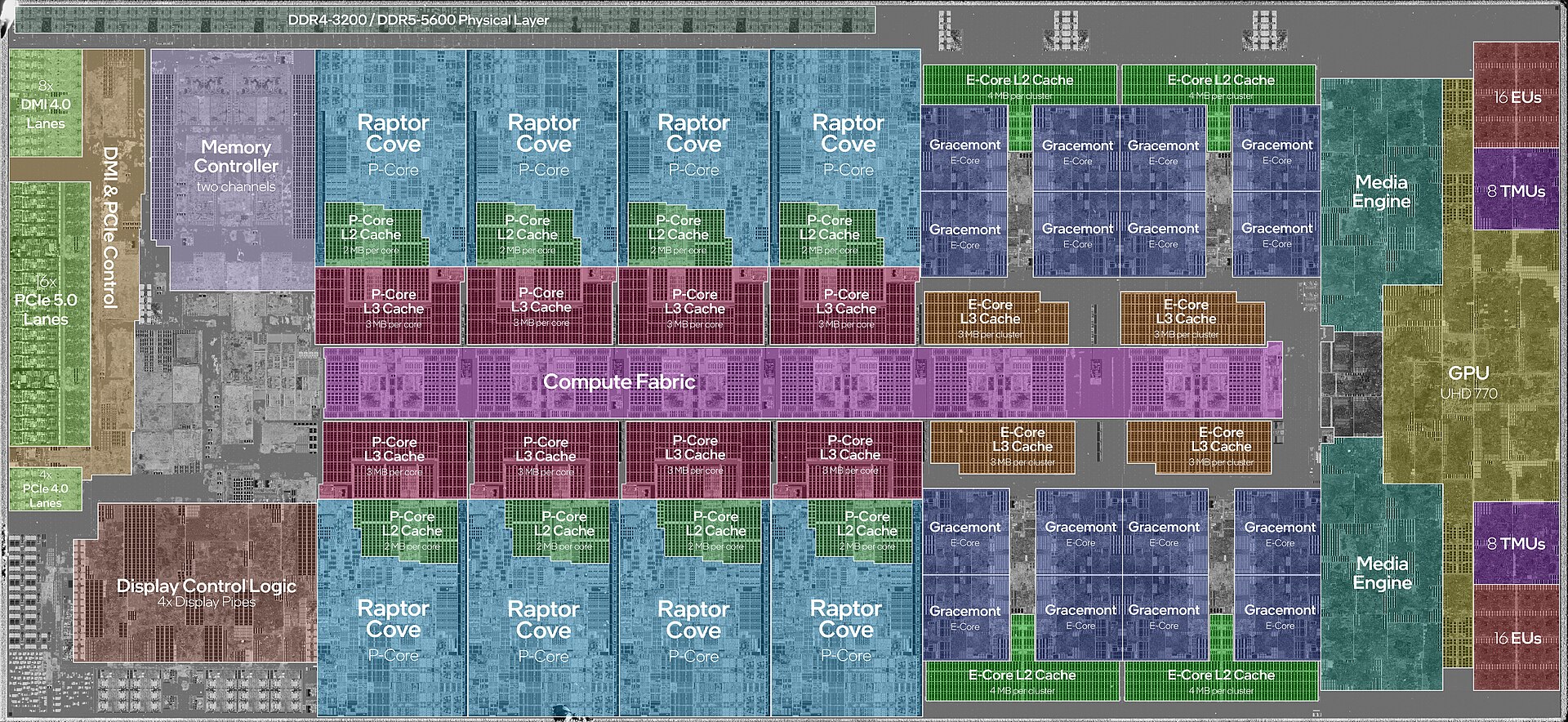
Figure 32.1 — The same chip as in Chapter 2. Find the block labelled "GPU UHD 770": it is the integrated GPU, a complete graphics processor living inside the CPU chip. The labels next to it name its parts: "16 EUs", "8 TMUs" and "Media Engine". At the bottom left, "Display Control Logic 4x Display Pipes" is the part that sends pictures to monitors. Photo: JmsDoug and Fritzchens Fritz, CC0, via Wikimedia Commons.

What the labels tell you:
- EUs (Execution Units): Intel's name for its small graphics cores. This GPU has 16 of them. A big discrete card has far more cores, which is why it draws faster.
- TMUs: the texture units from the table above. This one has 8.
- Media Engine: the video decode/encode block.
- Display Control Logic with 4 Display Pipes: the display engine. "Pipes" are separate paths to screens, so this chip can feed several monitors.
- Notice how small the GPU block is compared with all the CPU cores and caches. An integrated GPU is a modest helper, enough for office work and video, but not for heavy 3D games.
1.2 VRAM (Dedicated Video Memory)
What it is: A GPU needs a place to keep its working data: textures, 3D shapes, and the finished picture (the frame buffer, Section 7). That place is called VRAM (Video RAM).
Graphics work moves huge amounts of data every second, so GPU memory is built for very high bandwidth (how many bytes can move per second). Cards use special memory types such as GDDR6 (the exact type depends on the card and its age). It sits on the card, very close to the GPU chip, with a wide connection to it.
There are two main designs:
| Integrated GPU (iGPU) | Discrete GPU (dGPU) | |
|---|---|---|
| Where it lives | Inside the CPU chip (Figure 32.1) | A separate card, or a separate chip on a laptop board |
| Memory | Shares system RAM with the CPU | Has its own VRAM on the card |
| Speed | Modest | Much faster (more cores, faster memory) |
| Power and heat | Low | High (fans, extra power plugs) |
| Cost | Free with the CPU | An extra part to buy |
| Typical use | Office, web, video | Gaming, 3D, video editing, AI |
Why sharing is slower: system RAM (Chapter 3) is also needed by the CPU. The iGPU and the CPU must take turns, and normal RAM is slower than GDDR. A discrete card's VRAM is private to the GPU, so the GPU never waits for the CPU.
Windows shows both kinds of memory. In Task Manager (Chapter 11) the GPU page lists Dedicated GPU memory (real VRAM) and Shared GPU memory (a slice of normal RAM Windows lends to the GPU when needed). A discrete card shows both. An integrated GPU shows mostly shared memory.
1.3 Where a Graphics Card Plugs In
A discrete card does not talk to the CPU through magic. It plugs into the motherboard's PCIe x16 slot, the longest PCIe slot, with the most lanes (Chapter 4, Section 2). PCIe is the fast "road" that carries commands and data between the CPU, RAM and the card.
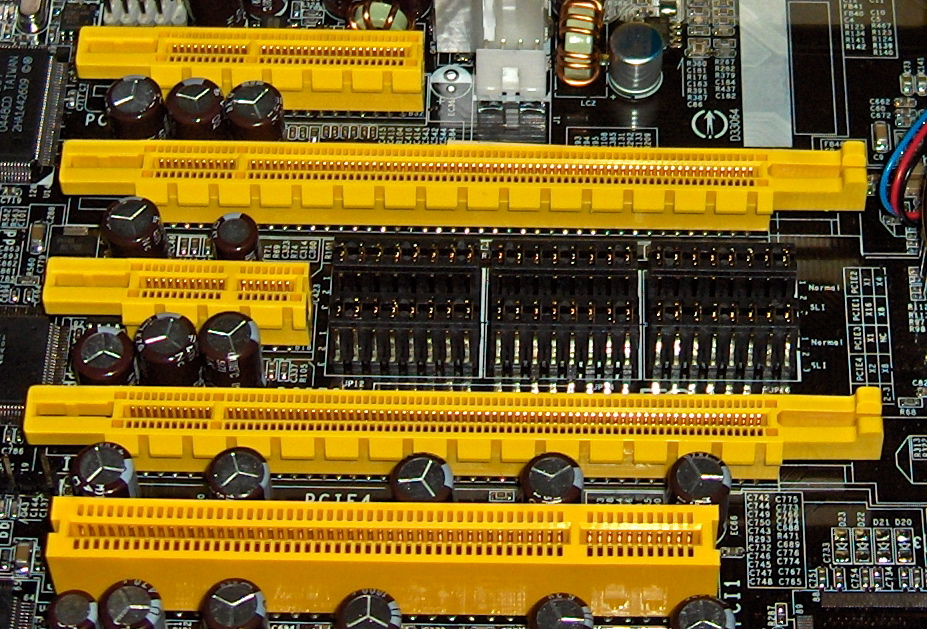
Figure 32.2 — The slots you saw in Chapter 4. A graphics card goes into one of the two long PCIe x16 slots (the second and fourth from the top in this photo). The short ones are x4 and x1, and the wide one at the bottom is an old PCI slot. Photo: snickerdo, CC BY-SA 3.0, via Wikimedia Commons.

Notice that, on a real board, the x16 slot nearest the CPU usually has a direct line to the CPU's own PCIe lanes. That gives the card the shortest and fastest path, as you saw in Chapter 4, Section 1.
 CPU chip
 ┌─────────────────────────────┐
 │  CPU cores    iGPU          │──── display ports on the motherboard
 │  memory ctrl  PCIe lanes    │      (use the integrated GPU)
 └──────┬─────────────┬────────┘
        │             │ PCIe x16 (fast road)
       RAM       ┌────┴─────────────────┐
  (iGPU shares   │ Graphics card        │──── display ports on the card
   this RAM)     │  GPU chip  + VRAM    │      (use the discrete GPU)
                 └──────────────────────┘
Which ports should I use? If you have a graphics card, plug the monitor into the card's ports, not the motherboard's. The motherboard ports are wired to the integrated GPU. Using them wastes your expensive card.
Laptops often have both GPUs: the integrated one for low power, and a discrete one that Windows switches on for heavy programs. Windows can show which GPU an app uses (Settings → System → Display → Graphics).
Summary
| Topic | Remember this |
|---|---|
| GPU | Hundreds to thousands of small cores doing the same maths on many pixels at once |
| CPU vs GPU | CPU: few strong cores for varied jobs. GPU: many simple cores for parallel jobs |
| Compute shaders | GPU programs for non-graphics maths (video, science, AI) |
| Fixed-function blocks | Rasterizer, TMUs, ROPs, media engine, display engine |
| iGPU | Inside the CPU chip; shares system RAM; low power; labelled "GPU UHD 770" in Figure 32.1 |
| dGPU | Separate card in a PCIe x16 slot; has its own fast VRAM (such as GDDR6) |
| VRAM | Fast memory for textures, shapes and the frame buffer |
| Which port? | Plug the monitor into the card, not the motherboard, when a card is fitted |