The Big Picture: The Whole Map
You have met the parts and the roads. Now let's see how they all connect. Read the diagram from the top: power comes in, the motherboard spreads it out, and the CPU, RAM and chipset sit in the middle with everything else hanging off the chipset.
                    POWER SUPPLY
                        ↓
                  ┌─────────────┐
                  │ MOTHERBOARD │
                  └─────────────┘
                        ↓
        ┌───────────────┼───────────────┐
        ↓               ↓               ↓
      CPU             RAM          CHIPSET
     (cores)         (fast         (hub)
    (threads)       memory)          ↓
        ↓               ↓        ┌────┼────┬────────────┐
        ↓               ↓        ↓    ↓    ↓            ↓
    [Registers]   [Memory        |    |    |        [BIOS/UEFI]
    [Cache]        Bus]    [PCIe] [USB] [NIC] [Audio]
                            ↓     ↓     ↓      ↓
                           GPU  Devices Storage NIC
                                         ↓
                    ┌─────────────────────┴──────────────────┐
                    ↓                    ↓                    ↓
                 [SSD/HDD]           [Controller]         [Firmware]
                 (Storage)
New words: registers and cache are very small, very fast memory inside the CPU. The CPU keeps what it is using right now there.
Here is the same idea in a real photo. Find the CPU socket (1), the memory slots (2), the chipset chips (3 and 4), and the slots and ports (5 to 12) on this board.
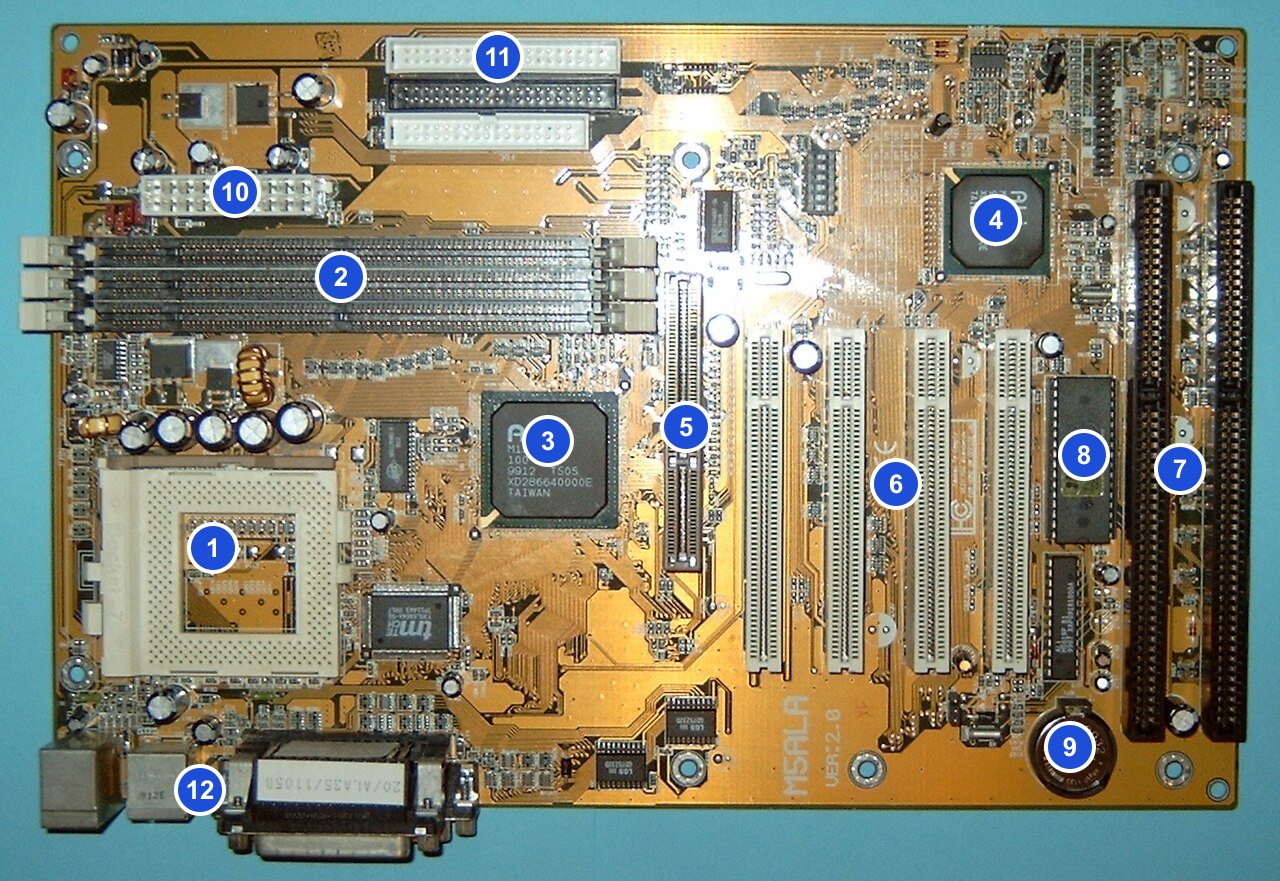
Figure 1.8 — The same older motherboard as Figure 1.2. Follow the numbers 1 to 12 and match each part to a box in the diagram above: CPU socket (1), memory slots (2), the two chipset chips (3, 4), expansion slots (5, 6, 7), BIOS chip (8), battery (9), power connector (10), disk connectors (11) and ports (12). Photo: Arnulf zu Linden, CC BY-SA 3.0, numbers added, via Wikimedia Commons.

How a Complete Operation Works
Example: You open a web browser. Follow the steps in order.
1. [Keyboard] — You press a key to open a program

2. [USB Controller] — Detects the keyboard input
   └→ [USB Driver] — Windows driver processes keyboard signal

3. [CPU] — Executes the instruction to open the application

4. [Storage Controller] — Reads the browser executable from disk
   └→ [HDD/SSD] — Retrieves the .exe file

5. [Chipset/Bus] — Routes data from storage to RAM

6. [Memory Bus] — Moves the executable from storage to RAM

7. [RAM] — Stores the running browser code and data

8. [CPU] — Executes browser code (thousands of instructions per second)

9. [Network Interface] — Connects to the internet

10. [GPU] — Renders the webpage to pixels

11. [Monitor] — Displays the webpage to you
In everyday words: you press a key, the USB controller notices, the CPU decides what to do, the browser program is copied from storage into RAM, the CPU runs it, the network card fetches the page, the GPU draws it, and the monitor shows it. An executable (the ".exe file") is just the program file.
Summary
| Step | Who does it | Plain meaning |
|---|---|---|
| Key press | Keyboard, USB controller, driver | The computer notices you |
| Decide | CPU | Works out what to do |
| Load | Storage, chipset, memory bus, RAM | Program is copied to the fast desk |
| Run | CPU | Executes the browser code |
| Connect | NIC | Fetches the web page |
| Draw and show | GPU, monitor | Turns the page into pixels you can see |