The Big Picture: Many Workers, Not One Super-Worker
Imagine a kitchen. You could hire one chef who works faster and faster. But there is a limit to how fast one person can move. Or you could hire several chefs and let them cook at the same time. CPUs went the second way. This section explains the words you will see on every CPU box: cores and threads.
2.1 What Is a Core?
What it is: A core is a complete, independent mini-processor. It can run its own fetch → decode → execute loop.
Think of the CPU chip as a small building. Each core is a fully staffed office inside it. Each office has its own registers (the tiny storage boxes from Section 1) and its own execution units (the parts that do the real work). It does not need to wait for the others.
┌───────────────────────────────────────────────┐
│                   CPU CHIP                     │
├───────────────┬───────────────┬───────────────┤
│   CORE 0      │   CORE 1      │   CORE 2  ...  │
│  (own regs,   │  (own regs,   │               │
│   own L1/L2   │   own L1/L2   │               │
│   cache)      │   cache)      │               │
└───────────────┴───────────────┴───────────────┘
        │               │               │
        └───────── Shared L3 Cache ──────┘
(Cache is a small, very fast memory next to the core. Section 3 explains it fully.)
Older CPUs (1990s to early 2000s) had exactly one core. Every program had to take turns, switching so fast that it felt simultaneous. Modern CPUs put several cores on one chip, so work can truly happen at the same time.
What it looks like: Here is a modern Intel Core i9-13900K chip, photographed and colour-labelled. You can see the cores as separate blocks.
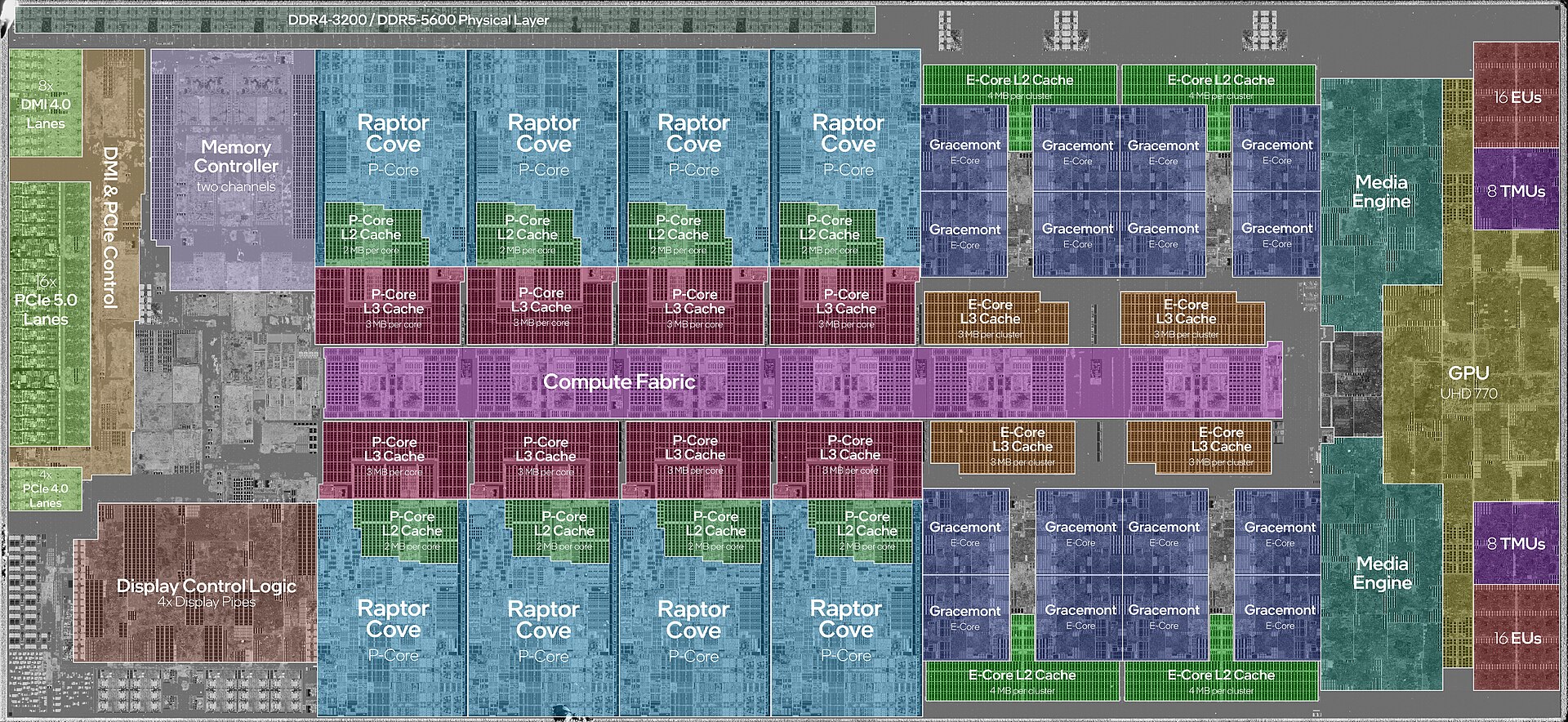
Figure 2.3 — The silicon die of an Intel Core i9-13900K with labels. Look for the 8 big blue blocks labelled "Raptor Cove P-Core" (the strong cores) and the 16 small dark-blue "Gracemont E-Core" blocks in groups of 4 on the right (the small, efficient cores). Photo: JmsDoug and Fritzchens Fritz, CC0, via Wikimedia Commons.

Notice that the big blue P-cores take up much more space than the small E-cores. Section 2.3 explains why there are two kinds.
2.2 What Is a Thread?
What it is: A thread is one independent line of instructions that can be scheduled to run. Think of it as one "to-do list" for a worker.
The word is used in two related ways. Mixing them up causes confusion:
| Meaning | Where it is used | Example |
|---|---|---|
| Software thread | Inside a process (an OS idea) | A word processor may have one thread for typing and one for spell-check in the background |
| Hardware thread | Inside a physical core (a CPU idea) | An Intel Core i7 core can run 2 hardware threads using Hyper-Threading |
This section is about hardware threads. Software threads belong to the OS and are covered fully in Chapter 10.
2.3 Cores vs. Threads (Modern Architecture)
A CPU spec sheet often says something like this:
Intel Core i7-13700K: 16 cores / 24 threads
That looks odd: 16 cores but 24 threads? The reason is that Intel and AMD chips mix two kinds of cores, and use Simultaneous Multi-Threading (SMT) on some of them:
| Core type | Nickname | Hardware threads each |
|---|---|---|
| Performance core | P-core | 2 (using Hyper-Threading) |
| Efficiency core | E-core | 1 |
P-cores are big and fast. E-cores are small and use little power. The CPU uses P-cores for heavy tasks and E-cores for light background work.
8 P-cores × 2 threads each = 16 threads
8 E-cores × 1 thread each  =  8 threads
                    TOTAL  = 24 threads (16 cores)
Key idea: A "thread" on a spec sheet is a logical processor. The operating system sees it as a separate CPU it can give work to. But two logical threads on the same core still share real hardware.
2.4 Multi-Core Benefits
What it is: Why put several cores on a chip instead of making one core faster?
- Physical limits: Pushing one core's clock speed higher creates far more heat (the heat rises much faster than the speed). There is a practical ceiling around 5–6 GHz with current technology.
- True parallelism: 8 cores can run 8 different instruction streams at the same instant, not just "very fast switching".
- Real-world benefit: Video encoding, compiling code, running a database, and gaming while streaming all gain directly from more independent workers.
Important catch: Multi-core only helps if the software is written to use many cores (this is called multi-threaded). A program that does everything on one thread uses one core, however many cores the CPU has.
2.5 Hyperthreading (SMT) Explained
What it is: A trick (Intel calls it Hyper-Threading, AMD calls it SMT) that lets one physical core look like two logical processors to the operating system.
Why it works: A core has more internal parts (execution units, decoders) than one instruction stream can keep busy every moment. There are often idle gaps. Hyper-Threading slips a second instruction stream into those gaps. It is like a waiter who serves a second table while the first table is still reading the menu.
Without SMT:                  With SMT (2 threads):
Core: [A][A][ ][A][ ][A]      Core: [A][B][A][B][B][A]
        ↑ idle gaps wasted            ↑ gaps filled by the other thread
What it is NOT:
- It does not double performance. A realistic gain is about 15–30%, because both threads share the same execution units.
- It is not the same as two real cores. Two real cores can each run at 100%. Two SMT threads on one core compete for the same hardware.
What you see in practice: Task Manager shows "logical processors" (cores × SMT threads per core). An 8-core/16-thread CPU shows 16 graphs in the CPU view, but only 8 physically independent engines are underneath.
Summary
| Term | Plain meaning |
|---|---|
| Core | A complete mini-processor on the chip |
| Thread (hardware) | One stream of instructions a core can run |
| Logical processor | What the OS counts as one CPU (one hardware thread) |
| P-core / E-core | Fast, big core / small, power-saving core |
| Hyper-Threading / SMT | One core pretending to be two; about 15–30% extra speed |
| Multi-threaded software | Software that can use many cores at once |