2.1 DRAM (Dynamic RAM)
What it is: The technology used for main system RAM — the memory sticks in your computer.
How DRAM cells work: A bit is one 0 or 1. DRAM stores each bit as a tiny electric charge (or no charge) in a capacitor, which is like a very small bucket that holds electricity. Next to it sits one transistor, a tiny switch that decides when the bucket can be read or filled.
One DRAM cell:
     ┌───────────┐
     │ Capacitor │  charged = 1, uncharged = 0
     └─────┬─────┘
           │
     ┌─────┴─────┐
     │ Transistor│  controls read/write access
     └───────────┘
The problem — refresh cycles: The bucket has a small hole. Capacitors leak their charge over time, even when nothing is being read or written. Left alone, a DRAM cell would forget its value within milliseconds. To stop this, DRAM must be refreshed: every cell is read and rewritten thousands of times per second, non-stop, for as long as the computer is on. This extra work is part of the price that makes DRAM slower than SRAM.
Capacity: Each cell needs only one capacitor and one transistor, so DRAM cells are very small and cheap to make in huge numbers. That is exactly why DRAM is used for main memory, where you need many gigabytes.
2.2 SRAM (Static RAM)
What it is: The technology used for CPU caches (L1, L2, L3 — Chapter 2, Section 3).
How SRAM cells work: Each bit is held by a small loop of transistors (usually six) that locks itself into a steady state while power is on. There is no capacitor, so there is no leak to fight.
One SRAM cell (simplified):
   ┌──────────────────────┐
   │  6 transistors in a  │   stable state = 1 or 0
   │  cross-coupled loop  │   (no refresh needed)
   └──────────────────────┘
No refresh needed: The transistor loop holds its value by itself, so SRAM never needs constant refreshing. This is a big reason SRAM is much faster than DRAM.
Faster but expensive: Six transistors per bit take far more chip space than DRAM's one capacitor plus one transistor. So SRAM costs much more per byte and cannot be used in large amounts.
Used for CPU caches: Fast, expensive and small — that is why SRAM is used only for CPU caches (kilobytes to a few megabytes), while DRAM is used for main RAM (gigabytes). Each type is used where its strengths matter most.
The two side by side:
| DRAM | SRAM | |
|---|---|---|
| Storage mechanism | Capacitor + 1 transistor | 6-transistor loop |
| Needs refreshing | Yes, constantly | No |
| Speed | Slower | Much faster |
| Cost per byte | Low | High |
| Typical use | Main RAM (GBs) | CPU cache (KBs–MBs) |
2.3 DDR (Double Data Rate)
What it is: DDR is the family of standards that decides how modern RAM sticks talk to the rest of the computer. A clock is a steady "tick-tick-tick" signal that keeps everything in step. The clock goes up and down, and an older memory moved data only on the "up". "Double Data Rate" means data moves on both the rising edge (up) and the falling edge (down) of the clock. That doubles the throughput without making the clock itself run twice as fast.
Single Data Rate:  one transfer per clock tick   ▲   ▲   ▲
Double Data Rate:  two transfers per clock tick  ▲▼  ▲▼  ▲▼
DDR3, DDR4, DDR5 explained: Each new generation is faster, uses less power, and usually allows more capacity per stick:
| Standard | Typical speed range | Typical voltage | Era |
|---|---|---|---|
| DDR3 | 800–2133 MT/s | 1.5V | ~2007–2014 |
| DDR4 | 2133–3200+ MT/s | 1.2V | ~2014–2021 |
| DDR5 | 4800–8000+ MT/s | 1.1V | ~2021–present |
(MT/s = million transfers per second. It is the standard way to measure DDR speed, because "double data rate" makes the plain clock number misleading on its own.)
Reading a real label. The laptop stick below has a white label that says "8GB 1Rx8 PC4-3200AA". Here is how to read it:
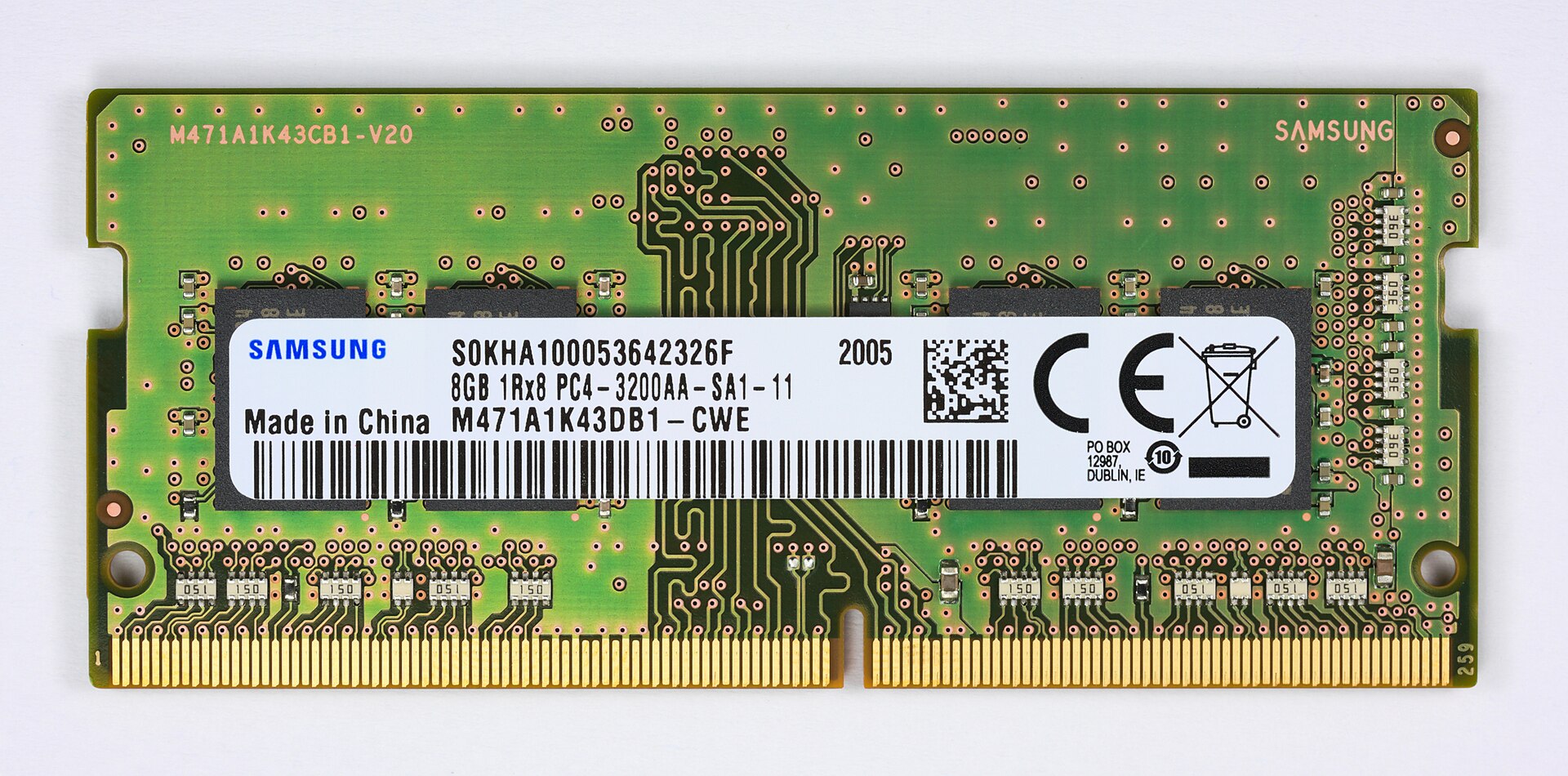
Figure 3.3 — Read the white label. "8GB" is the size. "PC4" means DDR4 (PC3 would be DDR3, PC5 would be DDR5). "3200" means it runs at 3200 MT/s. Photo: D-Kuru, CC BY-SA 4.0, via Wikimedia Commons.

| Part of the label | Meaning |
|---|---|
| 8GB | Capacity of this stick |
| PC4 | The DDR4 generation |
| 3200 | Speed: 3200 MT/s |
Speed progression: The generations are not only faster. The notch on the stick sits in a different place for each one (a DDR4 stick physically cannot fit into a DDR5 slot). So moving to a new generation always needs a new motherboard, not just new sticks.
Bandwidth calculation: Bandwidth means how much data can move per second. The formula is:
Bandwidth = Transfer rate (MT/s) × Bus width (bytes) × Number of channels

Example: DDR4-3200, dual channel, 64-bit (8-byte) bus width
= 3200 MT/s × 8 bytes × 2 channels
= 51,200 MB/s
= ~51.2 GB/s
Analogy: Think of a motorway. Transfer rate is how fast cars go, bus width is how wide each lane is, and channels are how many lanes you have. Two lanes carry twice as much as one.
This is why dual-channel mode (two matched sticks working together) roughly doubles bandwidth compared with one stick of the same speed. It is one of the most useful, and most often missed, upgrades — especially for PCs with integrated graphics (a graphics part built into the CPU), because that graphics part shares the same memory bandwidth with the CPU.
Summary
| Topic | Remember this |
|---|---|
| DRAM | One capacitor + one transistor per bit; cheap and dense, but leaks and needs constant refresh. Used for main RAM |
| SRAM | Six transistors per bit; no refresh, very fast, but costly. Used for CPU caches |
| DDR | Data moves on both the rising and falling clock edge |
| MT/s | The honest speed number: million transfers per second |
| PC4-3200 | DDR4 at 3200 MT/s |
| Bandwidth | Transfer rate × bus width × channels (DDR4-3200 dual channel ≈ 51.2 GB/s) |