4.1 What the MMU Is
What it is: The Memory Management Unit (MMU) is a piece of hardware built right into the CPU. Its whole job is to turn virtual addresses into physical addresses on every single memory access — and to check the permissions while it does so.
Analogy: The MMU is the front-desk clerk of the hotel from Section 3. A guest says "Room 1", and the clerk instantly looks up the real room number and checks that the guest is allowed in.
This is the hardware that makes Section 3's virtual memory illusion work. Without the MMU, "virtual memory" would be just an idea. Doing the translation in software for every memory access would be far too slow.
CPU core wants to read virtual address 0x00401000
              │
              ▼
        ┌───────────┐
        │    MMU    │  ← translates virtual → physical, checks permissions
        └─────┬─────┘
              │
              ▼
   Physical RAM address 0x1A2B3000
Where it lives. Modern CPUs keep a lot of memory-related hardware on the same piece of silicon. Here is a labelled photo of the silicon die (the actual chip, with the cover removed) of an Intel Core i9-13900K:
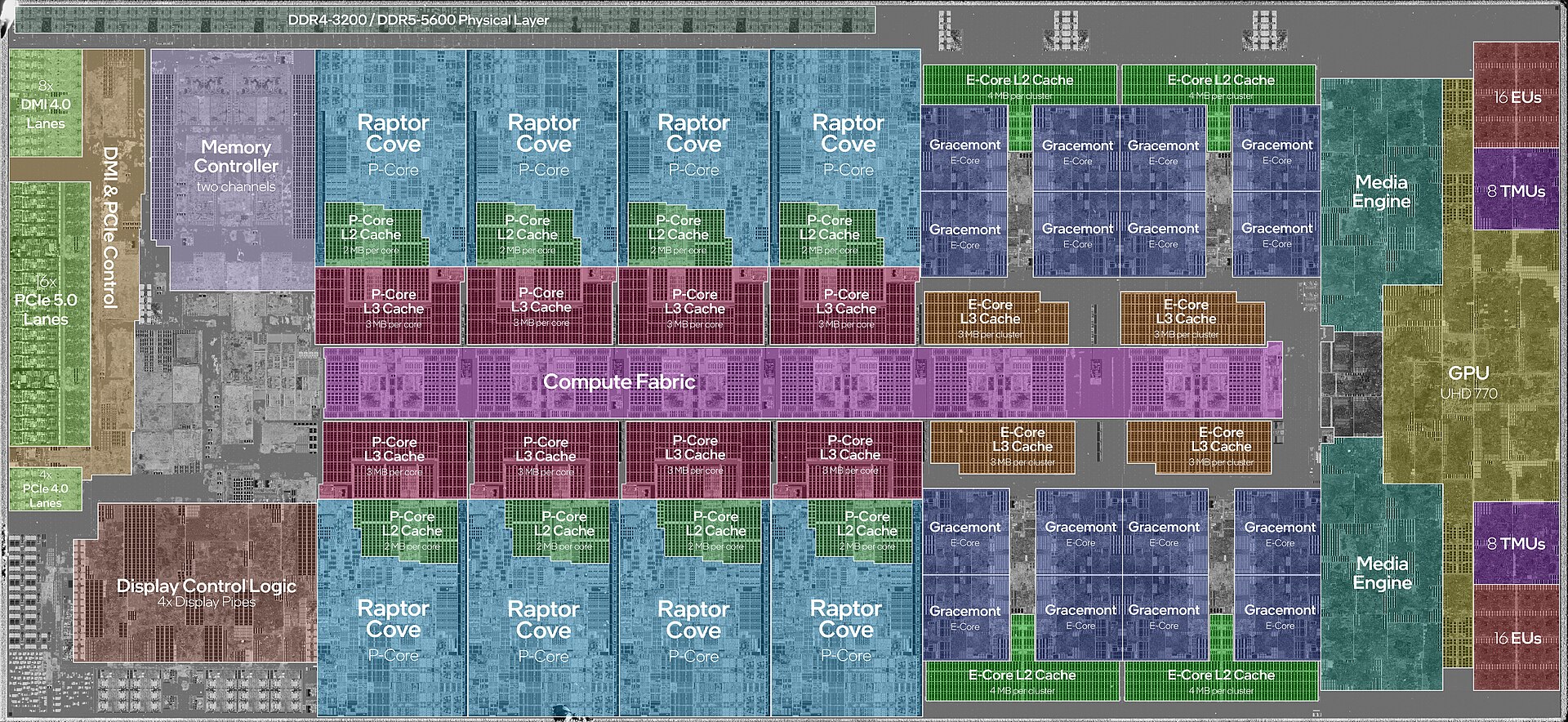
Figure 3.4 — Inside one CPU. Find the green blocks labelled "L2 Cache" next to each P-core, the dark-red blocks labelled "L3 Cache", and the block at the top left labelled "Memory Controller two channels". All of these sit inside the CPU, not on the motherboard. The MMU and TLB are tiny parts built into each core and are too small to be labelled here. Photo: JmsDoug and Fritzchens Fritz, CC0, via Wikimedia Commons.

The memory controller is the part that talks to the RAM sticks. The caches (L2 and L3, from Chapter 2) sit beside the cores. The MMU and its TLB (Section 4.4) work with these to keep memory access fast.
4.2 Address Translation
The MMU does not translate by magic. It follows a data structure kept by the operating system, called a page table. That is described next.
4.3 Page Tables (Hierarchical)
What they are: A page table is a data structure that the OS keeps in memory (one set per process). It records which virtual pages belong to which physical pages.
Memory is cut into equal-sized chunks called pages (commonly 4 KB on x64 Windows). Both virtual memory and real RAM are cut this way, and the page table records which physical page each virtual page currently uses.
Analogy: A page table is like a phone book. You look up the "virtual" name and it gives you the "real" number.
A single flat table for a full 64-bit address space would itself need an impossibly huge amount of memory. So real page tables are hierarchical: a tree with several levels. Each level narrows down one part of the address, and branches that are never used do not need to exist at all.
Virtual address bits split into levels:
┌─────────┬─────────┬─────────┬─────────┬───────────┐
│ Level 4 │ Level 3 │ Level 2 │ Level 1 │  Offset   │
│  index  │  index  │  index  │  index  │within page│
└────┬────┴────┬────┴────┬────┴────┬────┴───────────┘
     │         │         │         │
     ▼         ▼         ▼         ▼
  Table 4 → Table 3 → Table 2 → Table 1 → Physical page + offset
The offset is simply "how far into the page" the byte is.
Walking this tree for every memory access — following pointer after pointer through 4 levels of tables — would itself be slow. That is the exact problem the TLB (next) solves.
4.4 TLB (Translation Lookaside Buffer)
What it is: The TLB is a small, very fast cache inside the CPU. It remembers recently used virtual-to-physical translations, so the MMU does not have to walk the whole multi-level page table every time.
Analogy: You look up a friend's number in the phone book once, then write it on a sticky note on your desk. Next time you just read the sticky note.
CPU needs to translate a virtual address
              │
              ▼
        Check TLB first
         │           │
      HIT             MISS
   (translation    (must walk the
   found instantly)  full page table —
         │            much slower)
         ▼                 │
   Use it immediately       ▼
                    Store result in TLB
                    for next time, then
                    use it
The TLB is the same idea as the CPU cache hierarchy from Chapter 2, Section 3: a small, fast layer in front of something much slower. The only difference is that it stores address translations instead of data.
4.5 TLB Misses and Performance
A TLB hit is almost free. The translation is ready in a cycle or two.
A TLB miss forces a full page table walk: following the multi-level structure from Section 4.3 through main RAM. Ironically, that needs several memory accesses (one per level) before the original access the program wanted can even start.
Why this matters in real life: Programs that jump around memory in scattered patterns across a huge range cause many more TLB misses than programs that read memory in order, or stay inside a small area. This is one of the less obvious reasons why "memory access patterns" change real-world speed, on top of ordinary cache hits and misses.
It is also why modern CPUs support large pages (2 MB or even 1 GB, instead of the usual 4 KB) for some workloads. Fewer, bigger pages mean far fewer TLB entries are needed to cover the same amount of memory, so there are fewer misses.
| TLB hit | TLB miss | |
|---|---|---|
| What happens | Translation found in the TLB | Full page table walk through RAM |
| Cost | About a cycle or two | Several extra memory accesses |
4.6 Memory Protection (Per-Page Permissions)
As well as translating, each page table entry carries permission bits. The MMU checks them on every access to enforce these rules:
| Permission | Meaning |
|---|---|
| Read | Can this page be read? |
| Write | Can this page be written to? |
| Execute | Can instructions be fetched and run from this page? |
| User/Supervisor | Can user-mode (Ring 3) code access this page, or is it kernel-only (Ring 0)? |
This is the real mechanism behind several ideas you know from earlier chapters:
- Data Execution Prevention (DEP): Data pages (like the stack or heap) are marked non-executable. Even if an attacker sneaks malicious code into a data area, the CPU refuses to run it, because that page's Execute bit is off.
- Read-only code: A program's compiled instructions are normally mapped read-only. So a bug (or an attacker) cannot quietly change a program's own code while it runs.
- The Ring 0/Ring 3 boundary from Chapter 2, Section 6: Kernel memory pages are marked supervisor-only. If user-mode code tries to touch one, the MMU itself refuses and raises a fault. This is the real hardware that enforces the privilege boundary you read about in Chapter 2, not just a software habit.
Any broken rule — writing to a read-only page, running a non-executable page, or a user-mode process touching a kernel-only page — causes a hardware exception (a general protection fault or access violation, covered more in Section 8). The OS then handles it, usually by ending the offending process.
Summary
| Topic | Remember this |
|---|---|
| MMU | Hardware inside the CPU that translates virtual to physical addresses and checks permissions |
| Page | A fixed-size block of memory (commonly 4 KB) |
| Page table | The OS's lookup table (a multi-level tree) for virtual-to-physical mapping |
| TLB | A small, fast cache of recent translations; a miss means a slow table walk |
| Large pages | 2 MB or 1 GB pages that need fewer TLB entries |
| Permission bits | Read, Write, Execute, User/Supervisor — the base of DEP and the Ring 0/3 split |