5.1 Pages (Fixed-Size Memory Blocks)
What they are: As Section 4 said, memory is cut into equal-sized chunks called pages. The standard size on x64 Windows is 4 KB.
Using equal-sized pages (instead of chunks of every possible size) is what makes virtual memory practical. The OS and the MMU can track, move and manage memory in simple, uniform units. Think of a bookshelf of identical boxes: any box fits in any slot.
A process's virtual address space, divided into pages:
┌──────┬──────┬──────┬──────┬──────┬──────┬──────┐
│ Page │ Page │ Page │ Page │ Page │ Page │ Page │
│  0   │  1   │  2   │  3   │  4   │  5   │  6   │  ← each 4 KB
└──────┴──────┴──────┴──────┴──────┴──────┴──────┘
Not every virtual page needs a real page in RAM at every moment. This is the key idea behind everything else in this section.
5.2 Page Faults
What it is: A page fault is a hardware exception (Chapter 2, Section 7.4) that happens when a program touches a virtual page that is not currently mapped to physical RAM.
The name sounds scary, but most page faults are completely normal. They are not a sign of trouble:
Program accesses virtual address in Page 4
              │
              ▼
     Is Page 4 currently in physical RAM?
         │                    │
        YES                   NO  → PAGE FAULT
         │                    │
    Access proceeds    OS's fault handler runs:
    normally,          finds/loads the needed data,
    no fault           maps a physical page, retries
There are two kinds:
| Kind | What happens | Speed |
|---|---|---|
| Minor (soft) page fault | The data is already in memory somewhere (for example shared with another process, or recently discarded but not yet reused). Only the mapping needs fixing | Fast, and extremely common |
| Major (hard) page fault | The data must be read from storage (from the program's own file, or from the pagefile — see 5.3) | Much slower; the kind linked to real performance problems |
5.3 Paging to Storage (Swap / Pagefile)
What it is: When physical RAM is full and something needs space, the operating system can move the contents of some rarely used pages out to storage, into a special file. On Windows this file is the pagefile; in general it is called swap. That frees the real RAM for something that is needed right now.
Analogy: Your desk is full. You put the papers you have not touched in days into a drawer (the pagefile). The drawer is slower to reach, but now the desk has space.
Physical RAM (full):
┌─────────────────────────────────────┐
│ [Active page][Active page][Idle pg] │
└──────────────────────┬──────────────┘
                       │ OS decides this page hasn't been
                       │ touched in a while — write it out
                       ▼
              ┌─────────────────┐
              │ Pagefile (disk) │
              └─────────────────┘
                       │
       Physical RAM now has a free page for
       something that actually needs it right now
If the program later uses that swapped-out page again, a major page fault happens (Section 5.2). The OS reads the page back from the pagefile into RAM before letting the program carry on.
Here is where the pagefile physically lives on an older PC — a hard disk drive with the lid taken off:
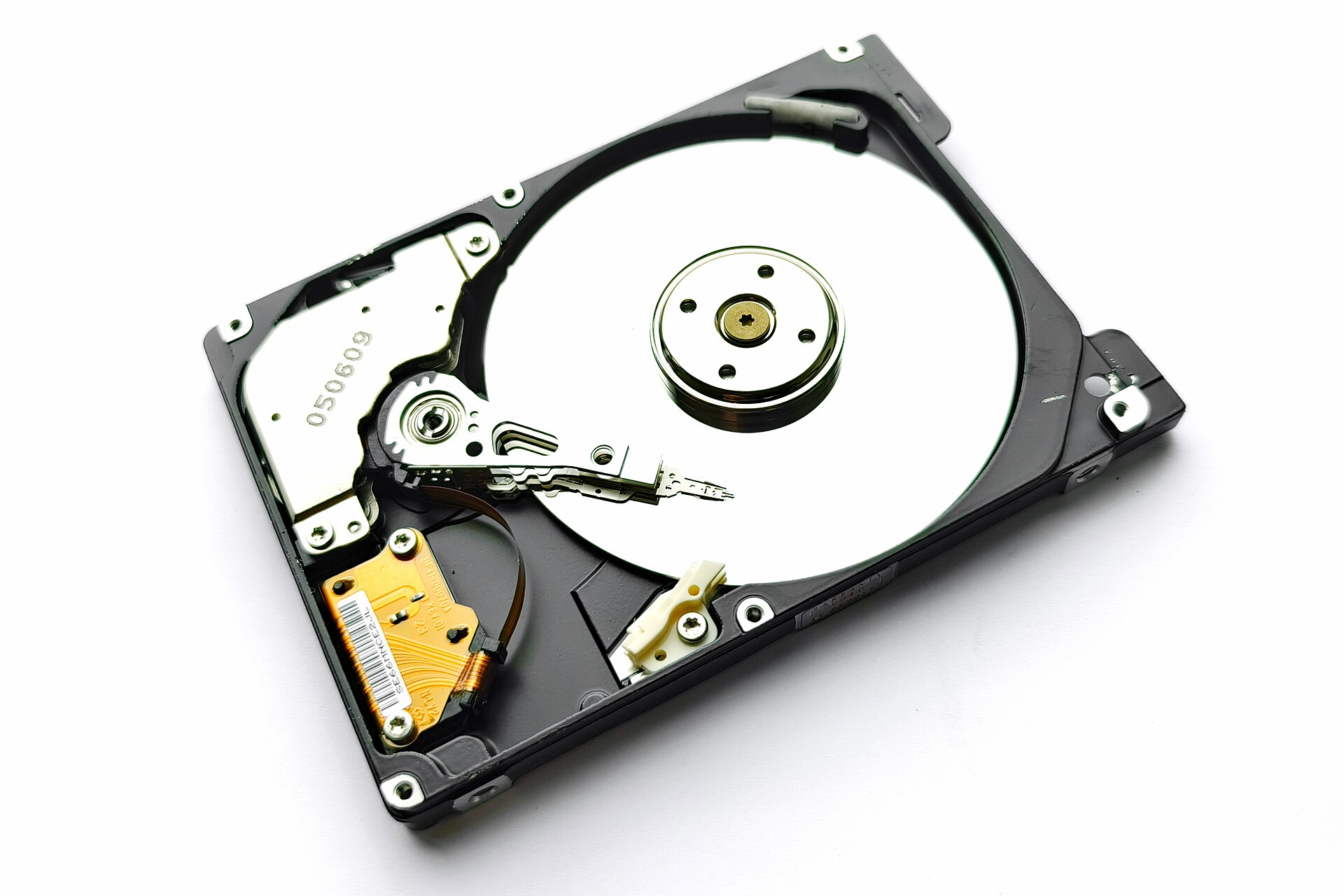
Figure 3.5 — Inside a 2.5-inch laptop hard drive. The shiny round disk is the platter, which stores data magnetically. The thin arm swings across it to read and write, and the gold ribbon is the flexible cable that carries signals to the arm. The arm has to physically move and wait for the platter to spin round, which is why a hard drive takes millions of nanoseconds to answer. Photo: Mk2010, CC BY 4.0, via Wikimedia Commons.

On a newer PC the pagefile sits on an SSD instead. An SSD has no moving parts, so it does the same job much faster (see 5.5).
5.4 When Paging Happens
Paging out happens when the operating system's memory manager decides that RAM is under enough pressure that some data is more useful reclaimed for active use than left in place. It is triggered by:
- Total memory demand from all running processes exceeding the available physical RAM
- The memory manager spotting, ahead of time, pages that have not been used recently (it uses an algorithm that approximates "least recently used" data)
- A memory-mapped file (Section 9.4) that does not need to be in RAM until it is actually accessed
5.5 Paging Performance (Slow!)
This section explains one of the best-known symptoms in computing: a PC that becomes slow and unresponsive once it "runs out of RAM."
RAM access time:    ~60–100 nanoseconds
SSD access time:    ~10,000–100,000+ nanoseconds   (100–1,000× slower)
HDD access time:    ~5,000,000–10,000,000+ nanoseconds  (50,000–100,000× slower)
A major page fault that reads from a pagefile on a spinning HDD can be tens of thousands of times slower than reading the same data from RAM. When a PC is short of memory and constantly moving pages in and out, that is called thrashing. The CPU can end up spending more time waiting for the pagefile than doing useful work. That is the "everything is frozen, the disk light is always on" feeling most people know as "the computer needs more RAM."
An SSD-based pagefile cuts this penalty a lot (but does not remove it). Moving from an HDD to an SSD has been one of the biggest everyday improvements for PCs short on memory.
5.6 Windows Pagefile
What it is: pagefile.sys is a hidden system file, usually on the system drive. Windows uses it as the storage for paged-out memory.
Key facts:
- Windows manages the pagefile size automatically by default. You can set it by hand (System Properties → Advanced → Performance → Advanced → Virtual Memory)
- The pagefile lets the total memory committed by all processes go above the installed RAM. That is why Task Manager can show more "committed" memory than the RAM you own
- A bigger pagefile does not make paging faster. It only means the system can handle more overcommitment before it runs out of places to put paged-out data
- Some special workloads (certain databases, and systems with very large amounts of RAM) switch off or shrink the pagefile on purpose. If real RAM never runs out, the slow fallback is never needed
Why this matters: The pagefile is a safety valve. It stops Windows from failing the moment RAM is used up. It trades a big speed loss for the ability to keep running instead of crashing.
Summary
| Topic | Remember this |
|---|---|
| Page | A fixed 4 KB block (on x64 Windows) |
| Page fault | The CPU reports "this page is not in RAM"; usually normal |
| Minor vs major fault | Minor = fix the mapping (fast); major = read from disk (slow) |
| Pagefile / swap | A file on storage that holds pages pushed out of RAM |
| Thrashing | Constant paging in and out; the PC feels frozen |
| HDD vs SSD | HDD is 50,000–100,000× slower than RAM, SSD is 100–1,000× slower |
| pagefile.sys | The hidden Windows file that acts as the safety valve |