The Big Picture: The Core of Windows
Everything that runs in the powerful kernel mode (ring 0) is the "core" of Windows. This core is built from a few pieces that sit on top of each other:
┌──────────────────────────────────────────────────┐
│  KERNEL MODE  (ring 0)                           │
│                                                  │
│  ┌────────────────────────────────────────────┐  │
│  │ ntoskrnl.exe                               │  │
│  │  ┌──────────────────────────────────────┐  │  │
│  │  │ EXECUTIVE  (the "managers")          │  │  │
│  │  ├──────────────────────────────────────┤  │  │
│  │  │ KERNEL     (CPU-level basics)        │  │  │
│  │  └──────────────────────────────────────┘  │  │
│  └────────────────────────────────────────────┘  │
│  ┌────────────────────────────────────────────┐  │
│  │ Device drivers  (.sys files)               │  │
│  └────────────────────────────────────────────┘  │
│  ┌────────────────────────────────────────────┐  │
│  │ HAL  (Hardware Abstraction Layer)          │  │
│  └────────────────────────────────────────────┘  │
├──────────────────────────────────────────────────┤
│  HARDWARE                                        │
└──────────────────────────────────────────────────┘
Two words are easy to mix up. The kernel (small "k") is the lowest part inside ntoskrnl.exe. The word kernel mode means "the whole region that runs at ring 0", which includes the Executive, drivers and HAL too.
2.1 The Kernel (ntoskrnl.exe)
What it is: ntoskrnl.exe (NT OS Kernel) is the main file of Windows. It lives in C:\Windows\System32. When your PC boots, the boot loader (Chapter 5) loads this one file into memory, and Windows starts to exist.
One file, two layers. Inside ntoskrnl.exe there are two parts:
| Part | Job |
|---|---|
| Kernel (the low layer) | Decides which thread runs on which CPU core; handles interrupts and errors (exceptions); provides locks so two cores do not clash |
| Executive (the upper layer) | A set of "managers" for memory, processes, I/O, security and more (Section 2.2 and Section 3) |
What the kernel layer does, in everyday words:
- Thread scheduling. A thread is one line of work inside a program (Chapter 7). The kernel is the referee that gives each thread a short turn on a CPU core. Switching from one thread to another is called a context switch.
- Interrupt and exception handling. An interrupt is a device saying "I need you" (Chapter 4). An exception is the CPU saying "something went wrong" (for example, dividing by zero). The kernel receives both and passes them to the right code.
- Synchronization. When two cores try to change the same data, a mess follows. The kernel supplies locks (such as spinlocks) so only one goes at a time.
- The first stop for system calls. When a program asks for an OS service, the CPU jumps into the kernel (Section 8.5).
Why it is small. The kernel layer is intentionally simple and does not know about files, windows or networks. It only knows about CPUs, threads and interrupts. All the "what" is left to the Executive. This is the NT way of keeping the heart tiny and the rest organised.
The kernel is not "just a program". Look at ntoskrnl.exe as a normal file: it is a normal EXE format file (Part 28 explains the format). But the boot loader runs it in ring 0, so it is allowed to touch all memory and all devices. A mistake here does not crash one app. It crashes the whole PC: the blue screen (also called a bug check or BSOD).
Windows tip: In Task Manager, open the Performance tab, right-click the CPU graph, and choose Show kernel times. A second, darker line shows how much CPU time is spent in kernel mode (ring 0) vs user mode (ring 3).
2.2 The Executive Layer (Processes, Memory, I/O, Security)
What it is: The Executive is the layer inside ntoskrnl.exe that holds the managers. Each manager owns one big subject. They talk to each other through function calls, and applications reach them through system calls.
| Manager | Owns | Everyday meaning |
|---|---|---|
| Object Manager | Names and handles for all resources | The "librarian" of every resource (Section 6) |
| Process Manager | Processes and threads | Creates and ends programs |
| Memory Manager | Virtual memory, paging | Hands out and protects RAM |
| I/O Manager | Requests to devices | The "post office" for hardware (Section 3.3) |
| Security Reference Monitor (SRM) | Permissions | The "security guard" (Section 3.4) |
| Configuration Manager | The registry | The settings database (Section 7) |
| Cache Manager | File caching | Keeps recently used file data in RAM |
| Plug and Play Manager | Finding devices | Notices new hardware (Section 3.6) |
| Power Manager | Sleep and power use | Manages power states (Section 3.7) |
You will meet each manager in detail in the next sections. For now, the main idea is that each one has one job and a clear border. When the Process Manager needs memory for a new program, it asks the Memory Manager. When the Memory Manager has to read a file from disk, it asks the I/O Manager. They cooperate like departments in a company.
Executive vs Kernel in one sentence: the kernel decides who runs now; the Executive decides what things exist, what they may do, and how they are connected.
Why this is called a "hybrid" design. Computer scientists name OS designs. A monolithic kernel puts everything in one big block. A microkernel keeps only a tiny core and runs everything else as separate programs outside it. Windows sits in between. Most of the Executive and drivers share one address space (monolithic-like, fast), but the design is split into well-separated parts (microkernel-like, tidy). People call this hybrid.
2.3 HAL (Hardware Abstraction Layer)
What it is: The HAL is a thin layer at the very bottom of the Windows core. Its file is hal.dll (in C:\Windows\System32). Its job is to hide small differences between computers so the kernel can be written once.
An analogy. Think of a travel power adapter. The laptop has one plug. Different countries have different sockets. The adapter makes the laptop work anywhere. The HAL is the adapter between the kernel and the motherboard-level hardware.
What it covers. The HAL deals with the parts of the board that differ between machines, such as:
- the interrupt controller (how interrupts are received and routed, Chapter 4)
- timers and the system clock
- the way multiple CPU cores are started and talk to each other
- low-level details of DMA and bus access
Look back at Figures 8.1 and 8.2 in Section 1. Two boards from two makers can use different interrupt chips. Because of the HAL, the kernel just says "send this interrupt to that core" and does not care which chip does it.
   Kernel:  "Set the timer to fire in 1 ms"
                    │
                    ▼
        ┌─────────────────────┐
        │  HAL  (hal.dll)     │  translates into the right
        └─────────┬───────────┘  commands for this board
                  ▼
        Board A timer   or   Board B timer
Note on today's Windows. On modern PCs, nearly all boards follow the same standards (such as ACPI, Chapter 4), so the HAL has become smaller than it was in the old days, when there were many HAL files. Still, the idea is the same: the kernel talks to the HAL, not to the chip.
2.4 Drivers
What it is: A driver is a program that knows how to talk to one kind of device. It runs in kernel mode and acts as a translator between Windows and the device's own language.
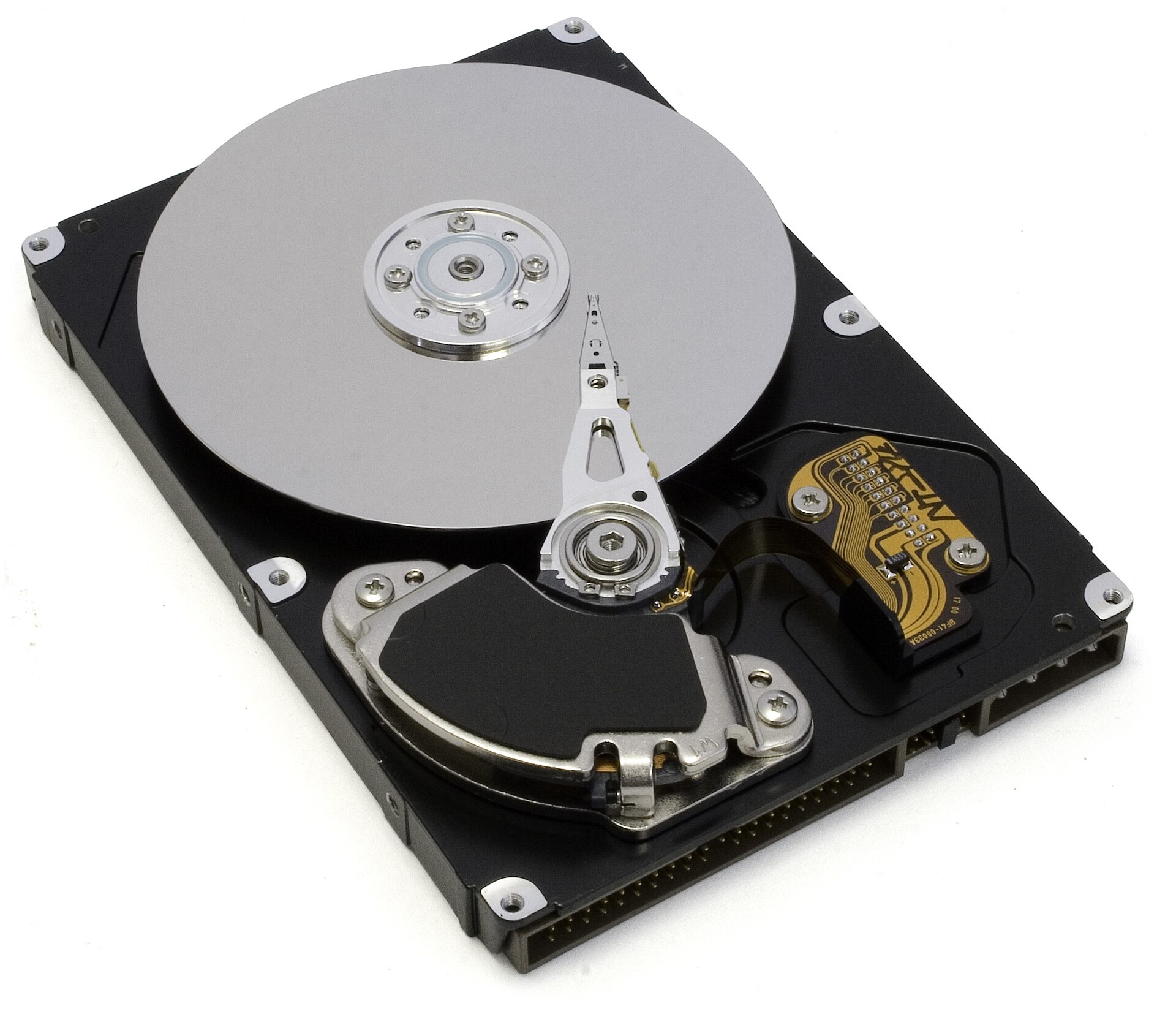
Figure 8.3 — An opened hard drive. Windows has no idea how to move that tiny arm. A driver for the disk controller knows the exact commands, and Windows simply asks the driver to "read this block". Photo: Zzubnik, public domain, via Wikimedia Commons.

Where they live. Most drivers are .sys files in C:\Windows\System32\drivers. The OS loads the ones it needs while booting or when a device is plugged in.
Types of drivers:
| Type | What it does | Example |
|---|---|---|
| Device driver | Controls one piece of hardware | Graphics, network, sound, keyboard |
| File system driver | Understands how data is laid out on a disk | NTFS (ntfs.sys) |
| Filter driver | Sits on top of another driver and adds a feature or watches traffic | Antivirus, disk encryption |
| Bus driver | Finds and lists the devices on a bus | The USB or PCI bus driver |
Driver stacks. One device is often handled by several drivers stacked on top of each other. A request goes down the stack, and the answer goes back up. This is how the I/O Manager works in Section 3.3.
Driver models (how a driver is written):
- WDM (Windows Driver Model): the older, low-level model.
- WDF (Windows Driver Framework): a newer helper framework. It has KMDF (kernel-mode) and UMDF (user-mode) versions. User-mode drivers are safer, because if they crash they only take down their own process.
The danger. A kernel-mode driver runs at ring 0 with no safety net. A bad driver can overwrite the kernel's memory and cause a blue screen. That is why Windows requires drivers to be digitally signed (they carry a proof of who made them), and why most blue screens are traced to a driver, not to Windows itself.
Windows tip: Open a PowerShell window and run
driverqueryto see a list of drivers. Add/vfor more detail. Also tryGet-CimInstance Win32_SystemDriver | Select-Object -First 10 Name, State.
Summary
| Topic | Remember this |
|---|---|
ntoskrnl.exe | The main file of Windows. Contains the Kernel and the Executive |
| Kernel (low layer) | Scheduling threads, handling interrupts, locks |
| Executive | Managers: Object, Process, Memory, I/O, Security, Configuration, Cache, PnP, Power |
HAL (hal.dll) | Hides board-level hardware differences from the kernel |
Drivers (.sys) | Translators for devices; run in ring 0, so a bad one can crash the PC |
| Hybrid design | Between monolithic and microkernel |