The Big Picture: Who Is Allowed to Start My PC?
A PC starts with a chain of programs. The firmware starts the boot loader. The boot loader starts the Windows kernel. The kernel loads drivers. Each one starts the next.
Now imagine an attacker slips a fake program into that chain, very early, before Windows and its antivirus even start. This is called a bootkit (malware that hides in the boot process). It is dangerous because it runs before any security tool can look at it, and it can hide itself from them.
Secure Boot is the guard on the door. Each program in the early chain must show a valid digital signature (a tamper-proof stamp from a trusted publisher). A program without a good stamp is refused.
You met Secure Boot in Chapter 5 (firmware and the boot process). This section looks at it from the security side: what is being protected, and how the trust is built.
3.1 Recap from Chapter 5, Security-Focused View
What it is: Secure Boot is a feature of UEFI firmware (the modern replacement for the old BIOS). Before UEFI runs a boot loader, a driver or an option ROM, it checks the program's signature against keys stored inside the firmware.
The keys live in the firmware's flash memory, on the motherboard. It is the same kind of chip that holds the UEFI program itself (you saw it in Chapter 4).
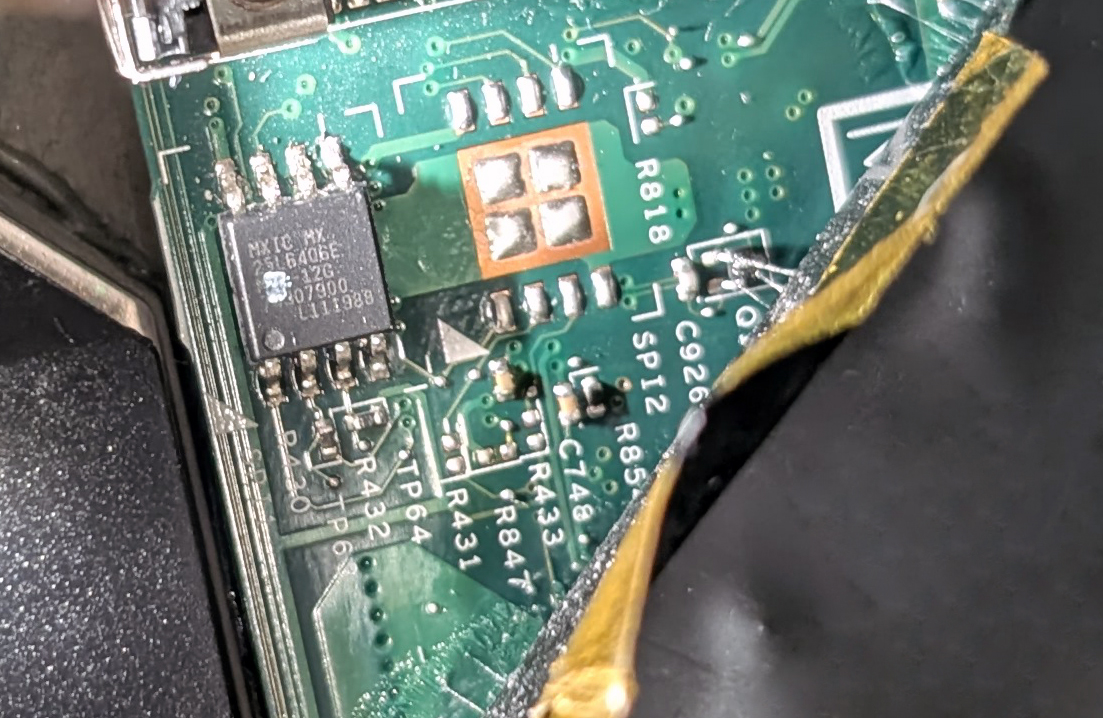
Figure 26.1 — A small 8-pin flash chip from a laptop board. The firmware, and the Secure Boot key lists, are stored in a chip like this. Photo: Siarhei Besarab, CC BY-SA 4.0, via Wikimedia Commons.

The four key lists. Secure Boot uses four databases. Learn their short names, they appear in tools and articles:
| Name | Full name | Plain meaning |
|---|---|---|
| PK | Platform Key | The "master key". Owned by the PC maker. Whoever holds it controls who may change the other lists. |
| KEK | Key Exchange Key | Keys allowed to update the db and dbx lists (for example, Microsoft's). |
| db | Signature database | The allow list: keys and file fingerprints that are trusted to boot. |
| dbx | Forbidden signature database | The block list: things that were once trusted but are now known to be bad. |
   PK  (platform owner)
    │  controls who may change ...
    ▼
   KEK (update keys)
    │  allow signed updates to ...
    ├──────────────┬───────────────┐
    ▼                              ▼
   db  (ALLOWED to boot)          dbx (BLOCKED, even if once trusted)
What happens at power-on:
- UEFI loads the next program (say, the Windows Boot Manager).
- It checks the program's signature.
- It looks in dbx first: is this blocked? If yes, stop.
- It looks in db: is the signer trusted? If yes, run it. If no, show a security violation and refuse.
What Secure Boot stops, and what it does not:
| It helps against | It does NOT stop |
|---|---|
| Bootkits and rootkits that replace the boot loader | Malware that runs after Windows is up (that is for Defender, App Control and others) |
| Unsigned or tampered boot loaders and drivers | An attacker who already has your admin rights and can change firmware settings |
| Booting an unknown operating system from a USB stick (on locked-down PCs) | Bugs inside a legitimately signed program |
Because an old signed loader can later turn out to have a bug, the dbx list is updated over time (through Windows Update) to block it.
Secure Boot certificates change over time. The certificates Microsoft uses to sign boot software have expiry dates, and Microsoft is replacing them in stages. Updates reach PCs through Windows Update and firmware updates. Check Microsoft's current guidance for the latest dates and what you need to do; do not rely on any date printed in a course.
Linux and dual boot. Secure Boot is not a "Windows only" idea. Many Linux distributions boot with it, using a small signed helper (called a shim). Some PCs also let you enrol your own keys.
How to check yours:
| Method | What to do |
|---|---|
| msinfo32 | Press Win + R, run msinfo32. On System Summary, read BIOS Mode (should be UEFI) and Secure Boot State (On / Off / Unsupported). |
| PowerShell (as admin) | Confirm-SecureBootUEFI prints True (on) or False (off). On a legacy-BIOS PC, it shows an error that the cmdlet is not supported. |
Windows tip: Windows 11 requires Secure Boot capability (the PC can do it). If msinfo32 says Off, you can usually turn it on in the UEFI settings, but if Windows was installed in the old BIOS/MBR style, converting needs care. Search first; do not guess.
3.2 Chain of Trust from Firmware to OS
What it is: A chain of trust means: each step is checked by the step before it, all the way back to something you must trust without checking. That first item is the root of trust.
A chain is only as strong as its first link. For a PC, the first link is code the CPU runs straight from protected hardware (the firmware and the keys in it).
 ┌──────────────────────────────────────────────┐
 │ 1. ROOT OF TRUST: firmware + Secure Boot keys│
 └──────────────────────┬───────────────────────┘
                        │ checks signature of
 ┌──────────────────────▼───────────────────────┐
 │ 2. Windows Boot Manager (bootmgfw.efi)       │
 └──────────────────────┬───────────────────────┘
                        │ checks signature of
 ┌──────────────────────▼───────────────────────┐
 │ 3. Windows OS loader (winload.efi)           │
 └──────────────────────┬───────────────────────┘
                        │ checks signature of
 ┌──────────────────────▼───────────────────────┐
 │ 4. Kernel (ntoskrnl.exe) + early drivers     │
 └──────────────────────┬───────────────────────┘
                        │ drivers must be signed
 ┌──────────────────────▼───────────────────────┐
 │ 5. Windows starts: services, Defender, you   │
 └──────────────────────────────────────────────┘
Each step verifies the next before handing over control. If any link fails, the boot stops or Windows goes into recovery.
Early-launch antimalware (ELAM). Right after the kernel starts, Windows loads a special tiny antimalware driver before the other boot drivers. It can say "this driver looks bad, do not load it". Microsoft Defender has one. So the chain of trust also reaches the first security software.
Secure Boot proves "signed". Measured Boot records "what happened". Secure Boot only decides yes or no. It does not leave a record. A second feature, Measured Boot, uses the TPM chip (Section 4) to keep a log of everything that loaded. Later, BitLocker (Section 5) uses that log to decide whether to hand over the disk key. Together:
| Feature | Question it answers | Who decides |
|---|---|---|
| Secure Boot | "Is this program allowed to start?" | The firmware, using db/dbx |
| Measured Boot | "What exactly started, in what order?" | The TPM records it; others check it |
Where the chain ends. After Windows is running, other layers take over: driver signing (Section 9), HVCI (Section 1.3) and App Control (Section 10). The aim is the same: only trusted code runs.
Summary
| Term | Plain meaning |
|---|---|
| Bootkit | Malware that hides in the boot process, before Windows |
| Secure Boot | UEFI checks signatures of boot software against stored keys |
| PK / KEK | Master key / keys allowed to update the lists |
| db / dbx | Allow list / block list |
| Chain of trust | Each step verifies the next, back to a root of trust |
| Root of trust | The first thing you must trust without checking (firmware and its keys) |
| ELAM | Early antimalware driver that loads before other boot drivers |
| Measured Boot | The TPM logs what loaded during boot (Section 4) |
Confirm-SecureBootUEFI | PowerShell check: True means Secure Boot is on |