The Big Picture: A Keyboard Is a Tiny Computer
A keyboard looks simple: press a key, a letter appears. But the keyboard does not know about letters. Inside it lives a small chip called a microcontroller (a tiny, cheap computer on one chip, with its own small program). That chip watches all the keys, works out which ones are down, and sends a short message to the PC.
The PC then decides what letter that message means. This split is the key idea of the whole chapter:
KEYBOARD (hardware)                 PC (software)
"Physical key number 30             "Key 30 on a US layout
 went DOWN."                         is the letter A."
        │                                  ▲
        └──────── a short code ────────────┘
This section covers the hardware side: the switches, the wiring, the scanning, and the codes.
1.1 Key Matrix Scanning
What it is: A full keyboard has about 100 keys. Giving each key its own wire to the chip would need 100 pins. Instead, the keys are wired in a matrix: a grid of rows and columns, like the streets and avenues of a city. Each key sits at one crossing and, when pressed, connects its row wire to its column wire.
Here is a tiny 3 × 3 example (9 keys, only 6 wires):
            COL 0     COL 1     COL 2
              │         │         │
ROW 0 ────────●─────────●─────────●────
              │         │         │      ● = one key (a switch
ROW 1 ────────●─────────●─────────●────        between a row
              │         │         │          wire and a column
ROW 2 ────────●─────────●─────────●────        wire)
              │         │         │
A real 104-key keyboard might use about 8 rows × 16 columns = 128 crossings, using only about 24 wires. (Exact numbers differ from model to model.)
How the scan works. The microcontroller scans the matrix again and again, many times per second:
- It puts power on row 0 only.
- It looks at every column wire. If a column "sees" power, the key at that crossing is down.
- It moves on to row 1, then row 2, and so on.
- When it reaches the last row, it starts over. A whole pass takes a fraction of a millisecond (typical scan rates are hundreds to thousands of passes per second; it depends on the firmware).
Think of a teacher walking along the rows of a classroom asking "who has a hand up?" so quickly that no hand is missed.
| Matrix idea | Plain meaning |
|---|---|
| Row / column | The two sets of wires that cross like a grid |
| Scan | Powering one row at a time and reading the columns |
| Crossing | One key's position, identified by (row, column) |
| Key number | The firmware's label for that crossing, turned into a scan code (1.2) |
1.2 Scan Codes
What it is: A scan code is a number the keyboard sends to say which physical key changed. It says nothing about the letter on the key cap.
- When a key goes down, the keyboard sends a make code ("the key was made, contact closed").
- When a key comes up, the keyboard sends a break code ("the contact was broken").
Sending both is important. If the PC only knew "A went down" it could never know when you let go, and could not tell that Shift is still held while you type.
An example from the classic PC keyboard codes (the old "set 1"; other sets exist, and USB uses different numbers, see Section 2):
| Event | Code sent |
|---|---|
| Press A | 1E (make) |
| Release A | 9E (break; the make code with the top bit turned on) |
You do not need to memorise numbers. What matters is the idea: the code names a place on the keyboard. On a US layout, that place makes "A". On a French layout, the key in the same place makes "Q". The hardware is the same; only the layout differs.
Same physical key, same scan code ──► different letters
  US layout:      [ A ]
  French layout:  [ Q ]
  (the keyboard sent exactly the same code both times)
Who applies the layout? The operating system, not the keyboard. That is why you can switch from English to another language without changing any hardware. You will see exactly where Windows does this in Section 3 (3.5).
1.3 Switch Types
What it is: The switch is the part under each key that closes or changes an electrical contact. The type of switch decides how the key feels and how long it lasts.
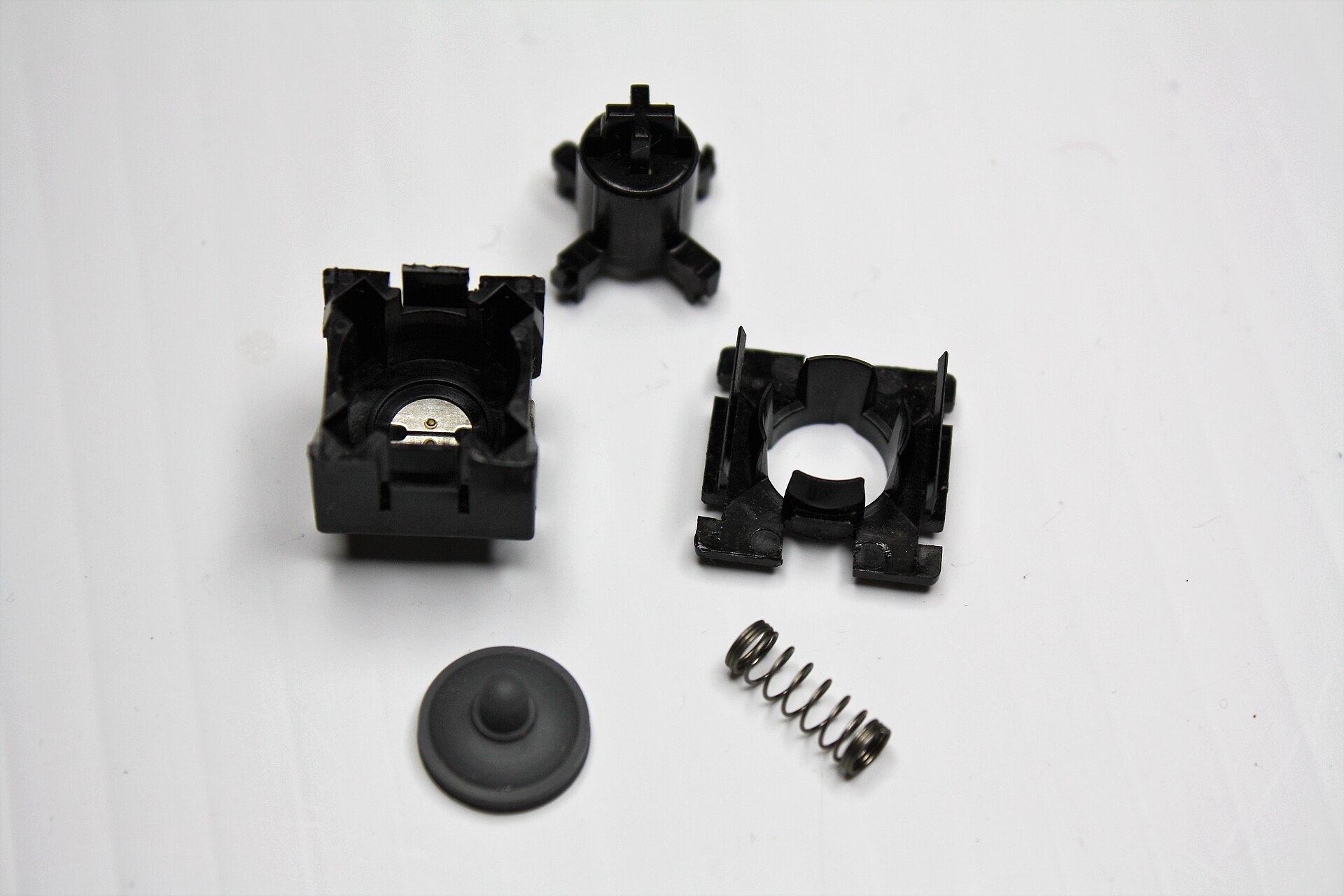
Figure 31.1 — One key switch taken apart. Look for the typical parts: the black housing with a metal contact inside, the plunger (the part your finger pushes, with a cross-shaped stem), a square frame that holds things in place, a small spring and a grey rubber dome-like piece. Photo: snuci, public domain, via Wikimedia Commons.

This one photo shows the idea behind every key switch: a plunger moves down, something springy pushes it back up, and a contact closes when it goes down. Different keyboards build that idea in different ways:
| Type | How it works | Where you find it |
|---|---|---|
| Membrane / rubber dome | A rubber dome sits over a printed plastic sheet with contact patterns. Pressing collapses the dome and it touches the contacts. The dome also pushes the key back up. | Most cheap desktop keyboards |
| Scissor | Same dome idea, but a small "scissor" shaped plastic frame keeps the key cap level and gives a short, shallow travel | Most laptops and slim keyboards |
| Mechanical | Each key has its own separate switch with a metal contact and a spring (the Cherry MX design is the best-known style, and many makers sell similar ones) | Enthusiast and gaming keyboards |
| Other | Some switches sense magnets or light instead of touching metal | Special keyboards |
Mechanical switches are often rated for tens of millions of key presses; rubber domes usually for fewer. (Figures vary by maker, so treat them as rough.)
1.4 Debouncing
What it is: A metal contact does not close cleanly. When it hits the other contact it bounces, like a ball dropped on the floor. For a few milliseconds the connection goes on-off-on-off before it settles.
Voltage
 ON  ─┐  ┌┐ ┌─────────────────────  (settled: key is down)
      │  ││ │
 OFF  └──┘└─┘
      ◄──►
   a few milliseconds of bounce
If the keyboard believed every flicker, one press would type "aaaaa". To prevent that, the firmware does debouncing: it ignores quick changes. A simple way is to say "only accept a new state once it has stayed the same for a few milliseconds." The same filter applies when you let go. Without it, even the best switch would type extra letters.
1.5 Key Rollover and Ghosting
What it is: Rollover is how many keys can be held at once and still be reported correctly. "N-key rollover" (NKRO) means any number of keys at the same time.
Why is there a limit? There are two reasons.
- The report format. The standard USB keyboard message (Section 2) has room for only 6 ordinary keys at once, plus the modifier keys such as Shift and Ctrl. This is called 6-key rollover (6KRO). Some keyboards use another report format to allow more.
- Ghosting. In a plain matrix, pressing three keys that form three corners of a rectangle can make the scan wrongly believe a fourth key (the missing corner) is also pressed. That false key is a ghost.
        COL 1    COL 2
ROW 1    [Q]───────[W]       Q, W and A are held down.
          │         │        The scan powers ROW 2. Power goes through A
ROW 2    [A]───────[S]       to COL 1, up through Q to ROW 1, across
                             through W to COL 2. COL 2 now has power,
                             as if S were pressed: S is a ghost.
Good keyboards avoid ghosting by putting a small diode (a one-way electrical valve) at each key, so current cannot sneak backwards. Cheap keyboards skip the diodes and may ghost, or simply refuse to report some combinations ("blocking"). A keyboard with 2-key rollover handles only two keys at once. Gamers care because they hold many keys at once. Typists rarely do.
| Term | Meaning |
|---|---|
| 2-key rollover | Only two keys at once are reliable (old or very cheap keyboards) |
| 6-key rollover | Up to 6 keys plus modifiers; the common USB standard report |
| N-key rollover | Any number of keys; needs diodes and a special report |
| Ghosting | A key that appears pressed but is not |
| Blocking | The keyboard ignores a key to avoid a ghost |
1.6 Everything Together Inside One Keyboard
 finger          switch            microcontroller                 cable / radio
   │               │                     │                              │
 press ──► contact closes ──► row/column scan finds it ──► debounce ──► build message
                                   (repeats very fast)       (filter)  (scan code or
                                                                        HID report)
                                                                             │
                                                                             ▼
                                                                          the PC
The keyboard also receives things from the PC. For example, when you press Caps Lock, the PC decides Caps Lock is now on and tells the keyboard to light its LED. That is why the lamp is a good test that the PC and keyboard are really talking (Practical Lab).
Summary
| Term | Plain meaning |
|---|---|
| Microcontroller | The tiny computer chip inside the keyboard |
| Matrix | Rows and columns of wire; each key joins one row to one column |
| Scan | Checking row by row which keys connect |
| Debounce | Ignoring the few-millisecond flicker when a contact closes |
| Scan code | A number naming a physical key, not a letter |
| Make / break code | Sent on press / on release |
| Layout | The table that turns key positions into letters; applied by the OS |
| Membrane / scissor / mechanical | Three common switch designs |
| Rollover | How many keys can be held at once and still be read correctly |
| Ghosting | A false key press caused by the matrix wiring |