The Big Picture: Three Ways to Reach the PC
The keyboard has worked out which key is down (Section 1). Now it must tell the PC. There are three common roads:
| Road | Wire? | How the message travels | Typical today |
|---|---|---|---|
| USB | Cable | The PC asks the device again and again; the device answers with a small report | Almost all wired keyboards and mice |
| Bluetooth / 2.4 GHz wireless | Radio | Same "report" idea, sent over radio | Wireless and laptop-style keyboards, mice |
| PS/2 | Round cable | The device sends each byte as soon as it is ready and the PC is interrupted | Old PCs; some desktop boards still have a socket |
The big surprise: the keyboard and mouse look the same to Windows whichever road they use. Windows describes them with the same simple idea, called HID (Human Interface Device).
2.1 USB HID (Human Interface Device) Class
What it is: USB is the common wired connection (see Chapter 4, Section 2). USB groups devices into classes. A class is a ready-made rulebook, so one built-in driver can work with many makers' devices. The HID class is the rulebook for things humans use: keyboards, mice, game controllers, and also buttons, dials and touch screens.
Step 1: The device describes itself. When you plug the keyboard in, Windows asks it "what are you?" (This is the plug-in steps in Chapter 13, Section 16: the USB hub notices the new device, the system gives it an address, and Windows picks a driver for its class.) A HID device answers with a report descriptor: a small table that says "my messages look like this: first byte is the modifier keys, second byte is reserved, then six key numbers." Because the device describes its own messages, one driver can read keyboards, mice and odd gadgets alike.
Step 2: The PC polls. USB is not interrupt-driven the way PS/2 is. A USB device cannot speak first. The USB host controller (the chip, usually called xHCI for USB 3, that runs the USB ports) polls each device: it asks "anything new?" at a fixed interval. A basic keyboard or mouse is often polled about every 8 milliseconds, which is about 125 times a second (125 Hz). Gaming devices may ask for 1 millisecond (1000 Hz), and some go faster. The exact interval is requested by the device and may differ by model.
   time ───────────────────────────────────────────────────►
   PC:     "news?"    "news?"    "news?"    "news?"
              │          │          │          │
   Device:  "no"       "no"   "yes: key A!"  "no change"
                                     ▲
                      the report is sent only when asked
Name warning. USB calls the endpoint used for this an interrupt endpoint. That does not mean the device raises a hardware interrupt like PS/2. It only means "small messages, delivered at a regular guaranteed interval". The host controller does the polling by itself, and the CPU is told only when a report arrives.
Step 3: The report. Each answer is a HID report: a few bytes. For a keyboard, the common "boot protocol" format is 8 bytes. (Boot protocol is a simple fixed format that BIOS/UEFI can understand before any real driver exists.)
Byte:   0          1          2    3    4    5    6    7
      ┌─────────┬──────────┬────┬────┬────┬────┬────┬────┐
      │Modifiers│ Reserved │Key1│Key2│Key3│Key4│Key5│Key6│
      └─────────┴──────────┴────┴────┴────┴────┴────┴────┘
- Byte 0, modifiers: one bit each for Left Ctrl, Left Shift, Left Alt, Left Windows key, and the four right-hand ones.
- Byte 1: reserved (always 0).
- Bytes 2 to 7: up to six key codes currently held down. This is where the 6-key rollover from Section 1.5 comes from. An empty slot holds 0.
Example: you hold Shift and press A. HID code numbers ("usages") are not the same as the old scan codes. In HID, A is 04, and the Shift bit is 02.
Shift+A held:    02 00 04 00 00 00 00 00
Everything up:   00 00 00 00 00 00 00 00
Notice: there is no "break code". The report shows what is down right now. The PC finds out a key was released because it has disappeared from the next report. Many keyboards use other, longer reports as well (extra media keys, N-key rollover), described by their descriptor.
LED lights go the other way. For Caps Lock, the PC sends the keyboard a small output report with bits for the lamps.
Auto-repeat. HID reports do not repeat a held key by themselves. For USB keyboards, Windows (the driver stack) generally creates the repeating when you hold a key, using your delay and rate settings (Practical Lab).
2.2 Bluetooth HID and 2.4 GHz Wireless
What it is: Wireless keyboards and mice use the same HID idea over radio. The reports look the same; only the carrier changes.
| Wireless type | How it connects | What Windows sees |
|---|---|---|
| 2.4 GHz receiver ("dongle") | A small USB receiver talks to the keyboard using the maker's own radio method | The receiver shows up as a normal USB HID device. Windows cannot tell it is wireless underneath |
| Bluetooth (Classic) | You pair the device in Settings. Windows keeps the pairing | A Bluetooth HID device, using the HID profile |
| Bluetooth Low Energy (BLE) | Same pairing, designed to save battery | "HID over GATT": the same reports sent through BLE's attribute system |
Points to remember:
- Pairing means the two sides swap secret keys once, so later traffic is encrypted and a stranger nearby cannot just read your typing. (How strong this is depends on the Bluetooth version and the maker. Keep devices updated.)
- A radio link has more delay and more chance of missed messages than a cable, so gaming mice often use a special 2.4 GHz link rather than plain Bluetooth.
- To save battery, wireless devices sleep when idle. The first key press after a pause may feel slightly slow while the device wakes and reconnects.
- On the PC side, Windows treats a paired device as a HID device; a different driver carries the bytes (the Bluetooth stack instead of the USB one). Above that, the chain is the same as the one in Section 3.
2.3 The Old Way: PS/2
What it is: PS/2 is the older connection named after an IBM PC model. It uses a small round socket, usually purple for the keyboard and green for the mouse. You can see both in the photo.
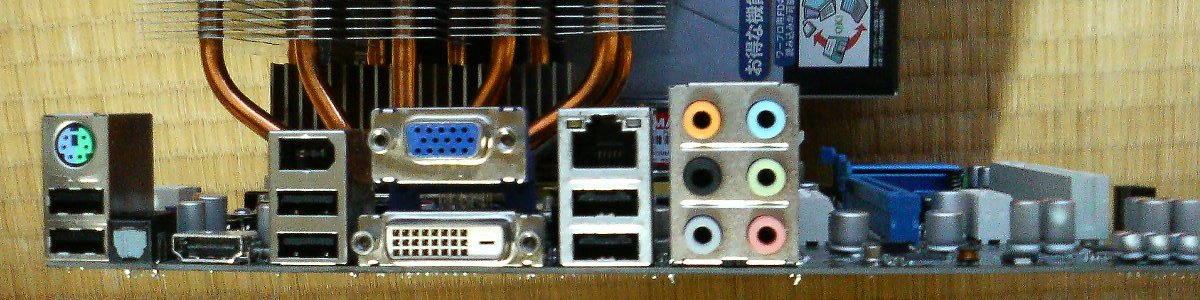
Figure 31.2 — Back of a PC. Find the two round PS/2 sockets (purple and green) and compare them with the rectangular USB sockets beside them. Photo: Hitachi-Train, public domain, via Wikimedia Commons.

How PS/2 works. It is a simple serial link: bits go one after another over a data wire, with a separate clock wire to keep time. The keyboard sends its scan codes (Section 1.2) by itself the moment a key changes. A small chip on the board (the keyboard controller, an "8042" type, today usually part of the chipset) catches each byte and raises an interrupt.
This ties back to Chapter 4, Section 3: the classic interrupt lines are IRQ 1 for the keyboard and IRQ 12 for the PS/2 mouse. When you press a key, the controller taps the CPU's shoulder, the CPU runs a small piece of the keyboard driver, and the byte is saved.
| PS/2 | USB HID | |
|---|---|---|
| Who starts a message? | The device (interrupt) | The host asks (poll) |
| Plug in while the PC is on? | Not designed for it | Yes (hot-plug) |
| Number of devices | One keyboard + one mouse | Many, through hubs |
| Rollover | Often unlimited (no 6-key report limit) | 6-key in boot format; more with other reports |
| Codes used | Scan codes (make / break) | HID usages (state of keys) |
| Today | Rare, sometimes kept on gaming boards | The normal choice |
The PS/2 idea that "the keyboard is a separate little computer sending codes" lives on in USB. Only the road is different.
2.4 The Path to Windows (Short Version)
PS/2 :  keyboard ──► keyboard controller (IRQ 1) ──► i8042prt driver ─┐
                                                                       ├─► keyboard class driver ─► Windows input
USB  :  keyboard ──► USB port ──► xHCI polls it ──► HID drivers ──────┤
BT   :  keyboard ──► radio ──► Bluetooth stack ──► HID drivers ───────┘
All three roads join into the same class driver and the same Windows input system. Names of the drivers are in Section 3. If you want to see the USB path on your own PC, the Practical Lab shows how to use Device Manager's Devices by connection view.
Summary
| Term | Plain meaning |
|---|---|
| HID | Human Interface Device: the standard "how keyboards and mice describe themselves" |
| Report descriptor | The device's own table describing the layout of its messages |
| Polling (USB) | The host asks the device at a fixed interval; the device cannot speak first |
| xHCI | The USB 3 host controller that does the polling |
| Polling rate | How often per second: 125 Hz (8 ms) typical, up to 1000 Hz or more for gaming |
| Boot protocol keyboard report | 8 bytes: modifiers, reserved, up to 6 key codes |
| Pairing | One-time key swap that sets up an encrypted Bluetooth link |
| 2.4 GHz dongle | Radio receiver that Windows sees as an ordinary USB HID device |
| PS/2 | Old round-socket serial link; interrupt-driven (IRQ 1 keyboard, IRQ 12 mouse) |