The Big Picture: What Makes One Screen Different from Another?
Two monitors can look very different even when both show the same picture. The differences come from a handful of characteristics (measurable properties). This section explains the ones you see on a shop label or in Windows settings.
6.1 Refresh Rate
What it is: The refresh rate is how many times per second the screen redraws its whole picture. It is measured in hertz (Hz). A 60 Hz screen redraws 60 times per second.
| Refresh rate | Time between redraws | Typical use |
|---|---|---|
| 60 Hz | about 16.7 ms | Office work, most monitors |
| 120 Hz | about 8.3 ms | Smoother motion, some TVs and phones |
| 144 Hz | about 6.9 ms | Gaming monitors |
| 240 Hz | about 4.2 ms | Fast gaming monitors |
(A millisecond, ms, is one thousandth of a second. The time between redraws is 1000 ÷ the refresh rate.)
Why it matters: A higher refresh rate makes moving things (scrolling, mouse movement, games) look smoother and less blurry. But the GPU must also be able to make that many pictures per second. The number of pictures the GPU makes each second is the frame rate, measured in FPS (frames per second). The refresh rate is what the monitor can show. The frame rate is what the GPU can make. They are different things.
Response time is a different number: how quickly one pixel can change colour, measured in milliseconds. A slow response time leaves faint trails behind moving objects ("ghosting").
6.2 Resolution
What it is: The resolution is the number of pixels across and down: width × height. More pixels means a sharper, more detailed picture, and also more work for the GPU and more data for the cable (Section 5).
| Name | Pixels | Total pixels (about) |
|---|---|---|
| HD / 720p | 1280 × 720 | 0.9 million |
| Full HD / 1080p | 1920 × 1080 | 2.1 million |
| QHD / 1440p | 2560 × 1440 | 3.7 million |
| 4K / UHD | 3840 × 2160 | 8.3 million |
Pixel density is how tightly packed the pixels are, measured in PPI (pixels per inch). The same 1080p resolution looks sharp on a small 14-inch laptop but coarse on a big 32-inch monitor, because the pixels are spread over a larger area.
Native resolution: every LCD has a fixed grid of real pixels. Running it at any other resolution forces the monitor to stretch the picture, which looks blurry. Always use the native (also called recommended) resolution.
Scaling: On a high-density screen, text would be tiny at native resolution. Windows can enlarge everything with display scaling (for example 125% or 150%). It uses more pixels to draw the same size of text, so the text stays sharp and readable.
6.3 VSync (Synchronizing Frame Delivery to the Refresh Rate)
What it is: The GPU makes frames at its own, uneven speed. The monitor redraws at a fixed speed. If the GPU hands over a new picture in the middle of a redraw, the top part of the screen shows the old frame and the bottom part shows the new one. The seam between them is a visible horizontal line called tearing.
VSync (vertical synchronisation) fixes this: the GPU waits until the monitor has finished one redraw before swapping in the next frame.
| VSync off | VSync on | |
|---|---|---|
| Tearing | Possible | None |
| Delay between your action and the screen | Lowest | A little higher |
| If the GPU is too slow for the refresh rate | Frame rate varies freely | Frame rate may drop in jumps (such as 60 → 30) |
Section 7 explains the mechanism (back buffer, swap) in detail. The modern, smarter fix is adaptive sync (Section 6.6).
6.4 Panel Types
What it is: The panel is the actual screen surface. Most monitors use LCD (liquid crystal display), which does not make light itself: a backlight shines through a layer of liquid crystals that turn to let more or less light pass. OLED screens are different: each pixel makes its own light.
| Panel | How it works (short) | Good at | Weak at |
|---|---|---|---|
| IPS (LCD) | Crystals twist sideways | Good colours; looks right from the side | Blacks look greyish; slower than TN in the past |
| VA (LCD) | Crystals tilt vertically | Deep blacks, high contrast | Slower response; colours shift at angles |
| TN (LCD) | Older twisted-crystal design | Cheap and fast | Poor colours and narrow viewing angle |
| OLED | Each pixel is a tiny light | Perfect black (pixel off), fast, great contrast | Costly; risk of "burn-in" (a faint ghost image) with static pictures |
(These are general tendencies. Individual models vary a lot.)
6.5 Brightness, Colour Depth, Gamut and HDR
| Term | What it means | Typical values |
|---|---|---|
| Brightness | How much light the screen gives out, in nits (candelas per square metre) | Office monitor about 250–350 nits; brighter for sunlight or HDR |
| Colour depth | How many shades of each colour the screen can show. 8-bit = 256 shades per colour, about 16.7 million colours in total. 10-bit = 1,024 shades per colour, over a billion colours | 8-bit common; 10-bit smoother gradients |
| Colour gamut | The range of colours the screen can show. sRGB is the standard that most everyday content uses; "wide gamut" screens show more | "100% sRGB" is a typical claim |
| HDR (High Dynamic Range) | A much bigger range between the darkest and brightest parts of a picture, so highlights shine and shadows keep detail | Needs a bright, capable screen and HDR content |
8-bit means three numbers per pixel: one 0–255 value each for red, green and blue. So 256 × 256 × 256 ≈ 16.7 million colours.
Windows tip: HDR can be switched on in Settings → System → Display (if your screen supports it). On screens that are not truly HDR-capable, the result can look washed out.
6.6 Adaptive Sync (G-Sync and FreeSync)
What it is: Instead of making the GPU wait for the monitor (VSync), adaptive sync lets the monitor wait for the GPU. The screen changes its refresh rate on the fly to match the frames being produced, so there is no tearing and little delay. The general idea is called variable refresh rate (VRR).
G-Sync is NVIDIA's brand name for its version. FreeSync is AMD's brand name, built on the open adaptive-sync standard of DisplayPort. Many monitors work with several of these. You need a GPU, a monitor and a cable that all support it (DisplayPort is the most common, and newer HDMI versions can do it too).
6.7 What Is a Pixel Made Of? Sub-pixels
What it is: A pixel on a colour screen is not a single dot of one colour. It is made of three smaller parts called sub-pixels, one red, one green and one blue. Because they are so small and so close together, your eye blends them. Light all three fully and you see white. Switch all three off and you see black. Mix different brightnesses and you see every other colour.
Here is a macro (extreme close-up) photograph of an LCD screen.
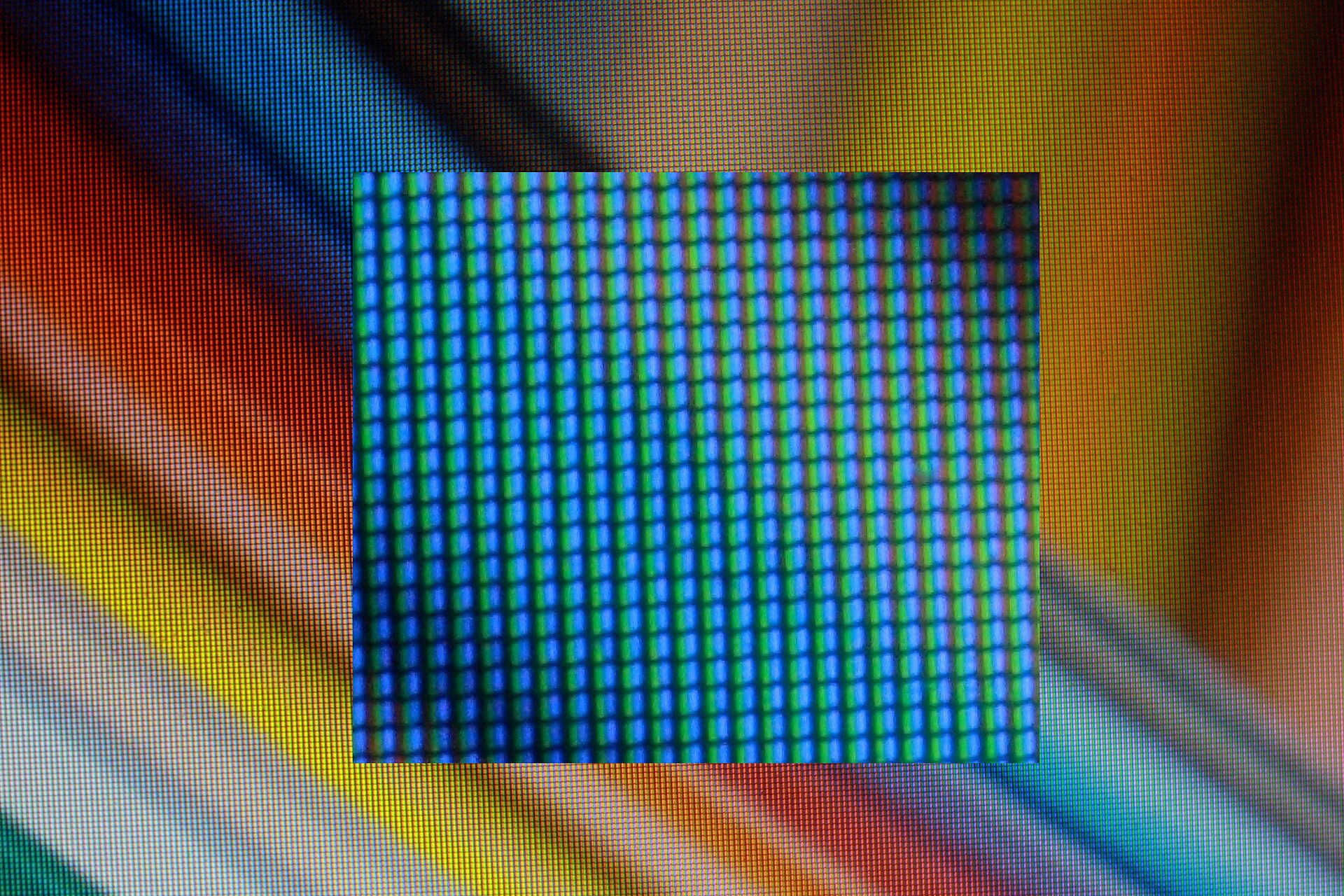
Figure 32.5 — An LCD screen photographed very close up. The whole picture is covered by a fine, regular grid of tiny stripes: no solid colour anywhere. The soft rainbow bands (orange, yellow, blue, grey) are the colourful image the screen was showing. In the middle, a rectangle shows a closer, magnified view of a region that looks blue: you can see separate vertical bars of blue and green, set in a neat grid. Each coloured stripe is one sub-pixel, and three side by side (red, green and blue) make one pixel. Photo: Politelyinsulting, CC BY-SA 3.0, via Wikimedia Commons.

What to take from the photo:
- The picture you normally see is built from many small stripes, not from smooth colour.
- Where the image looks orange, the red (and some green) stripes are bright. Where it looks blue, the blue stripes are brightest. The screen makes colours by controlling the brightness of each sub-pixel.
- The stripes are in a perfectly regular grid, because the screen is a fixed grid of real pixels (this is why native resolution matters, Section 6.2).
Summary
| Topic | Remember this |
|---|---|
| Refresh rate | Redraws per second (Hz); 60 Hz means a new picture every about 16.7 ms |
| Response time | How fast one pixel changes colour (ms) |
| Resolution | Pixels across × down; use the native resolution |
| Pixel density | Pixels per inch (PPI); small + dense = sharp |
| VSync | GPU waits for the monitor's redraw; stops tearing |
| Panel types | IPS (colour), VA (contrast), TN (cheap and fast), OLED (self-lit pixels) |
| Brightness | Measured in nits |
| Colour depth | 8-bit ≈ 16.7 million colours; 10-bit has smoother gradients |
| Gamut / HDR | sRGB is the common standard; HDR widens the bright-to-dark range |
| Adaptive sync | G-Sync / FreeSync: the monitor follows the GPU's frame timing |
| Sub-pixels | Each pixel is red + green + blue stripes (Figure 32.5) |