The Big Picture: Sound Is Moving Air
Sound is a pressure wave in the air. When a guitar string shakes, it pushes the air next to it. That air pushes the air next to it, and so on. A ripple of "slightly squeezed, slightly stretched" air travels to your ear. Your eardrum wiggles in step with the ripple, and your brain hears sound.
A speaker copies this trick. Inside it is a light paper or plastic cone attached to a coil of wire and a magnet. Electric current in the coil makes the cone move in and out. The moving cone pushes the air, and you hear sound. A microphone does the reverse: moving air wiggles a thin plate, and that makes a tiny electric signal.
The problem is that a computer only understands numbers. So a PC needs a translator between the world of air and wires and the world of numbers.
 AIR WAVE ──► microphone ──► ADC ──► NUMBERS ──► (RAM, CPU, files)
                                        │
 AIR WAVE ◄── speaker ◄── amplifier ◄── DAC ◄───┘
| Part | Short for | Plain job |
|---|---|---|
| ADC | Analogue-to-Digital Converter | Measures a smooth electric wave and writes down numbers (used for microphones) |
| DAC | Digital-to-Analogue Converter | Reads numbers and rebuilds a smooth electric wave (used for speakers and headphones) |
| Amplifier | — | Makes a weak signal strong enough to move a speaker cone or drive headphones |
(Analogue means a smooth, continuously changing signal, like a wave on a wire. Digital means a list of numbers.)
1.1 The Audio Codec Chip
What it is: On most PCs, the DAC, the ADC and a small amplifier live together in one little chip on the motherboard called the audio codec. The word codec here means "coder-decoder": it codes (ADC) and decodes (DAC) sound between the digital and analogue worlds. (Do not mix it up with a software codec such as MP3, which you meet in Section 5.)
Which chip? Many desktop and laptop boards use a codec made by Realtek, but other makers exist (for example Conexant, or chips by the laptop maker itself), so check your own PC. The name is printed on the chip and also shows up in Device Manager.
How it connects to the rest of the PC. The codec does not talk straight to the CPU. It is wired to an audio controller that is part of the chipset (the PCH from Chapter 4 — Motherboard and Hardware Communication). Intel calls this controller High Definition Audio (often shortened to HD Audio). AMD chipsets have an equivalent. The wire between controller and codec is a small serial link (bits travel one after another on a few wires, rather than many wires side by side).
┌─────────────────────┐   PCIe / DMI    ┌───────────────────────┐   HD Audio    ┌──────────────────┐
│ CPU + RAM           │◄───────────────►│ Chipset (PCH)         │◄─────────────►│ Audio codec chip │
│ (audio data lives   │                 │  HD Audio controller  │  serial link  │ DAC + ADC + amp  │
│  in RAM buffers)    │                 │  (reads RAM by DMA)   │               │                  │
└─────────────────────┘                 └───────────────────────┘               └────────┬─────────┘
                                                                                         │ analogue wires
                                                                               jacks: speakers, mic, line in
The key idea: the HD Audio controller reads the sound data from RAM by itself using DMA (Direct Memory Access, Chapter 4, Section 4). The CPU only has to fill a buffer in RAM. The controller then streams the buffer to the codec while the CPU does other work. When the buffer is nearly empty, the controller sends an interrupt (Chapter 4, Section 3) to say "I need more."
Other places the converter can live. The DAC does not have to be on the motherboard:
| Where the DAC is | Examples | Notes |
|---|---|---|
| Motherboard codec | Back-panel and front-panel jacks | The most common case on a desktop |
| Inside a USB device | USB headset, USB speakers, USB "sound card" dongle, a USB microphone | The PC sends digital audio over USB. The device has its own DAC/ADC |
| Inside a Bluetooth device | Wireless earbuds, Bluetooth speakers | The PC sends compressed digital audio by radio. The earbuds decode it and have their own DAC |
| Inside the monitor or TV | HDMI or DisplayPort monitor with speakers | The graphics card sends digital audio along with the picture. The monitor does the conversion |
| A PCIe sound card | Gaming and studio cards | A card in a PCIe slot with a better codec and sometimes extra chips. Rarer today |
1.2 Speakers and Microphone as Endpoints
What it is: The things sound finally goes to (speakers, headphones) or comes from (microphone) are called endpoints. Windows treats each one as a separate device you can choose, mute and adjust. Section 4 covers endpoints in detail. Here we look at the real plugs.
The back-panel jacks. Look at the back of a desktop PC:
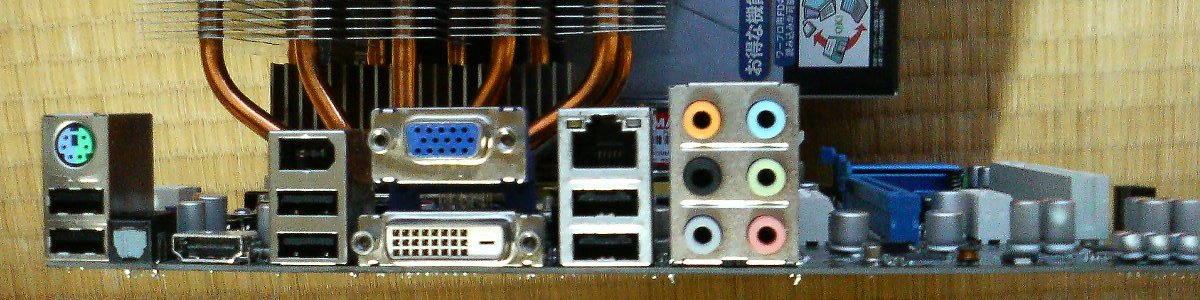
Figure 33.1 — The back of a PC. In the photo you can see six audio jacks in a row. Photo: Hitachi-Train, public domain, via Wikimedia Commons.

Six round 3.5 mm jacks in a row is a very common layout. The jacks are normally colour-coded by a standard that most makers follow, although some boards differ:
| Colour (usual) | Usual meaning |
|---|---|
| Green | Line out: front speakers or headphones |
| Pink | Microphone in |
| Blue | Line in: a signal from another device such as a music player |
| Other colours (for example black, orange, grey) | Extra speaker channels for surround sound (rear, centre/subwoofer, side) |
Hedge: The colours above are the common standard, but boards can differ. The board's manual always has the exact table. Many boards can also re-task a jack in software, so a blue jack might be set to act as a headphone output.
Why "line out" is not the same as "speaker out". Most of these jacks give a line-level signal, which is fairly weak. It is enough for headphones or powered speakers (speakers with their own amplifier plugged into the wall). Large unpowered speakers need an extra amplifier.
Other ways sound leaves the PC:
- USB: the PC sends digital samples; the USB device converts them.
- Bluetooth: radio, with compression and some delay (Section 6).
- HDMI / DisplayPort: digital audio travels in the same cable as the picture. Windows lists the monitor or TV as its own playback device.
- S/PDIF (optical or coax): an older digital connection that some boards still have.
Jack detection. When you plug something into a jack, the codec can notice the change and tell the driver. Windows can then pop up a message such as "What device did you plug in?" or switch the sound from the speakers to the headphones. (What you see depends on your driver.)
Summary
| Term | Plain meaning |
|---|---|
| Sound | A pressure wave in air |
| Speaker cone | A light cone moved by a coil and magnet to push air |
| DAC | Numbers in, smooth electric wave out |
| ADC | Smooth electric wave in, numbers out |
| Amplifier | Makes the signal strong enough for speakers or headphones |
| Audio codec chip | Motherboard chip holding the DAC, ADC and a small amplifier (often Realtek, but check yours) |
| HD Audio controller | Part of the chipset that moves audio between RAM and the codec by DMA |
| 3.5 mm jacks | Round sockets on the back panel, usually colour-coded (green, pink, blue are the common ones) |
| USB / Bluetooth / HDMI audio | Digital audio sent to a device that has its own DAC |