The Big Picture: How Is the BIOS Built?
The BIOS is a small program with a clear design. It sits in a ROM-type chip, runs in the CPU's oldest mode, and offers services to other programs through a list of numbered "doorbells" called interrupts. Add-in cards (like a graphics card) bring their own mini-BIOS, called an option ROM. This section walks through each piece.
2.1 Boot ROM
What it is: The boot ROM is the chip that holds the BIOS code. ROM means Read-Only Memory: its contents stay when the power is off. Older chips were true ROM or EPROM. Later chips were flash (memory that can be erased and rewritten, and keeps data without power).
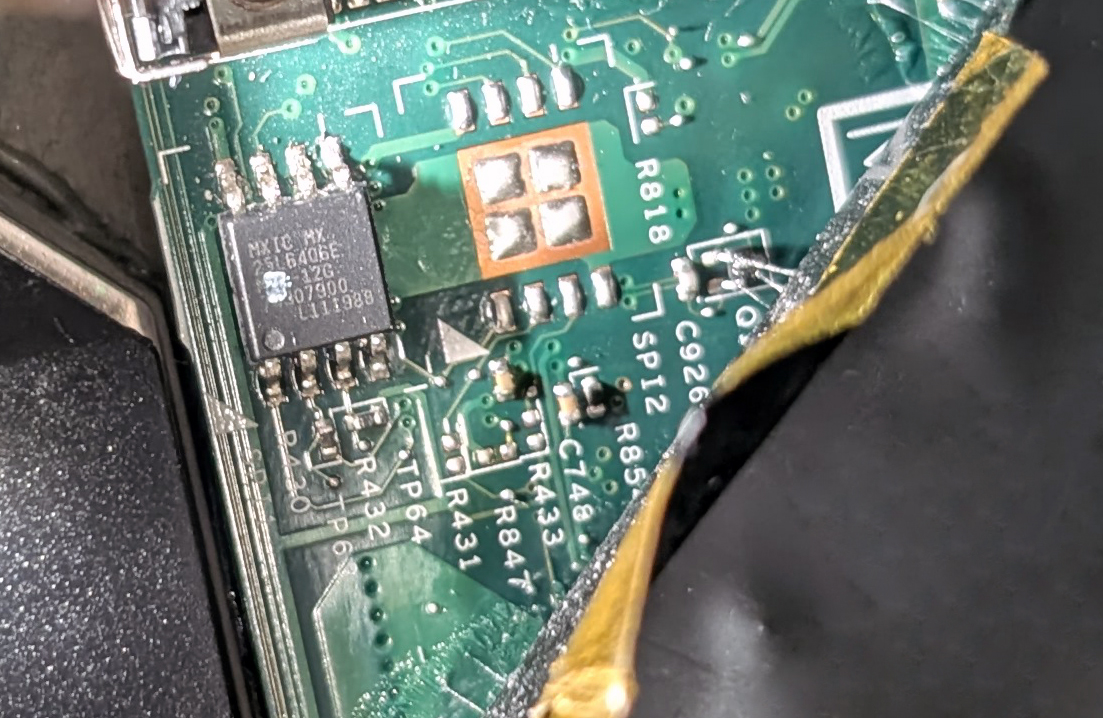
Figure 5.3 — The BIOS flash chip of a ThinkPad X220 laptop: a small 8-pin chip, soldered to the board. Photo: Siarhei Besarab, CC BY-SA 4.0, via Wikimedia Commons.

How the CPU finds it. When the CPU is reset, it does not know where anything is. It always begins executing at one fixed address. On modern x86 CPUs this is 0xFFFFFFF0, just 16 bytes below the 4 GB line. The chipset is wired so that this address reaches the boot ROM. (The original 8086 used 0xFFFF0, just below 1 MB. The idea is the same.)
At that address there is only room for a tiny instruction, usually a jump to the real start of the BIOS code. This is called the reset vector (the place the CPU is sent on reset).
Reset released
     │
     ▼
CPU starts at 0xFFFFFFF0   ("reset vector")
     │   chipset routes this address to the ROM chip
     ▼
JUMP to the start of BIOS code
     │
     ▼
POST and setup begin
The BIOS code is also copied (shadowed) into RAM later, because RAM is much faster than a ROM chip. This is called BIOS shadowing.
| Item | Typical size |
|---|---|
| Original BIOS (1980s) | 8 – 64 KB |
| Classic PC BIOS (1990s – 2000s) | 128 KB – 1 MB |
| Modern UEFI firmware chip | 16 – 32 MB (about) |
2.2 Real-mode Execution
What it is: Real mode is the oldest operating mode of an x86 CPU. It is how the 8086 worked in 1978. Every x86 CPU, even a brand-new 64-bit one, starts in real mode after reset, so the BIOS runs in it.
Rules of real mode:
| Feature | Real mode |
|---|---|
| Register size | 16-bit |
| Memory reach | 1 MB (20 address lines) |
| Memory protection | None. Any program can write anywhere. |
| Multitasking | None built in |
| Addresses | Segment : offset pairs |
Segment:offset in simple words. A 16-bit number can only count to 65,535 (64 KB). To reach 1 MB, the CPU uses two 16-bit numbers. It shifts the segment left by 4 bits (multiplies by 16) and adds the offset:
physical address = (segment × 16) + offset

Example:  0000:7C00  →  0 × 16 + 0x7C00  =  0x07C00
          B800:0000  →  0xB800 × 16      =  0xB8000  (text screen memory)
The 1 MB map of real mode (simplified):
0x00000 ┌──────────────────────────────┐
        │ Interrupt vector table (1 KB)│
0x00400 │ BIOS data area               │
0x00500 │ Free memory (about 640 KB    │
        │  total "conventional memory")│
0x9FFFF ├──────────────────────────────┤
0xA0000 │ Video memory                 │
0xC0000 │ Option ROMs (video BIOS...)  │
0xF0000 │ System BIOS (shadowed)       │
0xFFFFF └──────────────────────────────┘
The famous 640 KB limit comes from this map: 640 KB for programs, the rest of the 1 MB for video, ROMs and the BIOS.
Why modern PCs still start this way: Backward compatibility. Later, the bootloader (or the OS loader) switches the CPU to protected mode (32-bit, with memory protection) and then long mode (64-bit). UEFI skips the 16-bit phase and moves to 64-bit mode much earlier (see Section 4).
2.3 BIOS Interrupts
What it is: A software interrupt is a way for a program to call a service by number. The instruction INT 10h means "call service number 10 (hex)". The CPU looks the number up in the Interrupt Vector Table (IVT): a list of 256 entries, 4 bytes each (1 KB), at the very start of memory (address 0). Each entry holds the address of a BIOS routine.
Analogy: A hotel with numbered phone extensions. Dial 10 for the video desk, 13 for the disk desk, 16 for the keyboard desk. You do not need to know where the desk is. You only need the number.
 Program runs  INT 13h  (read disk)
        │
        ▼
 CPU reads IVT entry #0x13  (at address 0x13 × 4 = 0x4C)
        │
        ▼
 Jumps to the BIOS disk routine ── talks to the disk ── returns
(Do not confuse these with hardware interrupts from Chapter 4. Those come from devices. These are called by software. They share the same table in real mode.)
The main BIOS interrupts:
| INT | Service |
|---|---|
| 10h | Video: set text/graphics mode, print a character, move the cursor |
| 13h | Disk: read and write sectors (floppy and hard disk) |
| 14h | Serial port |
| 15h | System services: memory size and memory map (function E820h lists RAM) |
| 16h | Keyboard: read a key press |
| 17h | Printer |
| 19h | Bootstrap: "load the boot sector and run it" |
| 1Ah | Clock: time of day (the RTC) |
Example: DOS and old boot code printed text and read disks by calling INT 10h and INT 13h. Windows today does not use these once it is running. Its own drivers are faster and safer. But the early part of a legacy boot (the boot sector and the first Windows loader code) still uses INT 13h to read the disk.
2.4 BIOS Services
What it is: The "basic" in BIOS means a small set of services that any program can use without knowing the hardware. This is called a hardware abstraction (a simple, common way to use many different devices).
| Service group | What it gives programs |
|---|---|
| Keyboard | Read key presses |
| Video | Print text, change screen mode (through the video option ROM) |
| Disk | Read/write sectors by sector number (LBA) or by cylinder/head/sector |
| Memory | Report how much RAM there is and where |
| Time | Read the clock |
| Boot | Find and start the OS |
| Setup | Save and load settings (see Section 7) |
| Tables | Hand over information to the OS: SMBIOS (hardware inventory) and ACPI tables (power and devices, Chapter 4) |
Why the OS stopped using them: BIOS services are slow, 16-bit and one-at-a-time. A modern OS switches to 32 or 64-bit mode, which cannot call 16-bit real-mode code easily. So after boot, Windows uses its own drivers, and only keeps the tables (ACPI, SMBIOS) that the firmware left behind.
See SMBIOS data in Windows:
Get-CimInstance Win32_BIOS | Select-Object Manufacturer, SMBIOSBIOSVersion, ReleaseDateThis reads facts that the firmware stored for the OS.
2.5 Option ROMs
What it is: An option ROM is a small program stored on an add-in card (graphics card, network card, disk controller). The BIOS cannot know how to start every card in the world. So the card brings its own firmware, and the BIOS runs it.
Examples:
- The video BIOS on a graphics card lets the screen show text during boot.
- A RAID controller card shows its own setup screen (like "Press Ctrl+I").
- A network card with PXE (Preboot Execution Environment) can boot a PC from the network.
How the BIOS finds them:
- The BIOS scans the memory area
0xC0000to0xEFFFF, in steps of 2 KB. - A valid option ROM starts with the two bytes
55 AA(the signature) and then a length byte (counted in 512-byte blocks). - The BIOS checks that the bytes add up to zero (a checksum). If correct, it calls the ROM's init code.
- The ROM sets itself up, often hooking an interrupt (for example, a disk card hooks
INT 13hso its disks can be read).
 Memory 0xC0000 ─► look for 55 AA ─► check checksum ─► run init code
                  (every 2 KB)                              │
                                                            ▼
                          the card hooks its service (e.g. INT 13h)
Today. UEFI has the same idea, called UEFI drivers (also stored on cards). They are written in a modern format and are not limited to 16-bit. Cards that carry both an old and new ROM are common.
Why it matters (security): Option ROMs run very early, before any antivirus. Malicious ROM code could hide in a card. This is one reason Secure Boot (Section 6) checks them too.
Summary
| Term | Plain meaning |
|---|---|
| Boot ROM | The chip that holds the BIOS code |
| Reset vector | The fixed address (0xFFFFFFF0) where the CPU starts after reset |
| Shadowing | Copying the BIOS into faster RAM |
| Real mode | The 16-bit, 1 MB, no-protection CPU mode the BIOS uses |
| Segment:offset | Two 16-bit numbers combined to make a 20-bit address |
| IVT | The 256-entry table that maps interrupt numbers to routines |
| INT 10h / 13h / 16h | Video / disk / keyboard BIOS services |
| INT 15h E820 | The call that lists the usable RAM |
| SMBIOS / ACPI | Tables the firmware gives to the OS |
| Option ROM | Firmware on an add-in card, started by the BIOS (signature 55 AA) |