The Big Picture: A Modern Replacement
By the 2000s the old BIOS was holding PCs back: 16-bit code, a 2 TB disk limit, text-only menus. The industry built a replacement from scratch. It is called UEFI. It does the same job as the BIOS (check hardware, set up devices, start the OS), but it is built like a small operating system of its own, written in modern code, with a mouse-friendly screen, network support and security features.
4.1 Definition (Unified Extensible Firmware Interface)
What it is: UEFI stands for Unified Extensible Firmware Interface.
| Word | Meaning |
|---|---|
| Unified | One common standard that all makers follow |
| Extensible | New drivers and programs can be added |
| Firmware | The program on the motherboard chip |
| Interface | A defined way for the OS and the firmware to talk |
Important: UEFI is a specification (a written standard, a rulebook). Companies such as AMI, Insyde and Phoenix write firmware that follows it. It is managed by the UEFI Forum, a group of many companies.
Where it came from:
| Time | Event |
|---|---|
| Late 1990s | Intel designs EFI (Extensible Firmware Interface) for its Itanium servers because BIOS could not handle them well. |
| 2005 | Many companies form the Unified EFI Forum and EFI becomes UEFI. |
| 2007 – 2010 | UEFI appears on some PCs. Windows Vista SP1 (64-bit) and Windows 7 can boot from it. |
| 2012 | Windows 8 certified PCs must use UEFI with Secure Boot (Section 6). It becomes common. |
| 2021 | Windows 11 requires a PC that boots with UEFI. |
What UEFI looks like to you: Often a nicer graphical setup screen, usable with a mouse, often with a language menu and "EZ Mode" and "Advanced Mode". The setup screen is called "UEFI Setup" or "UEFI Firmware Settings", but most people still call it "BIOS".
4.2 Advantages Over BIOS
What it is: UEFI fixes the problems from Section 1.3.
| Feature | Legacy BIOS | UEFI |
|---|---|---|
| Code | 16-bit assembly | 32 or 64-bit, mostly written in C |
| Disk limit | About 2 TB (MBR) | Huge (GPT, about 9.4 zettabytes with 512-byte sectors) |
| Partitions | 4 primary | 128 by default (GPT) |
| Boot method | Run the 512-byte boot sector | Load a real program file (.efi) from a partition |
| Setup screen | Text, keyboard only | Graphics, mouse, languages |
| Security | None | Secure Boot checks signatures |
| Start speed | Slower, steps in sequence | Faster; drivers can start in parallel |
| Network | Only PXE option ROM | Built-in network stack (for PXE and HTTP boot) |
| Drivers | 16-bit option ROMs | UEFI drivers, not limited to 16-bit |
| Boot menu | Order of disks | A list of named boot entries stored in NVRAM |
| Updates | Vendor tools only | Capsule updates can arrive through Windows Update |
| Extra tools | None | Can run apps, including a UEFI Shell |
A key idea: GPT versus MBR. UEFI works best with the newer disk layout, GPT (GUID Partition Table). Here is a picture of a GPT disk:
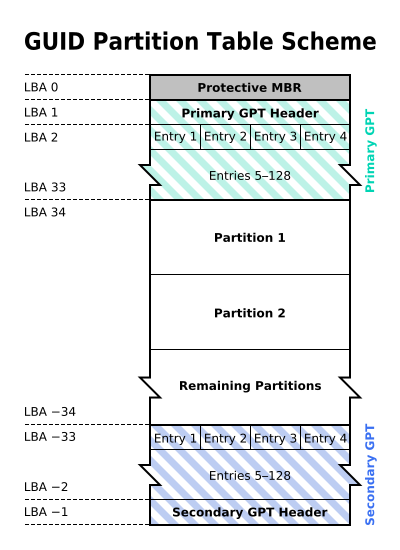
Figure 5.5 — A GPT disk from start to end. At the very start: LBA 0 holds a Protective MBR, LBA 1 the Primary GPT Header, then the partition entries 1 to 128 (up to LBA 33). Partitions begin at LBA 34. At the very end of the disk sit a second copy of the entries and a Secondary GPT Header. Diagram: Kbolino, CC BY-SA 2.5, via Wikimedia Commons.

(LBA means Logical Block Address: just the number of a sector, counting from 0.)
| MBR | GPT | |
|---|---|---|
| Max disk size | About 2 TB | Far beyond any real disk |
| Partitions | 4 primary | 128 by default |
| Backup of the table | None | A second copy at the end of the disk |
| Error check | None | CRC32 checksums on the headers and table |
| IDs | Short numbers | GUIDs (128-bit unique IDs) |
| Used with | Legacy BIOS boot | UEFI boot (the usual way) |
Why the "Protective MBR"? At LBA 0, GPT disks keep a fake MBR that says "this whole disk is used". Old tools that only know MBR see a full disk and will not damage the real GPT data.
Check your disk in Windows (PowerShell):
Get-Disk | Select-Object Number, FriendlyName, PartitionStylePartitionStyle shows GPT or MBR.
4.3 32-bit vs 64-bit
What it is: The "bitness" of UEFI means which kind of code the firmware runs. Most PCs today use 64-bit UEFI with a 64-bit CPU.
| Feature | Legacy BIOS | UEFI |
|---|---|---|
| CPU mode when running | 16-bit real mode | Same mode as the OS (64-bit long mode on a 64-bit PC) |
| Memory reach | 1 MB at first | All the RAM |
| Paging / addresses | None | Memory mapped in a flat way |
Why this matters:
- UEFI starts the CPU in real mode at reset, but quickly moves it into protected mode and then 64-bit mode. The firmware and its drivers run in 64-bit, with lots of memory and fast code.
- The OS loader is a 64-bit program (on Windows
bootmgfw.efi). The firmware's bitness must match it: a 64-bit UEFI loads a 64-bit loader. - Some small tablets and cheap PCs have a 32-bit UEFI on a 64-bit CPU. This is called mixed mode. Normal 64-bit Windows installers may not boot on them without special help.
File name convention. UEFI looks for a fallback loader named for the architecture:
| CPU type | Fallback file |
|---|---|
| x64 (64-bit PC) | \EFI\BOOT\BOOTX64.EFI |
| 32-bit x86 | \EFI\BOOT\BOOTIA32.EFI |
| ARM 64-bit | \EFI\BOOT\BOOTAA64.EFI |
Check on Windows: In msinfo32, System Type shows "x64-based PC", and BIOS Mode shows UEFI.
4.4 Modular Architecture
What it is: UEFI is built from many separate modules (small pieces of code), not one big program. The firmware is a pile of these pieces, and the boot process loads them in a set order.
Why modular?
- Different makers can write different pieces (the CPU maker writes the CPU part, the board maker the board part, the firmware company the rest).
- New hardware only needs a new driver, not a new firmware.
- Bugs can be fixed in one module.
The big layers:
┌─────────────────────────────────────────────────┐
│ Operating system (Windows, Linux)               │
├─────────────────────────────────────────────────┤
│ UEFI boot loader / applications (.efi files)    │
├─────────────────────────────────────────────────┤
│ UEFI services: Boot Services + Runtime Services │
├─────────────────────────────────────────────────┤
│ UEFI drivers and protocols                      │
├─────────────────────────────────────────────────┤
│ Platform firmware (chipset, CPU, board code)    │
├─────────────────────────────────────────────────┤
│ Hardware                                        │
└─────────────────────────────────────────────────┘
The boot phases (preview). UEFI follows the PI (Platform Initialization) design, a companion standard. The firmware moves through several phases:
| Phase | Full name | What happens |
|---|---|---|
| SEC | Security | First code. Sets up a temporary stack and finds the next phase. |
| PEI | Pre-EFI Initialization | Starts the RAM and the basic CPU/chipset |
| DXE | Driver Execution Environment | Loads most drivers and discovers devices |
| BDS | Boot Device Selection | Chooses what to boot using the boot entries |
| TSL | Transient System Load | The OS loader runs |
| RT | Runtime | Windows runs; a few UEFI Runtime Services stay |
You will see these in detail in Section 5.
Free code. A well-known open-source UEFI codebase is EDK II (from the TianoCore project). Many commercial firmwares are built from it.
Windows tip: Look at the firmware's own version info:
Get-CimInstance Win32_BIOS | Format-List Manufacturer, SMBIOSBIOSVersion, ReleaseDateSummary
| Term | Plain meaning |
|---|---|
| UEFI | Unified Extensible Firmware Interface: the modern BIOS replacement |
| UEFI Forum | The group of companies that writes the standard |
| EFI | The earlier Intel version of the idea |
| GPT | The modern disk layout (128 partitions, backup copy, checksums) |
| Protective MBR | A fake MBR at the start of a GPT disk to protect it from old tools |
| LBA | A sector number |
.efi file | A program UEFI can run |
| Mixed mode | A 32-bit UEFI on a 64-bit CPU |
| Module | A small separate piece of firmware code |
| PI | Platform Initialization: the design for the firmware phases |
| EDK II | A popular open-source UEFI code base |