The Big Picture: Who Fills the Tree?
Section 1 said that Device Manager only shows the tree. So who builds it?
Think of a new school term. The principal does not know every pupil by name. Instead, each class teacher takes a roll call and reports names up to the office. The office then builds the full list.
Windows works the same way. It starts at the top, asks each bus "who is connected to you?", and the bus answers with a list. This roll call is called enumeration. You first met the idea in Chapter 4 (Section 6, "how the CPU finds devices at boot"). Here you see what Windows does with the answers.
2.1 Bus Enumeration (PCI, USB, ACPI Buses Reporting Devices)
What it is: A bus is a road that carries data between parts (Chapter 4, Section 2). In Windows, each bus has a bus driver: a special driver whose job is to find the devices on its bus and report them to the PnP manager. A bus driver does not run the devices. It only finds them and says "here are my children."
Enumeration means: the bus driver looks at its bus, makes a list of what it finds, and hands the list to the PnP manager. For every new device on the list, the PnP manager creates a node in the tree and then looks for a driver (Section 4).
Different buses find their children in different ways:
| Bus | How it finds devices | Who reports |
|---|---|---|
| Root (the top) | Windows itself starts it | The "root enumerator" lists a few built-in items |
| ACPI | Reads tables written by the motherboard maker (firmware). The tables say "there is a keyboard controller, a battery, a power button..." | The ACPI driver |
| PCI / PCIe | Scans every slot and chip position and asks "anybody there?" Anyone who answers gives an ID card with a vendor and a device number | The PCI bus driver |
| USB | A USB hub notices a plug being inserted, then asks the new device to describe itself | The USB hub driver and the USB controller driver |
The "ID card" idea is important. Every device can tell the bus what it is. That ID card is the hardware ID (Section 3).
Why does each bus find things differently? Because the buses are built differently:
- PCI has a fixed, scannable layout, like numbered mailboxes. You can knock on each one.
- USB is hot-plug: devices appear and vanish at any moment, so the hub raises an alert when something changes.
- ACPI describes parts that are soldered onto the board and cannot announce themselves, so the firmware writes them down in advance.
Example: what happens when you plug in a USB mouse
1. Mouse is plugged in.
2. The USB hub driver sees a signal change on the port.
3. The hub asks the mouse "what are you?" The mouse answers
   with its IDs (a vendor number and a product number).
4. The hub driver reports a new child to the PnP manager.
5. PnP manager creates a new node in the tree.
6. PnP manager finds a matching driver and starts it.
7. Device Manager (if open) refreshes and shows the new device.
Steps 1-5 are enumeration. Steps 6-7 come from the next sections.
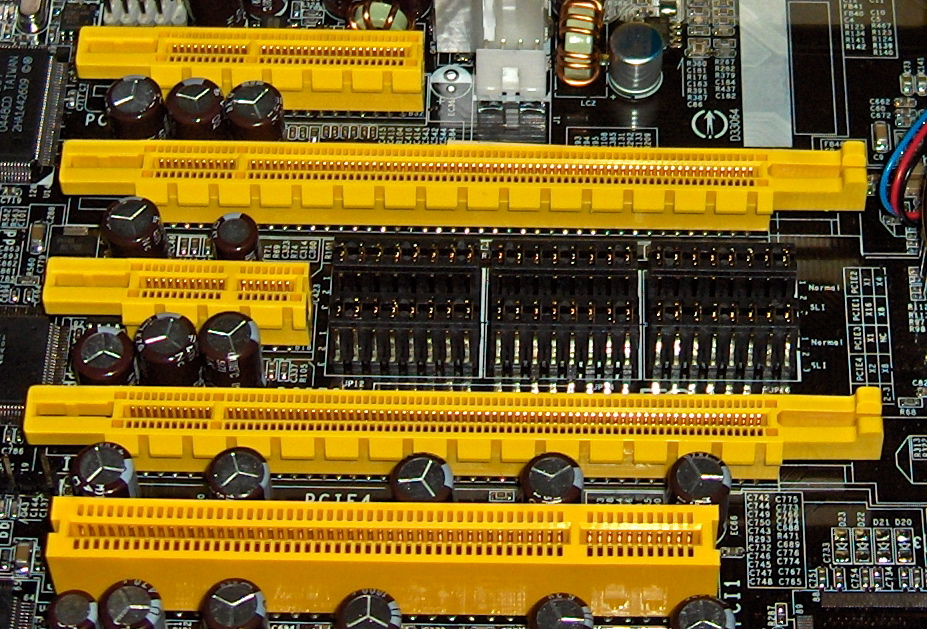
Figure 14.2 — The PCI Express slots on a motherboard. Windows asks every slot "who is there?" and each card answers with its ID. A slot with no card gives no answer, so no node is created. Photo: snickerdo, CC BY-SA 3.0, via Wikimedia Commons.

When does enumeration happen?
| Moment | What happens |
|---|---|
| At boot | The whole tree is built from the top down |
| Hot-plug (a USB device is added or removed) | The bus driver reports the change straight away |
| You click "Scan for hardware changes" | You ask the PnP manager to enumerate again (Section 5) |
| Resume from sleep | Some buses are checked again |
Modern PCIe also supports hot-plug (for example, Thunderbolt and external graphics boxes), but ordinary desktop slots are not meant to be used while the PC is on.
Windows tip: If you plug something in and nothing happens, try Action → Scan for hardware changes in Device Manager. It forces a new roll call.
2.2 Device Tree Hierarchy (Bus → Device → Function)
What it is: The tree has levels. Each level is a parent of the next.
The simplified chain is:
Bus → Device → Function
| Level | Plain meaning | Example |
|---|---|---|
| Bus | A road with places to connect | PCI bus |
| Device | One chip or card connected to the bus | A sound/graphics card |
| Function | One job inside that device | The card's audio part and its video part |
Why "function"? One physical card can do several jobs. A graphics card from NVIDIA or AMD is often a good example: it shows pictures, and it also carries a separate audio part for sound over HDMI. On the PCI bus these are two functions of the same device. In Device Manager each function becomes its own node, with its own driver.
PCI bus
 └─ Device in the x16 slot
     ├─ Function 0: Video part   → shows under "Display adapters"
     └─ Function 1: Audio part   → shows under "Sound, video and game controllers"
Each PCI function is found by three numbers: bus number, device number, function number. Windows shows them in the Details tab as the Location (for example "PCI bus 1, device 0, function 0"). You may see wording that looks a little different on your version.
Parent and child: The device above a node is its parent. Devices below it are its children. Rules that follow:
| Rule | Example |
|---|---|
| A child cannot work if its parent does not work | If the USB controller is off, every USB device below it is dead |
| Power usually goes from parent to child | A hub supplies power to the devices plugged into it |
| Removing a parent removes its children | Unplugging a hub removes the mouse and keyboard on it |
Seeing it yourself. Choose View → Devices by connection. You will see something like this (names differ per PC):
ACPI x64-based PC
 └─ Microsoft ACPI-Compliant System
     ├─ PCI Express Root Complex
     │   ├─ PCI Express Root Port
     │   │   └─ (your graphics card)
     │   ├─ Standard NVM Express Controller   (your SSD)
     │   └─ USB xHCI Compliant Host Controller
     │       └─ USB Root Hub (USB 3.0)
     │           └─ USB Input Device
     └─ ACPI Fixed Feature Button
Compare this with the Chapter 4 tree. They match, because both are describing the same real wiring.
Virtual and non-bus devices. Some devices have no real bus. Their parent is a software bus such as the "root enumerator." Virtual network adapters often sit there.
Remember the instance path. Every node has a unique address in the tree called the device instance path, such as USB\VID_046D&PID_C52B\5&2a3b1c4d&0&1. The first part is the bus name, the second part is the hardware ID, and the last part makes it unique. Section 9 shows where to read it.
2.3 Seeing Enumeration from the Command Line
You can also see the same list without Device Manager:
pnputil /enum-devices /connected
This prints every connected device, with its Instance ID, description, class and status. Leave off /connected and it also shows devices that are not present.
In PowerShell:
Get-PnpDevice -PresentOnly | Select-Object Class, FriendlyName, Status-PresentOnly hides devices that are not connected. The Status column says "OK" for working devices and "Error" or "Unknown" for others.
Summary
| Term | Plain meaning |
|---|---|
| Enumeration | The roll call: a bus finding and reporting its devices |
| Bus driver | The driver that finds the devices on one bus |
| Root / ACPI / PCI / USB | Different buses, each finding devices in its own way |
| Hot-plug | Adding or removing a device while the PC is on |
| Device tree | Parents and children, drawn from the root downward |
| Bus → device → function | Road → card/chip → one job inside it |
| Parent / child | A child cannot work without its parent |
| Device instance path | The unique address of a node in the tree |
| Scan for hardware changes | You ask Windows to do the roll call again |