The Big Picture: A Record Player That Stores Data
A hard disk drive (HDD) is a machine that stores data on spinning discs coated with a magnetic layer. If you picture a record player, you are close: a disc spins, an arm swings over it, and a tiny tip reads what is on the surface. The big differences are that an HDD writes as well as reads, it uses magnetism instead of grooves, and the arm never touches the disc.
Here is a real 3.5-inch desktop hard drive with its lid taken off. The lid is normally bolted on and sealed, because dust is deadly to the inside of a drive.
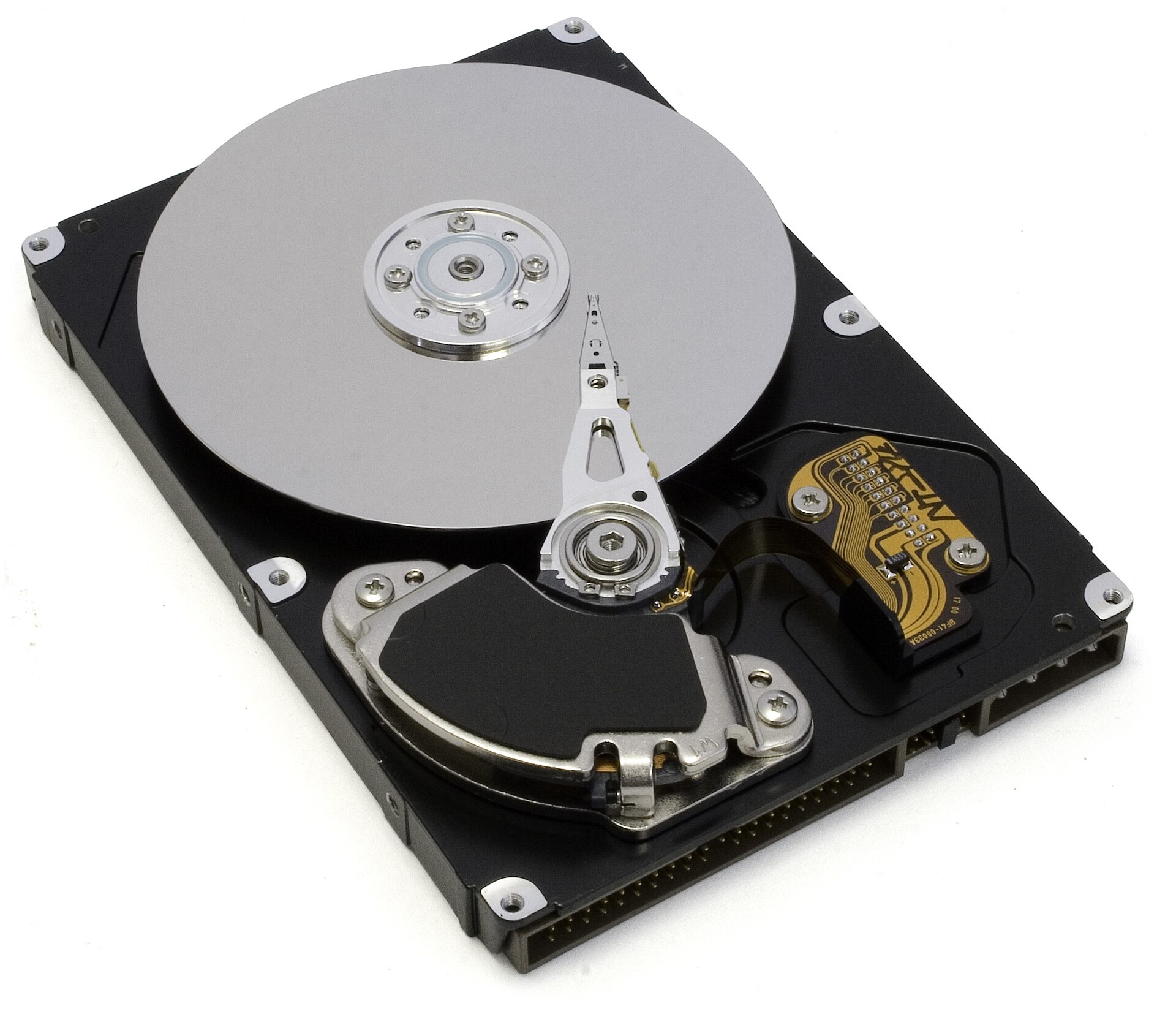
Figure 18.1 — A 3.5-inch hard drive with the lid off. Photo: Zzubnik, public domain, via Wikimedia Commons.

What you can see in Figure 18.1:
- The big round silver disc is the platter. It is so shiny you can see reflections in it. This is where your data lives.
- The long silver arm reaches over the platter. At its tip sits the read/write head, the part that actually reads and writes data.
- The black block in the lower left holds the magnets and the coil that swing the arm. This is the actuator.
- The gold strip is a thin flexible circuit that carries signals between the head and the electronics.
- The row of pins along the bottom edge is an old IDE connector (an older cable type, replaced by SATA). The drive in the photo is old, but the same parts exist in a modern drive.
The overall picture looks like this:
      HDD SEEN FROM ABOVE (lid removed)

   ┌────────────────────────────────────────────┐
   │                   ╭──────╮                 │
   │      PLATTER      │ hub  │──── arm ──╮     │
   │   (spins around   │(motor│            ╲    │
   │    the hub)       ╰──────╯       ● head    │
   │                                            │
   │   ┌────────────┐                           │
   │   │ magnets +  │◄── swings the arm         │
   │   │ voice coil │    (the actuator)         │
   │   └────────────┘                           │
   └────────────────────────────────────────────┘
        Controller board is bolted underneath
Let us go through each part, then see how data is laid out on the platter and how fast it can be reached.
1.1 Platters: The Magnetic Storage Surface
What it is: A platter is a flat, round disc that holds your data. It is made of a very flat, stiff base (usually aluminium, sometimes glass in some laptop and special drives), covered with several very thin layers. The most important layer is a magnetic coating. On top of it is a thin protective layer and a slippery lubricant layer so that the head does not damage it.
How data is stored: The magnetic coating is made of billions of tiny magnetic grains (think of microscopic bar magnets). Each small group of grains can be magnetised in one of two directions: "north-up" or "north-down". The drive reads these two directions as 0 and 1. Writing data means changing the direction of the grains. Because magnetism stays without power, the data stays when you switch off.
| Fact | Detail |
|---|---|
| Shape | Round disc with a hole in the middle for the spindle |
| Size | 3.5-inch (desktops, servers) or 2.5-inch (laptops) are the common sizes |
| Base material | Aluminium (very common) or glass |
| Surface | Magnetic coating, protective layer, lubricant, all thinner than a hair |
| Both sides used? | Yes, each platter has two surfaces, one on each side |
| How many platters? | One to several stacked on the same shaft (a high-capacity drive may have many) |
The stack: A drive often holds more than one platter, stacked like discs on a pole with small gaps between them. Each platter has two usable surfaces (top and bottom), so a drive with 3 platters has 6 surfaces, and 6 heads.
   SIDE VIEW OF A 3-PLATTER DRIVE

   head ──►  ═══════════════   ◄── surface 0 (top of platter 1)
             ═══════════════   ◄── surface 1 (bottom of platter 1)
   head ──►  ═══════════════   ◄── surface 2
             ═══════════════   ◄── surface 3
   head ──►  ═══════════════   ◄── surface 4
             ═══════════════   ◄── surface 5
                   ║
                spindle (all platters spin together)
The spindle motor and RPM: The platters are all clamped onto one hub, and a spindle motor underneath spins them. The speed is measured in RPM (revolutions per minute).
| RPM | Where you see it |
|---|---|
| 5,400 | Laptop drives, cheap and quiet external drives |
| 7,200 | Standard desktop drives |
| 10,000 and 15,000 | Some server drives (rarely seen in home PCs today) |
A higher RPM means the data passes under the head more quickly, so reads and writes are quicker. But a faster spin makes more heat, noise and power use. This is why laptop drives often spin slower.
Here is a close-up of the middle of a platter, where the spindle sits:
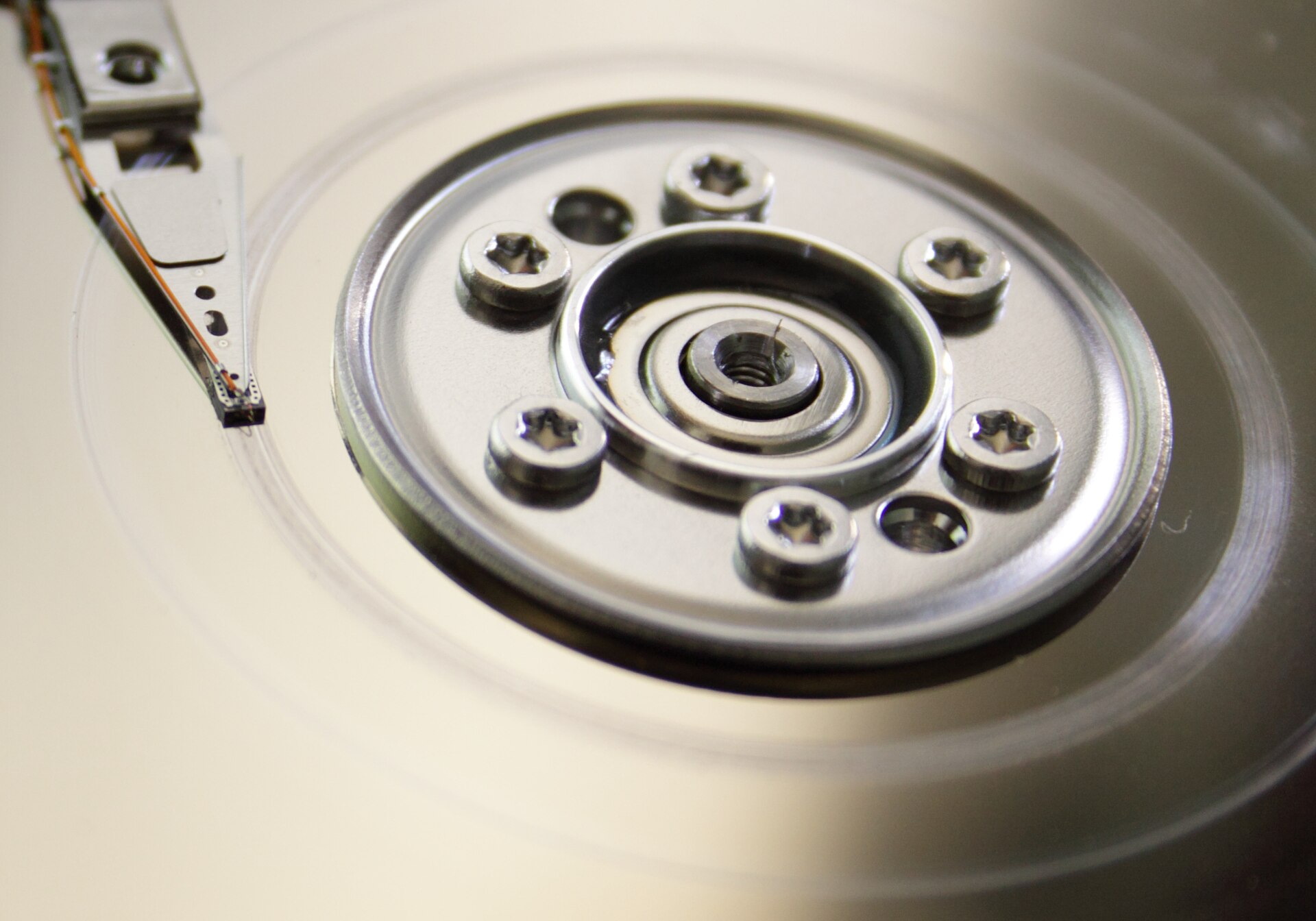
Figure 18.2 — Close-up of a platter. The file is named "Head crash" on Commons, but the photo shows the head and hub close-up. Photo: Jeepika, CC0, public domain dedication, via Wikimedia Commons.

What you can see in Figure 18.2:
- In the centre is the hub. The six small star-shaped (Torx) screws clamp the platter to the spindle motor hidden underneath.
- The surface is mirror-like. You can see reflections in it. It looks smooth because it is polished to an extremely flat finish.
- At the top left you can see the tip of the actuator arm, with the tiny read/write head resting on the surface. In a working drive the head does not touch the platter; it floats just above it (see 1.4).
A laptop-size drive: Laptop drives work the same way but are smaller (2.5 inches), use less power and are built to survive a little more bumping.
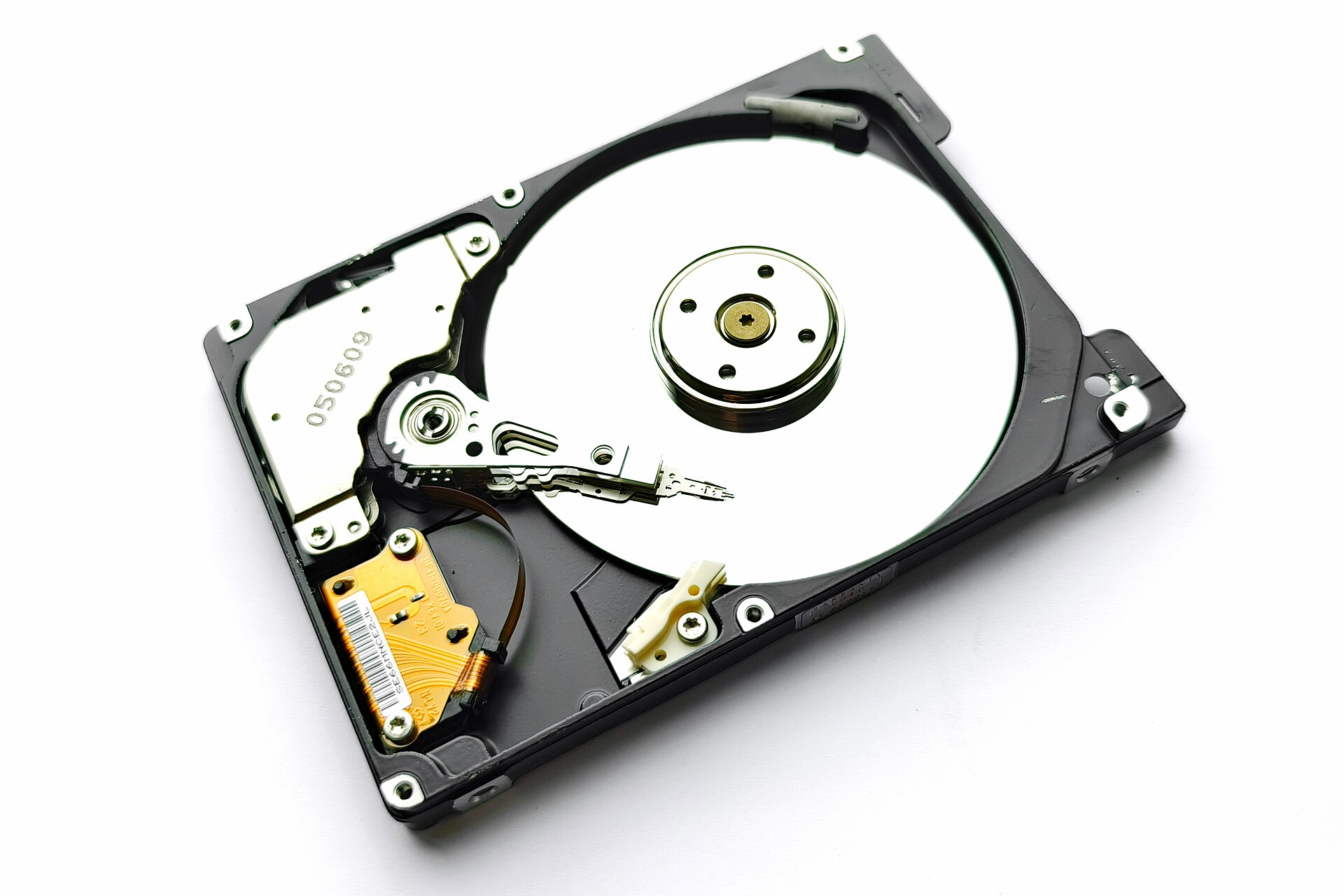
Figure 18.3 — An opened 2.5-inch laptop hard drive. You can again see the shiny platter, the arm with its head, and the gold flexible cable. Photo: Mk2010, CC BY 4.0, via Wikimedia Commons.

Windows tip: Never open a working hard drive to "look inside". Even one speck of dust can scratch the platter and destroy your data. The photos in this chapter are of drives that were opened for teaching or recycling.
1.2 Tracks: Concentric Circles on the Platter
What it is: A track is one thin circular path on a platter surface. The drive does not store data in one long spiral like a record. It stores it in many concentric circles, like the rings on a target or a tree stump. Each ring is a track.
Why it matters: The head can only read one track at a time. To get to different data, the arm must move in or out to a different track. Moving between tracks is what takes the most time on a hard drive (see 1.5).
   TOP VIEW OF ONE PLATTER SURFACE

          ╭─────────────────╮
        ╱   ╭───────────╮     ╲       Each ring is one TRACK.
       │   ╱   ╭─────╮   ╲     │      Track 0 is usually the
       │  │   │  ●  │    │     │      OUTER edge.
       │   ╲   ╰─────╯   ╱     │      Thousands of tracks are
        ╲   ╰───────────╯     ╱       packed in, each far narrower
          ╰─────────────────╯         than a hair.
              (● = the hub)
How many tracks? A modern drive has hundreds of thousands of tracks per surface. They are so close together that each one is only a few tens of nanometres wide (a nanometre is a billionth of a metre). Making tracks narrower and closer is the main way makers raise a drive's capacity.
Zones: The outer tracks are longer than the inner ones, so they can hold more data. Modern drives therefore split the platter into zones. Outer zones hold more sectors per track than inner zones. This is called zoned recording.
| Position | Track length | Sectors per track | Speed |
|---|---|---|---|
| Outer edge | Longest | Most | Fastest (more data passes under the head per turn) |
| Inner area | Shortest | Fewest | Slower |
Why it matters for you: The start of a hard drive (the outer edge) is the fastest part. A hard drive may read at about 200 MB/s at the outer edge and noticeably less near the middle. That is one reason a full HDD feels slower than an empty one.
Cylinders: A cylinder is the set of all tracks that are at the same distance from the centre, on every surface. Because all heads move together on one arm assembly, they are always above the same track number on every surface at once.
   CYLINDER 100 = track 100 on EVERY surface

   surface 0:   ───────── track 100 ─────────
   surface 1:   ───────── track 100 ─────────
   surface 2:   ───────── track 100 ─────────
   surface 3:   ───────── track 100 ─────────
              (all four heads are over it together)
Old systems addressed a drive by CHS (Cylinder, Head, Sector), which meant "which cylinder, which head, which sector". Modern drives hide their real layout and use a single number instead, called an LBA (Logical Block Address). The drive's controller converts the number into the real physical position.
1.3 Sectors: Subdivisions of Tracks
What it is: A sector is the smallest piece of a track the drive can read or write on its own. A track is cut into many sectors, like slices cut from a ring. Each sector holds a fixed amount of user data, plus some extra bytes the drive uses for finding the sector and fixing errors.
   ONE TRACK CUT INTO SECTORS (simplified)

         ╭──────────────────────────╮
        ╱  S0   │  S1   │  S2   │    ╲
       │ ───────┼───────┼───────┼─────│
       │  S9    │       ...      │ S3 │
        ╲  S8   │  S7   │  S6   │ S4 ╱
         ╰──────────────────────────╯
   (a real track has hundreds of sectors)

   ONE SECTOR =  [ gap | sync + address | DATA | error-check code | gap ]
Sector sizes: This matters a lot for how Windows talks to the drive.
| Type | Size of data | Notes |
|---|---|---|
| 512-byte sectors | 512 bytes | The old standard. Used for decades. |
| Advanced Format (AF) | 4,096 bytes (4 KB) | Newer drives. Less wasted space per sector, and better error correction. |
| 512e (512 emulation) | Physical 4 KB, pretends to be 512 bytes | The drive uses 4 KB sectors inside but tells the computer "I have 512-byte sectors", so older software still works. |
What "emulation" costs you: On a 512e drive, if software writes just 512 bytes, the drive must first read the whole 4 KB sector, change 512 bytes, then write the 4 KB back. This is slower. Modern Windows lines up its partitions on 4 KB boundaries to avoid this.
Bad sectors: A sector can go bad (the magnetic coating is damaged, or errors build up). The drive keeps spare sectors and quietly swaps a bad one for a spare. This is called remapping. When a drive runs out of spares, bad sectors become visible, and that is a warning that the drive is dying (see SMART in Section 3).
Sectors versus the file system: A file system (such as NTFS, covered in a later chapter) groups sectors into larger pieces called clusters (often 4 KB). A file is stored in one or more clusters. The drive itself knows only sectors; it knows nothing about files.
1.4 Heads: Read/Write Heads and the Actuator
What it is: A head is a tiny device at the end of the arm that reads and writes the magnetism on the platter. There is one head for each surface, so a drive with 3 platters has 6 heads. Each head sits at the end of its own thin arm, and all the arms are joined together into one comb-like assembly that moves as one piece.
How the head reads and writes: A modern head has two small parts built together:
- A write element, a tiny electromagnet. A current through it makes a magnetic field that changes the direction of the grains under it.
- A read element, a very sensitive sensor. As the magnetised grains pass underneath, they change the sensor's electrical resistance a little, and the drive turns those changes into 0s and 1s.
The air cushion: The head does not touch the platter. Because the platter spins very fast, it drags a thin layer of air along with it. The head is shaped like a tiny wing (called a slider) and floats on this air layer, like a hovercraft or a water-skier. The gap between the head and the platter is much thinner than a hair (just a few nanometres).
   SIDE VIEW OF A HEAD FLOATING (not to scale)

          arm
           │
        ┌──┴──┐
        │head │      ◄── slider, shaped like a tiny wing
        └──┬──┘
           ▼
        ~~~~~~~~~     ◄── air cushion, only a few nanometres thick
   ════════════════   ◄── platter surface, spinning →
Think of a jumbo jet flying a few millimetres above the ground at full speed. That is roughly the scale of what the head does. This is why a hard drive must be built in a very clean place, and why it hates being hit.
The actuator: The actuator moves the arm assembly across the platter. Modern drives use a voice-coil actuator. It has a coil of wire placed between strong magnets. When the controller sends current through the coil, the coil is pushed by the magnets (the same principle as a loudspeaker, which is where the name "voice coil" comes from). More current, more movement. Reversing the current moves it the other way. It is fast and very precise, and the head reads small position marks on the platter to keep itself exactly on the track.
Head parking: When the drive is powered down (or idle in some laptops), the heads must not rest on the data area. They are parked: moved to a safe zone, either to a ramp off the edge of the platter (common today) or to a landing zone near the hub. This protects the data areas from scratches while the platters are not spinning fast enough to make the air cushion.
Why HDDs hate shocks: If you bump or drop a running drive, the head can slam onto the platter and scratch off part of the magnetic layer. This is called a head crash. The scratched area, and any data on it, is lost, and the loose particles can cause even more damage. This is why:
- You should not move a laptop roughly while its hard drive is working.
- Laptop drives have shock sensors that park the heads when they detect a fall.
- A spinning drive should not be knocked on the desk or hit.
A tip: Switch the drive off (or let the PC shut down fully) before moving a desktop. SSDs have no moving parts, so they don't have this problem (see Section 2).
The electronics: On the underside of the drive is a controller board. Here is a real one.
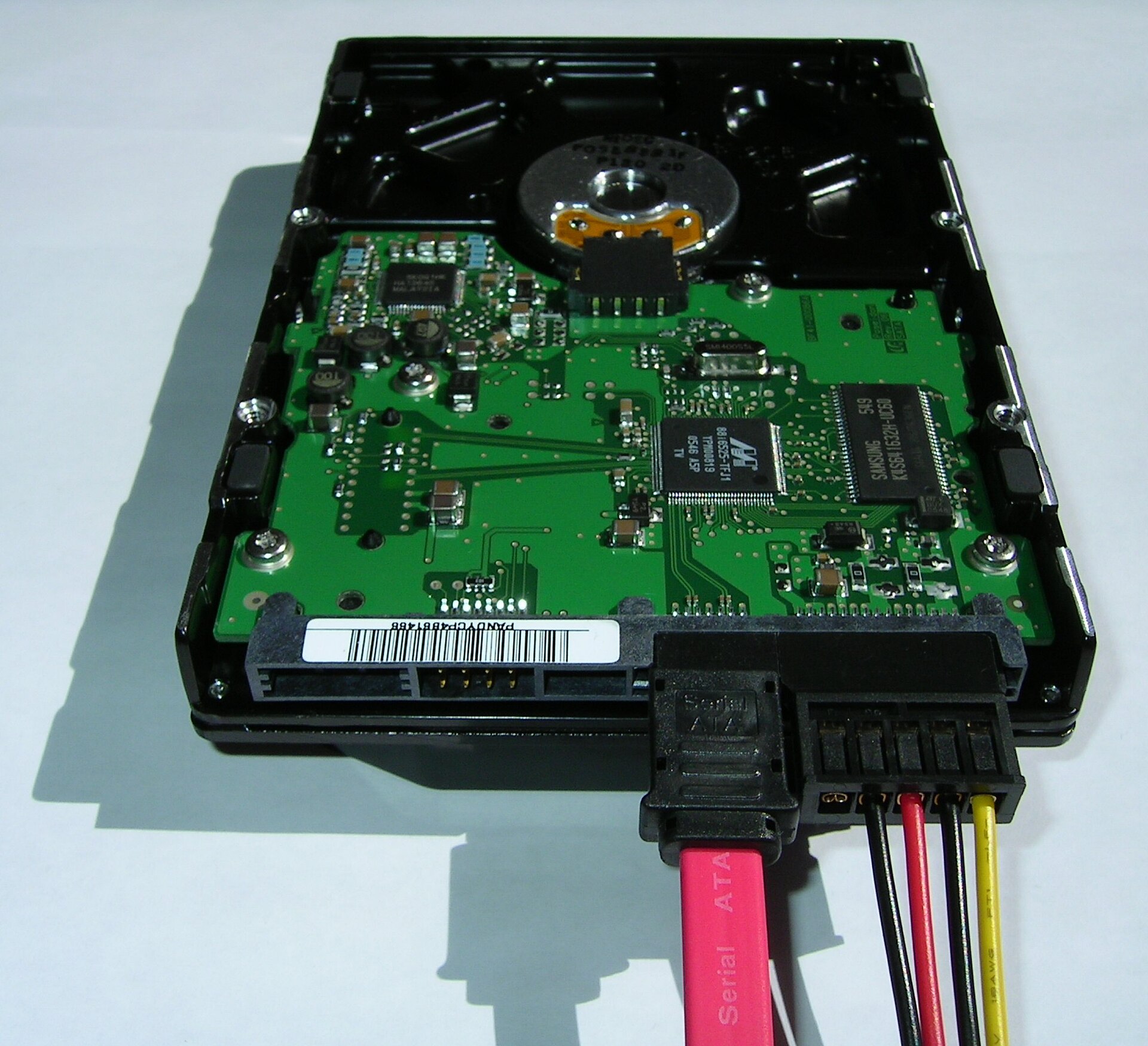
Figure 18.4 — The underside of a 3.5-inch drive. Photo: Thomas Rosenau (User:Pumbaa80), CC BY-SA 2.5, via Wikimedia Commons.

What you can see in Figure 18.4:
- The green circuit board is the drive's controller board. It is the drive's "brain".
- The large chip (a Marvell chip) is the controller. It runs the drive: it moves the arm, decodes the signal from the head, fixes errors, and talks to the computer.
- The Samsung chip is memory (DRAM) used as a cache, a small fast buffer holding data on its way to or from the platter. Typical sizes are tens to hundreds of MB.
- The small silver part is a crystal that keeps time for the electronics.
- At the front edge are the SATA connectors: a red flat data cable with a black latch plug, and the power plug with black, red, black and yellow wires. You will meet these again in Section 4.
The controller board also drives the spindle motor and the voice-coil actuator, and it holds the firmware (the drive's own built-in program). The firmware also manages the cache, remaps bad sectors, and can reorder requests so the arm travels less.
1.5 Seek Time and Rotational Latency
What it is: Before a hard drive can give you data, two physical things must happen. Both are measured in milliseconds (ms), thousandths of a second. To a CPU that works in billionths of a second, these are very long waits.
- Seek time: The arm must move to the correct track. It takes about a few milliseconds (often quoted at around 8-12 ms on average for a desktop drive, less on server drives).
- Rotational latency: The head is now on the right track, but the sector you want may be on the other side of the platter. You must wait for it to spin around to the head.
   STEPS TO READ ONE SECTOR

   1. Command arrives ──► 2. Arm SEEKS to track  ──► 3. WAIT for the
                              (several ms)               sector to spin
                                                         under the head
                                                         (latency)
                                                              │
   5. Data goes to RAM ◄── 4. Head READS the sector ◄─────────┘
Working out rotational latency. One full turn takes 60 seconds ÷ RPM. On average the sector you want is half a turn away, so average latency is half of one rotation.
| RPM | One rotation | Average rotational latency (half) |
|---|---|---|
| 5,400 | about 11.1 ms | about 5.6 ms |
| 7,200 | about 8.3 ms | about 4.2 ms |
| 10,000 | 6.0 ms | 3.0 ms |
| 15,000 | 4.0 ms | 2.0 ms |
Access time is roughly the seek time plus the rotational latency. For a typical 7,200 RPM drive, that is roughly 10-15 ms to reach a random sector. Compare that to an SSD at about 0.05-0.1 ms: the SSD is over a hundred times faster at random access.
Transfer rate: Once the head is in the right place, the data streams off the platter. This speed is the transfer rate (or sustained throughput). A modern 7,200 RPM desktop drive reaches roughly 100-250 MB/s depending on capacity and where on the platter the data is (the outer tracks are faster, see 1.2).
Sequential versus random access: This is the key idea for understanding hard-drive speed.
| Type | What it means | HDD result |
|---|---|---|
| Sequential | Reading one large file stored in one place, in order | Good. The head hardly has to move, so you get close to the full transfer rate. |
| Random | Reading many small pieces scattered across the disc | Very slow. Every piece needs a seek plus a wait, so you may get only 1 MB/s or less. |
Reading 1,000 small files that are scattered around the drive might mean 1,000 seeks, which is 10-15 seconds, where an SSD finishes in a fraction of a second. This is why a computer with an HDD feels sluggish at boot and when opening many programs.
How the drive fights the delay:
- Cache: The DRAM cache holds recent data and collects writes so the drive can write them in a better order.
- Command queuing (NCQ): The drive may accept several requests at once and reorder them so the arm sweeps across the platter in one direction, like a lift picking up passengers floor by floor. This is called Native Command Queuing (NCQ).
- Defragmentation: When a file is in many scattered pieces (fragmented), the HDD must seek between them. Defragmenting groups the pieces together. Windows does this for HDDs automatically (the Optimize Drives tool, see the lab).
SMR and CMR: There are two ways to arrange tracks, and it affects write speed.
- CMR (Conventional Magnetic Recording): Tracks sit side by side with small gaps, so each track can be rewritten alone.
- SMR (Shingled Magnetic Recording): Tracks overlap partly, like roof tiles (shingles). This fits more data on the same platter and makes drives cheaper per terabyte. But rewriting one track means rewriting the tracks on top of it as well. Drives hide this by writing new data to a cache area first and tidying later. During long sustained writes (such as a big backup or a RAID rebuild), an SMR drive can slow down sharply once its cache area fills.
Buying tip: Many makers list whether a drive is SMR or CMR on the data sheet. SMR is fine for archives and light use. For heavy writing (NAS, RAID, constant backups), look for CMR. The exact numbers vary by model, so check the maker's specification.
Power-saving and noise: Spinning a platter takes power. Windows can turn off the drive after a set idle time (a setting in Power Options). The next access then has to wait several seconds for the platters to spin up again. That "freeze" you sometimes see when opening a file after a long break is often a drive waking up.
Summary
| Term | Plain meaning |
|---|---|
| HDD | Drive that stores data magnetically on spinning discs |
| Platter | Round disc with a magnetic coating; two surfaces each |
| Spindle motor / RPM | Motor that spins the platters; 5,400 / 7,200 / 10,000-15,000 turns per minute |
| Track | One thin circular ring on a surface |
| Cylinder | The same track number on every surface |
| Sector | Smallest read/write piece of a track (512 bytes old, 4 KB Advanced Format) |
| 512e | A 4 KB-sector drive that pretends to have 512-byte sectors |
| Head | Tiny reader/writer floating on an air cushion, far thinner than a hair |
| Actuator (voice coil) | Magnet-and-coil motor that swings the arm |
| Head parking | Moving heads to a safe spot when stopped |
| Head crash | Head hitting the platter, usually after a shock |
| Controller board and cache | The drive's brain and its small fast buffer |
| Seek time | Time to move the arm to the right track |
| Rotational latency | Wait for the sector to spin around; average is half a turn (about 4.2 ms at 7,200 RPM) |
| Transfer rate | Speed of streaming data once in place |
| SMR / CMR | Overlapping (cheaper, slower when writing a lot) versus separate tracks |