The Big Picture: Storage With No Moving Parts
A solid-state drive (SSD) stores data in flash memory chips. There is no spinning disc, no arm and no head. Nothing moves, so there is no seek time, no waiting for a platter to turn, no noise, and no fear of a head crash. That is why an SSD makes a PC feel so much faster.
Here is a real modern SSD.
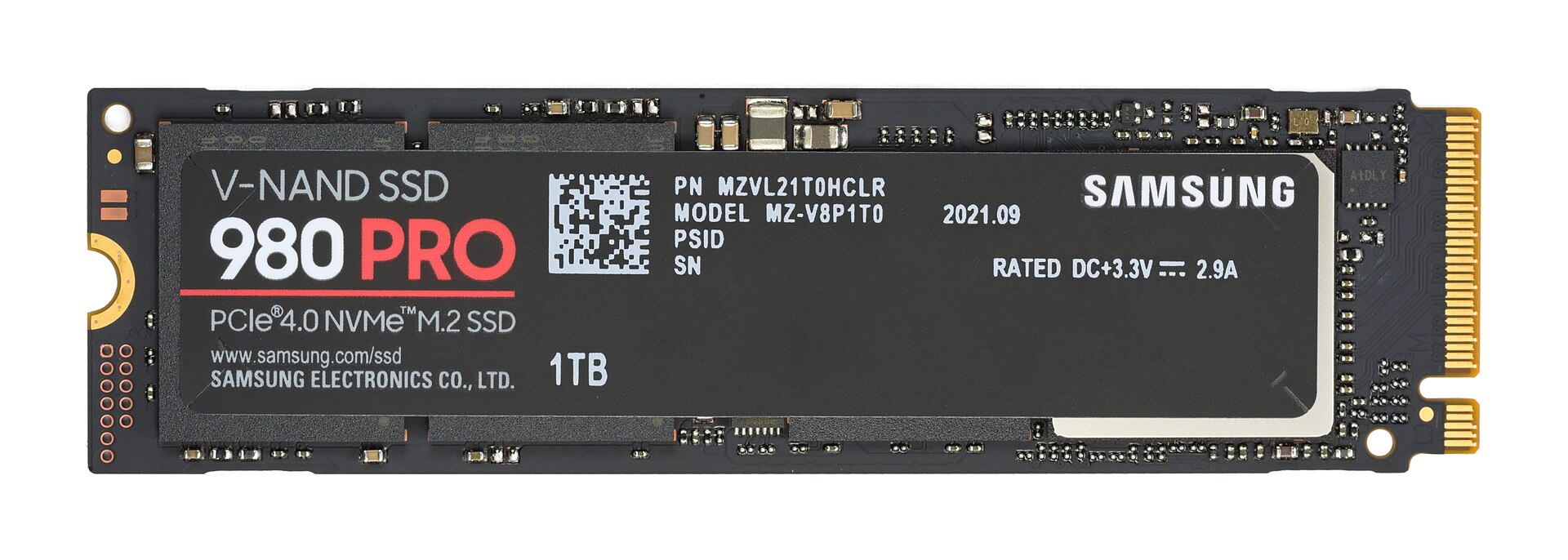
Figure 18.5 — The top side of a Samsung 980 PRO 1 TB SSD. Photo: D-Kuru, CC BY-SA 4.0, via Wikimedia Commons.

What you can see in Figure 18.5:
- A black circuit board about the size of a stick of chewing gum. It is an M.2 drive (a small card format, explained in Section 4).
- A black label reading "V-NAND SSD 980 PRO PCIe 4.0 NVMe M.2 SSD 1TB". That label tells you the maker's flash brand (V-NAND), the interface (PCIe 4.0, NVMe), the shape (M.2) and the size (1 TB).
- The label's small print gives the model number and the power rating (DC +3.3 V, 2.9 A), the electricity it needs.
- On the right is the gold edge connector, the row of contacts that plugs into the motherboard. The notch in it is the key, which stops you plugging it in the wrong way.
- On the left is a half-circle notch. A small screw goes through it to hold the drive down.
- Many tiny components sit around the label.
Note: The label sits on top of the chips, so you cannot see the flash chips or the controller in this photo. Under the label there is a controller chip and NAND flash chips. Some SSDs also have a DRAM chip. The inside is explained in this section.
   INSIDE A TYPICAL SSD (block view)

   ┌───────────────────────────────────────────────────┐
   │   Connector to the PC  (SATA or PCIe)             │
   └────────────────────────┬──────────────────────────┘
                            │
   ┌────────────────────────┴──────────────────────────┐
   │   CONTROLLER  (a small CPU + firmware, with FTL)  │◄── DRAM cache
   └─────┬──────────┬──────────┬──────────┬────────────┘     (some drives)
         │          │          │          │   (channels)
      ┌──┴──┐    ┌──┴──┐    ┌──┴──┐    ┌──┴──┐
      │NAND │    │NAND │    │NAND │    │NAND │
      │chip │    │chip │    │chip │    │chip │
      └─────┘    └─────┘    └─────┘    └─────┘
2.1 NAND Flash Memory Cells
What it is: Flash memory is memory that keeps its data with no power. NAND is the type of flash used in SSDs, USB sticks and phone storage. (The name comes from a kind of logic gate, "NOT AND", which describes how the cells are wired.)
How a cell holds data: A flash cell is a tiny transistor with a special layer that can trap electric charge. Think of a tiny bucket that holds electrons, sealed so well that they stay there for years.
- Adding charge to the bucket (programming) changes how the transistor behaves.
- To read, the controller checks how much charge is in the bucket by testing at what voltage the transistor turns on.
The amount of charge in the cell is read as a number of bits.
   ONE FLASH CELL (very simplified)

        Control gate  ───────────────  ◄── voltage applied here
        ───────────────────────────
        Insulator
        ┌─────────────────────────┐
        │  CHARGE TRAP  (● ● ●)   │ ◄── electrons stored here
        └─────────────────────────┘
        Insulator
   source ═══════ channel ═══════ drain
Bits per cell: The more levels of charge a cell can reliably tell apart, the more bits it stores.
| Type | Bits per cell | Charge levels | Speed | Lifetime | Cost per GB | Typical use |
|---|---|---|---|---|---|---|
| SLC (Single-Level) | 1 | 2 | Fastest | Longest | Highest | Servers, special uses, also used as a fast cache area |
| MLC (Multi-Level) | 2 | 4 | Fast | Long | High | Older high-end SSDs |
| TLC (Triple-Level) | 3 | 8 | Good | Medium | Moderate | Most consumer SSDs today |
| QLC (Quad-Level) | 4 | 16 | Slower | Shortest | Lowest | Cheap, big-capacity drives |
An easy way to think about it: a cell that stores 1 bit is like a light switch (on or off, easy to read). A cell that stores 4 bits is like a dimmer with 16 settings. It is much harder to tell setting 7 from setting 8 than to tell "on" from "off". So QLC cells take longer to read and write, and wear out sooner. Their advantage is that the same chip stores four times as much as SLC, so they cost less per gigabyte.
3D NAND (V-NAND): Early flash cells sat on one flat layer. To fit more, makers shrank the cells, but cells got too small and unreliable. The fix: build upward. In 3D NAND (Samsung calls it V-NAND, for Vertical NAND), the cells are stacked in dozens or even hundreds of layers, like a skyscraper instead of a bungalow. That gives much more space on the same small chip. This is why the label in Figure 18.5 says "V-NAND".
   2D NAND                       3D NAND (V-NAND)

   ░░░░░░░░░░░░░░░░░░           layer 100  ░░░░░░░░░░░░
   one flat layer               layer  99  ░░░░░░░░░░░░
                                  ...
                                layer   2  ░░░░░░░░░░░░
                                layer   1  ░░░░░░░░░░░░
Cells do wear out: Writing and erasing forces electrons through the thin insulator, and this slowly damages it. After many cycles, the cell can no longer hold its charge reliably. This is why SSD endurance matters (Section 3).
2.2 The Controller: The SSD's Brain
What it is: The controller is a small chip inside the SSD that runs everything. It is a tiny computer with its own processor cores and firmware (a built-in program). The PC sees a simple drive; the controller does all the hard work behind the scenes.
The controller's jobs:
| Job | What it means |
|---|---|
| Talk to the PC | Understand commands over SATA or NVMe |
| Talk to the flash | Read, write and erase NAND chips, using several parallel channels at once |
| Flash Translation Layer (FTL) | Keep a map from the PC's addresses to real flash locations (see below) |
| Error correction (ECC) | Flash makes errors by nature. The controller adds extra check data and fixes bit errors on every read |
| Garbage collection | Tidy up old data to create free space (Section 3) |
| Wear leveling | Spread wear evenly over all cells (Section 3) |
| Caching | Use SLC cache and DRAM to speed things up |
| Encryption | Many drives scramble data in hardware |
| Health reporting | Keep SMART counters (Section 3) |
Channels and parallelism: A single flash chip is slow, but the controller talks to many chips at once, in several channels (separate data paths). Reading from four or eight chips together multiplies the speed, like opening several checkout lanes at a supermarket. This parallelism is the secret of SSD speed.
The FTL (Flash Translation Layer): To explain it, we first need the rules of flash (2.3 and 2.4). The core idea is: the PC thinks it is writing to a fixed spot, but the SSD secretly puts the data wherever is convenient, and writes the address in a table.
   THE FTL MAP (logical to physical)

   What the PC says              The FTL table              Where it really is
   ─────────────────             ─────────────              ───────────────────
   "Write to address 100"  ──►   100 → block 7, page 3  ──► NAND block 7, page 3
   "Write to address 100"  ──►   100 → block 2, page 9  ──► NAND block 2, page 9
        (again, new data)         (table updated)             (old page marked stale)
Addresses the PC uses are called logical block addresses (LBAs). The places inside the flash are physical addresses. When the PC overwrites address 100, the SSD does not change the old spot. It writes the new data to a fresh page elsewhere, updates the table, and marks the old page as stale (out of date). The table is big (roughly 1 GB of table for every 1 TB of drive) and must be read very fast. That leads to the cache question.
DRAM cache, DRAM-less and HMB:
- With DRAM: Many SSDs have a DRAM chip that holds the FTL table for quick lookups.
- DRAM-less: Cheaper SSDs leave the chip out. They keep only a small part of the table in the controller and read the rest from flash when needed. This can slow random access.
- HMB (Host Memory Buffer): A feature of NVMe where a DRAM-less SSD borrows a little of the PC's RAM (often tens of megabytes) to hold part of the table. It makes DRAM-less SSDs faster, though usually not as fast as ones with their own DRAM.
The SLC write cache: To make writes feel quick, many TLC and QLC SSDs treat part of their flash as if it were SLC (storing only 1 bit per cell, which is much faster). New data goes there first, then is moved to normal TLC/QLC storage later. When you write a very large amount at once and the SLC cache fills up, the speed drops to the slower speed of the real storage. See Section 3.
2.3 Pages: The Smallest Write Unit
What it is: A page is a small group of flash cells. It is the smallest unit you can read or write. In current drives a page is typically a few kilobytes (for example 4 KB, 8 KB or 16 KB of user data, with extra bytes for error correction).
Your PC thinks in 4 KB or 512-byte pieces, but flash thinks in pages. The controller handles the match-up.
The key rule of flash writing:
A page can only be written if it is erased. A page cannot be changed in place. To erase, you must erase a whole block (see 2.4).
Think of writing in pencil on a page of a notebook that cannot be rubbed out one line at a time. You may only write on a blank line. To erase anything, you must tear out and clear a whole section of the notebook at once. So to "change" something, you write the new version on a fresh blank line and cross out (mark as stale) the old one.
| Action | Smallest unit | Speed (typical, roughly) |
|---|---|---|
| Read | Page | Fast (tens of microseconds) |
| Program (write) | Page | Slower (hundreds of microseconds) |
| Erase | Block (see 2.4) | Slowest (a few milliseconds) |
A microsecond is a millionth of a second. Even the slowest flash action is far faster than an HDD seek.
2.4 Blocks: The Smallest Erase Unit
What it is: A block is a group of many pages (often a few hundred, depending on the chip). It is the smallest unit that can be erased. Erasing a block sets every cell in it back to blank (all ones), ready to be written again.
   ONE NAND BLOCK (simplified; real blocks have hundreds of pages)

   ┌───────────────────────────────┐
   │ page 0   [ valid data       ] │
   │ page 1   [ valid data       ] │
   │ page 2   [ STALE (old data) ] │
   │ page 3   [ valid data       ] │
   │ page 4   [ STALE (old data) ] │
   │ page 5   [ blank (erased)   ] │  ◄── can be written
   │ page 6   [ blank (erased)   ] │  ◄── can be written
   │ page 7   [ blank (erased)   ] │  ◄── can be written
   └───────────────────────────────┘
        Erase works on the WHOLE block only.
A block is usually hundreds of kilobytes up to several megabytes. Several blocks form a plane, several planes form a die (one silicon piece), and several dies are stacked in one chip package.
   FLASH HIERARCHY (small to large)

   cell  ─►  page  ─►  block  ─►  plane  ─►  die  ─►  chip package
   (bits)   (read/    (erase     (group     (one     (what you see
             write)    unit)      of blocks) silicon) on the board)
Why does this rule make SSDs tricky? Imagine a block with 256 pages. Your PC changes just one tiny file that lives in one page. The SSD cannot erase just that page. Its options:
- Write the new data to a blank page elsewhere, mark the old one stale, update the map. (This is what really happens.)
- Later, when a block has become mostly stale pages, copy the few valid pages elsewhere and erase the whole block. That is garbage collection (Section 3).
This is the heart of SSD design. Everything in Section 3 (TRIM, wear leveling, over-provisioning, write amplification) exists because of this "write a page, erase a block" rule.
Wearing and blocks: Because each cell survives only a limited number of erase cycles, the controller counts erase counts per block, and tries to even them out. It also retires blocks that go bad and swaps in spare ones.
Comparing it to an HDD:
| Feature | HDD | SSD |
|---|---|---|
| Moving parts | Platters, arm, motor | None |
| Overwrite in place? | Yes | No (write to a new page, erase later) |
| Random access time | About 10-15 ms | About 0.05-0.1 ms |
| Shock resistance | Weak | Strong |
| Noise | Audible | Silent |
| Cost per GB | Lower | Higher (but falling) |
| Wear | Mechanical | Flash cells wear out with writes |
Summary
| Term | Plain meaning |
|---|---|
| SSD | Drive made of flash chips; no moving parts |
| NAND flash | Memory that keeps data without power |
| Cell | A tiny transistor with a trap for electric charge |
| SLC / MLC / TLC / QLC | 1 / 2 / 3 / 4 bits per cell. More bits: cheaper and denser, but slower and wears faster |
| 3D NAND / V-NAND | Cells stacked in many layers to fit more |
| Controller | The SSD's own small computer, running all the jobs |
| Channel | A separate path from the controller to flash; many work in parallel |
| FTL | The table that maps the PC's addresses to real flash places |
| DRAM / DRAM-less / HMB | Fast table memory on the drive / none / borrowed from PC RAM |
| SLC write cache | Part of the flash used in fast one-bit mode for new writes |
| Page | Smallest read and write unit (a few KB) |
| Block | Smallest erase unit (many pages) |
| Key rule | Write a page only if it is erased; erase only a whole block |