The Big Picture: How the Drive Meets the Computer
A drive is only useful if the computer can talk to it. Two things decide how well they talk:
- The physical connection (the plugs, cables or slots) — called the interface or bus.
- The language spoken over it — called the protocol.
A good comparison is a delivery service. The road is the interface (a country lane or a motorway). The delivery rules are the protocol (one van at a time, or hundreds of vans at once). Both matter.
| Interface | Protocol | Typical use |
|---|---|---|
| SATA | AHCI | Home HDDs and 2.5-inch SATA SSDs |
| SAS | SCSI commands | Servers and data centres |
| PCIe | NVMe | Fast SSDs (M.2, U.2, add-in cards) |
You met the PCIe and SATA "roads" in Chapter 4 (see Chapter 4, especially Section 2 on buses). Here we look at them from the drive's side.
4.1 SATA (AHCI Protocol)
What it is: SATA (Serial ATA) has been the standard way to connect HDDs and SSDs to PCs for many years. It replaced the old wide IDE ribbon cables (like the pins in Figure 18.1) with a thin cable. Serial means the bits travel one after another down one pair of wires in each direction, rather than many bits side by side.
The cables: A SATA drive uses two separate plugs: one for data, one for power. Look back at Figure 18.4, the underside of the 3.5-inch drive. At its front edge you can see both: the red flat data cable with a black latch plug, and the power plug with black, red, black and yellow wires.
Here is a very close look at the power plug.
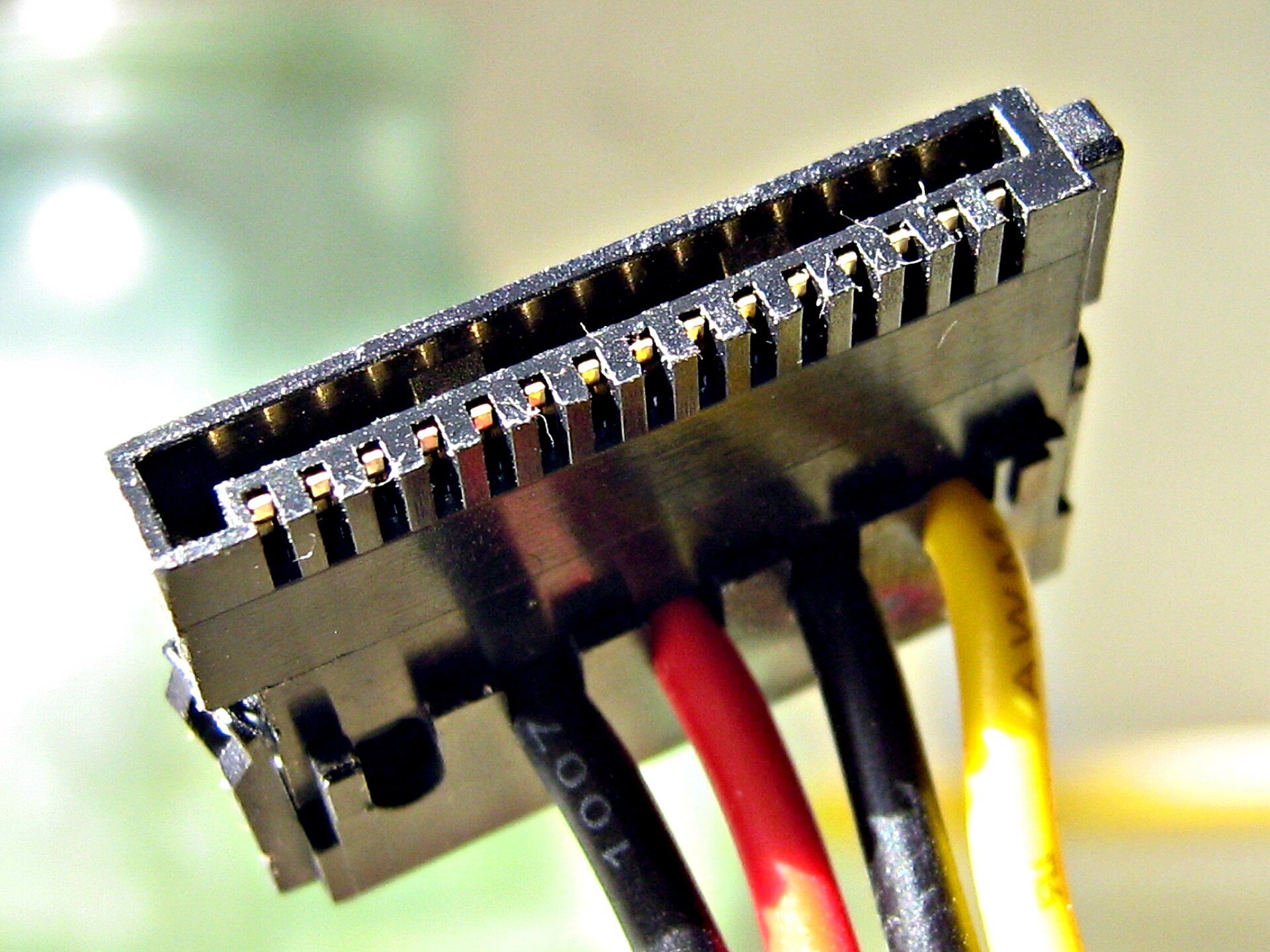
Figure 18.6 — A SATA power connector, very close up. Photo: FEXX (assumed by Commons), CC BY-SA 3.0, via Wikimedia Commons.

What you can see in Figure 18.6:
- A flat black plastic housing shaped like an L. The shape makes sure you can only plug it in the right way round.
- Gold contacts inside, to carry the electricity.
- Wires leaving at the bottom: black, red, black and yellow in this photo.
A real SATA power plug has 15 contacts in 5 groups: 3.3 V (orange wire), 5 V (red), 12 V (yellow), and grounds (black, the return path). The orange 3.3 V wire is not visible in this photo, because many power supplies leave it out. Drives mostly use 5 V (for electronics) and 12 V (for motors).
   SATA POWER PLUG (wire colours)

   black  = ground  (return path for current)
   red    = +5 V    (electronics)
   yellow = +12 V   (spindle motor and arm, in an HDD)
   orange = +3.3 V  (often not used; not visible in Figure 18.6)
The data cable is thin and flat, with 7 contacts. Each drive gets its own cable straight to a port on the motherboard (or an add-in card). It is limited to about 1 metre in length.
Speed: SATA has had three versions. The one you will find almost everywhere today is SATA III:
| Version | Link speed | Real-world maximum |
|---|---|---|
| SATA I | 1.5 Gbit/s | About 150 MB/s |
| SATA II | 3 Gbit/s | About 300 MB/s |
| SATA III | 6 Gbit/s | About 550-600 MB/s |
A Gbit/s is a billion bits per second. Dividing by 8 turns bits into bytes, and the link uses a little of its speed on encoding, so 6 Gbit/s ends up as roughly 600 MB/s at best, and about 550 MB/s in practice. This is why every SATA SSD seems to be "stuck" at about 550 MB/s: the road is the limit, not the SSD. A good hard drive (about 100-250 MB/s) fits easily inside SATA III.
AHCI (Advanced Host Controller Interface): This is the protocol (the delivery rules) SATA uses. It was designed in the days of spinning disks, which can do only a few things at once. AHCI has:
- One command queue
- Up to 32 commands waiting in that queue
That was plenty for an HDD. Remember NCQ from Section 1? AHCI is what allows NCQ's 32 queued commands. But a flash drive can do far more than 32 things at once, so AHCI becomes a bottleneck for fast SSDs.
Hot-swap and other facts: SATA supports hot plugging (connecting while the PC runs) when the controller and drive allow it. There is also eSATA, a rare cable type for external drives, which USB has largely replaced.
4.2 Other Interfaces: SAS, M.2, U.2 and mSATA
SAS (Serial Attached SCSI): SAS is the server relative of SATA. It uses a similar-looking connector, but with faster links (12 Gbit/s and 24 Gbit/s versions exist), two data paths per drive (so a drive stays reachable if one cable fails), longer cables and deeper command queues. SAS drives are mostly in data centres. A SAS controller can usually run SATA drives, but a SAS drive does not work on a plain SATA port.
Form factors: The form factor means the physical size and shape of the drive.
| Form factor | Shape | Interface | Notes |
|---|---|---|---|
| 3.5-inch | Large box | SATA, SAS | Desktop and server HDDs |
| 2.5-inch | Smaller box | SATA, SAS, U.2 | Laptop HDDs, SATA SSDs, some server SSDs |
| M.2 | Gum-stick card | SATA or PCIe (NVMe) | Common in modern PCs and laptops |
| mSATA | Small card | SATA only | Older small card format, replaced by M.2 |
| U.2 | 2.5-inch box with its own connector | PCIe (NVMe) | Servers and workstations |
| PCIe add-in card | Card for a big PCIe slot | PCIe (NVMe) | Used in servers and some desktops |
M.2 in detail: M.2 is a small card format. The name of each size is width and length in millimetres joined together. The most common is 2280, which means 22 mm wide and 80 mm long. Others are 2242, 2260 and 22110 (the long ones). The card slides into the slot on the board, and a single small screw at the far end holds it flat. Look back at the half-circle notch in Figure 18.5: that is where the screw goes.
Here is the other side of the same SSD.
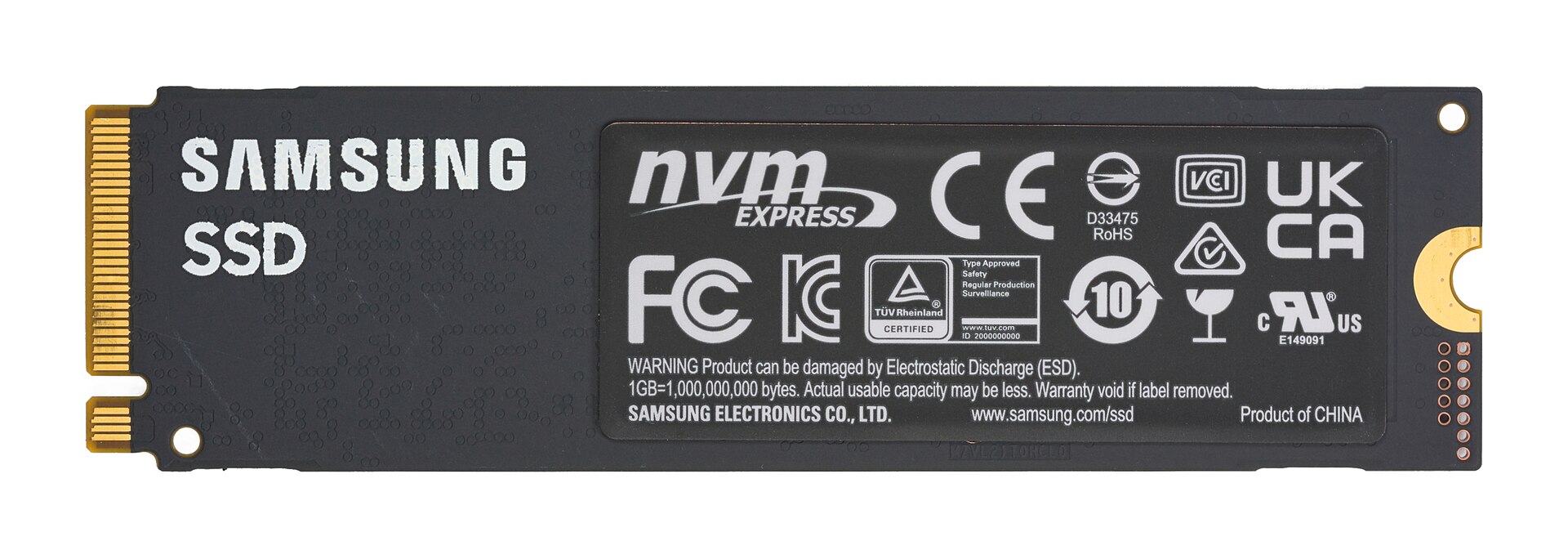
Figure 18.7 — The back side of the same SSD. Photo: D-Kuru, CC BY-SA 4.0, via Wikimedia Commons.

What you can see in Figure 18.7:
- "Samsung" and "SSD" lettering printed on the board.
- The gold connector is on the left in this photo (it is the same connector as on the right of Figure 18.5; the board is simply turned over).
- A large label with the "nvm express" logo. This tells you the drive speaks the NVMe protocol.
- Many small certification marks, and a warning about electrostatic discharge (ESD), a reminder that static electricity from your hands can damage the chips. Touch a metal part of the case before handling bare drives.
So an M.2 drive can have chips and labels on both sides (some have chips on only one side).
M.2 keys (the notches): The gold connector has one or two notches called keys. They are meant to stop wrong plug-ins.
| Key | Where you see it |
|---|---|
| M key | One notch. Used by NVMe SSDs (PCIe x4) and by some SATA M.2 SSDs |
| B key | One notch in a different place. Used by SATA M.2 SSDs and some small PCIe x2 drives |
| B+M key | Two notches. Used by many SATA M.2 SSDs |
Careful: SATA M.2 and NVMe M.2 drives can look very similar and may even fit the same slot. They are not the same speed. The motherboard's manual says whether each M.2 slot supports SATA, NVMe or both. Check it before you buy.
M.2 and PCIe: An NVMe M.2 drive does not use a data cable at all. Its gold contacts carry PCIe lanes straight from the motherboard. Remember from Chapter 4: a PCIe lane is one pair of wires for sending and one pair for receiving, and slots can have x1, x4, x8 or x16 lanes. NVMe drives almost always use x4 (four lanes).
Here is what PCIe slots look like on a real board.
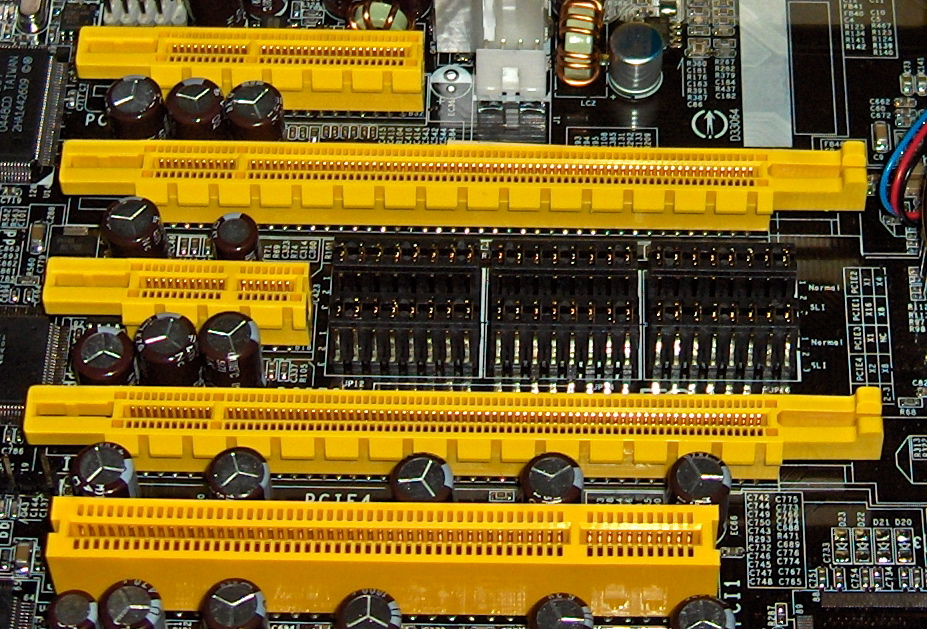
Figure 18.8 — PCIe slots of different lengths on a motherboard. A longer slot has more lanes. An NVMe SSD uses the same kind of lanes, just through the small M.2 connector instead. Photo: snickerdo, CC BY-SA 3.0, via Wikimedia Commons.
.jpg)
4.3 NVMe (PCIe-Based Protocol, Parallel Queues)
What it is: NVMe (Non-Volatile Memory Express) is a protocol designed from scratch for flash storage. It runs over PCIe. "Non-volatile" simply means "keeps data when power is off". Because it uses PCIe, the drive is connected directly to the CPU or the chipset, with no separate SATA controller in between.
Speed by PCIe generation (x4 link): Each new PCIe generation roughly doubles the speed.
| PCIe version | Peak, x4 link (about) | Typical SSD "up to" speed (about) |
|---|---|---|
| PCIe 3.0 x4 | 4 GB/s | About 3.5 GB/s |
| PCIe 4.0 x4 | 8 GB/s | About 7 GB/s |
| PCIe 5.0 x4 | 16 GB/s | About 14 GB/s |
These are about numbers. Real speeds depend on the drive and on what you do (the large sequential speeds on the box are best-case figures).
Interface-speed comparison:
   BEST-CASE SEQUENTIAL SPEED (about; each block is roughly 500 MB/s)

   HDD (7,200 RPM)      ▌                            ~ 200 MB/s
   SATA III SSD         █                            ~ 550 MB/s
   NVMe, PCIe 3.0 x4    ███████                      ~ 3,500 MB/s
   NVMe, PCIe 4.0 x4    ██████████████               ~ 7,000 MB/s
   NVMe, PCIe 5.0 x4    ████████████████████████████ ~ 14,000 MB/s
| Drive type | Link | Real-world sequential speed (about) | Random access delay |
|---|---|---|---|
| HDD 7,200 RPM | SATA III | 100-250 MB/s | 10-15 ms |
| SATA SSD | SATA III | 500-550 MB/s | 0.05-0.1 ms |
| NVMe SSD (PCIe 3.0) | PCIe x4 | up to 3,500 MB/s | around 0.02-0.1 ms |
| NVMe SSD (PCIe 4.0) | PCIe x4 | up to 7,000 MB/s | around 0.02-0.1 ms |
Check your lanes: Some motherboard M.2 slots are wired to the CPU (fastest, direct) and some to the chipset (which shares a link to the CPU, see Chapter 4 Section 1). Also a PCIe 4.0 SSD in a PCIe 3.0 slot works but only at PCIe 3.0 speed. The link runs at the slowest common speed.
How an NVMe command travels: NVMe uses queues in the PC's RAM.
   NVMe: SUBMIT AND COMPLETE (simplified)

   1. Software puts a command in a SUBMISSION queue (in RAM)
   2. Software rings a "doorbell" (writes to a register on the drive)
   3. The drive fetches the command, does the work (using DMA)
   4. The drive puts a result in a COMPLETION queue (in RAM)
   5. The drive raises an interrupt (often an MSI-X one, per CPU core)
DMA, interrupts and MSI-X were all explained in Chapter 4 (Sections 3 and 4). NVMe uses them all: it is a good example of how the pieces of a PC work together.
4.4 Why NVMe Is Dramatically Faster
NVMe is faster for two reasons: the PCIe road is much wider, and the rules are built for flash.
Reason 1: A wider road. SATA III is a single 6 Gbit/s lane. An NVMe drive has four PCIe lanes, and PCIe 4.0 lanes are each faster than a whole SATA link. So there is simply more bandwidth.
Reason 2: Better rules (queue depth). Queue depth is the number of requests that can wait to be handled at once. Flash chips (and many channels inside the SSD) can do many things in parallel, but only if the PC can send many requests at once.
| AHCI (SATA) | NVMe | |
|---|---|---|
| Number of queues | 1 | Up to about 64,000 (64K) |
| Commands per queue | 32 | Up to about 64,000 (64K) |
| Interrupts | Typically a single path | Many (MSI-X), can go per CPU core |
| Design built for | Spinning discs | Flash and parallelism |
| Command overhead | Higher (older, more steps) | Lower (fewer, simpler steps) |
An everyday picture:
   AHCI (SATA)                          NVMe

   one checkout, 32 people queueing     up to 64K checkouts,
   in a single line                     each with its own line of up to 64K

   ┌──────────────┐                     ┌─────────┐ ┌─────────┐ ┌─────────┐
   │ cashier 1    │                     │ lane 1  │ │ lane 2  │ │ lane 3  │ ...
   └──────────────┘                     └─────────┘ └─────────┘ └─────────┘
   all CPU cores share it               each CPU core can have its own lane
In real use a PC rarely needs 64K queues. But the key point is that each CPU core can have its own queue, so cores don't have to fight over one shared queue (a lock). Less waiting means more speed and lower delay, and it uses less CPU time per request.
Where you notice it: For loading Windows and everyday apps, a SATA SSD already feels fast, and NVMe is only a little quicker. NVMe shines for very large file copies, video editing, big game loading, databases, and heavy multitasking, where many requests arrive together.
Other NVMe extras:
- Lower delay: The path from CPU to flash is shorter.
- Features for flash: Namespaces (virtual sections of the drive), better power states, and more.
- Windows support: Windows 8.1 and later include a built-in NVMe driver (called
stornvme). In Device Manager, an NVMe drive shows up under Storage controllers as an NVM Express Controller.
Choosing a drive in one table:
| If you have... | Best match |
|---|---|
| An old PC with only SATA ports | SATA SSD (2.5-inch) |
| A modern board with M.2 slots (check which type!) | NVMe M.2 SSD |
| A big storage need on a budget | 3.5-inch HDD over SATA |
| A server | SAS drives or U.2 NVMe |
Summary
| Term | Plain meaning |
|---|---|
| Interface vs protocol | The road (plugs and wires) vs the delivery rules |
| SATA III | 6 Gbit/s link, about 550-600 MB/s real; the limit for SATA SSDs |
| AHCI | SATA's protocol: one queue of 32 commands, built for spinning disks |
| SATA power plug | 15 contacts: 3.3 V orange, 5 V red, 12 V yellow, grounds black |
| SAS | Server version of SATA: faster, dual-path, deeper queues |
| M.2 | Small card format; 2280 = 22 mm × 80 mm; SATA or NVMe |
| M / B keys | Notches on an M.2 connector; check the board manual because SATA and NVMe cards can look alike |
| U.2 / mSATA | 2.5-inch NVMe for servers / old small SATA card |
| NVMe | Flash protocol over PCIe, usually x4 lanes |
| PCIe 3.0 / 4.0 / 5.0 x4 | About 3.5 / 7 / 14 GB/s in real SSDs |
| Queue depth | Number of requests that can wait at once |
| AHCI vs NVMe | 1 queue of 32 commands vs up to 64K queues of 64K commands |