The Big Picture: From "Read This" to Electrical Signals
Section 1 showed the whole stack. Now we zoom into the bottom three layers: the ones that finally talk to the real hardware. These are all drivers: programs that run in kernel mode and know how to control a device. (Drivers and IRPs are explained in Chapter 13.)
The bottom of the stack has a clever design: one standard top, one standard middle, and a small custom bottom.
┌───────────────────────────────────────────────┐
│ Disk class driver   disk.sys                  │  same for every disk
├───────────────────────────────────────────────┤
│ Storage port driver storport.sys              │  same for most controllers
├───────────────────────────────────────────────┤
│ Miniport driver     stornvme.sys / storahci.sys│  one per controller type
╞═══════════════════════════════════════════════╡
│ Hardware: NVMe SSD, SATA drive, USB bridge ...│
└───────────────────────────────────────────────┘
Why this design? Microsoft writes the hard, shared parts once (the queues, the timers, the error handling). A hardware maker, or Microsoft for common controllers, only writes a small miniport for the details of one chip. That makes drivers shorter and safer.
6.1 The Disk Class Driver (disk.sys)
What it is: A class driver handles everything that is the same for a whole class of devices. disk.sys is the class driver for disks. It does not care whether the disk is a spinning hard drive, a SATA SSD, an NVMe SSD, or a USB drive. To it, every disk is a long row of numbered blocks.
What it does:
| Job | Explanation |
|---|---|
| Turns file requests into disk commands | Takes an IRP such as "read 8 blocks from block 1,008,000" and builds a standard SCSI-style command. (SCSI is an old, very widely used command language for storage; Windows uses its shape even for disks that are not SCSI.) |
| Learns the disk's size and sector size | At startup it asks the device "how many blocks, and how big is each?" |
Creates the \Device\Harddisk0\DR0 style names | These are internal names; Windows shows them as Disk 0, Disk 1... |
| Passes up partitions | Works with the partition manager (partmgr.sys) from Section 1 so each partition becomes a volume |
| Handles flush and cache commands | "Write this out for real now" requests, used when a program says it must be saved safely |
| Shows health and size to tools | The values Get-Disk and Disk Management show start here |
Does one disk.sys serve every disk? One driver, many instances: Windows creates one device object per disk, all run by the same driver code.
6.2 Port and Miniport Drivers (storport)
What it is: The port driver (storport.sys) is the "shared engine" below the class driver. A miniport driver plugs into it and knows one hardware family.
Storport's jobs (common to all controllers):
| Job | Plain meaning |
|---|---|
| Queues | Holds many requests waiting for the controller, not just one at a time |
| Timeouts | Starts a timer for every request. If the disk never answers, storport tries to recover |
| Resets | If a device is stuck, it can reset the device, or the whole controller bus, then retry |
| Power | Helps spin down or wake devices, with the power system from Chapter 4 |
| Hot plug | Notices a disk arriving or leaving and tells Plug and Play |
| Interrupts and DMA | Sets up the memory areas the device uses and handles the finishing "I'm done" interrupt |
The miniports you will meet:
| Miniport | Controller | Where you find it |
|---|---|---|
storahci.sys | AHCI (Advanced Host Controller Interface), the standard way an OS talks to SATA ports | SATA SSDs and hard drives; shown as "Standard SATA AHCI Controller" in Device Manager |
stornvme.sys | NVMe (Non-Volatile Memory Express), the standard for SSDs connected straight to PCIe | M.2 and PCIe SSDs; shown as "Standard NVM Express Controller" |
usbstor.sys and UASP drivers | USB storage | Pen drives, USB hard drives (these use a different route to reach the disk class driver) |
| Vendor miniports | RAID or special controllers (for example Intel RST) | If Intel RST or a RAID card is in use |
(usbstor.sys is not a storport miniport in the strict sense, but it fills the same "talk to the hardware" role for USB.)
Windows tip: Open Device Manager → Storage controllers and Disk drives. You will see "Standard NVM Express Controller" under controllers, and your SSD's brand name under Disk drives. Right-click one, choose Properties → Driver → Driver Details to see the real driver file names.
6.3 Talking to AHCI and NVMe Controllers
Both are controllers: small chips (or parts of a chip) that sit between the CPU and the storage device. The miniport does not move wires; it writes numbers into the controller's registers and into queues in RAM.
AHCI (SATA):
- A device-side chip called the HBA (Host Bus Adapter) sits in the chipset (the PCH from Chapter 4).
- It supports one command queue per port with up to 32 commands waiting (called NCQ, Native Command Queuing).
- This design was made when hard drives were slow, and it becomes a bottleneck for very fast SSDs.
NVMe (PCIe SSD):
- Built for flash memory and the PCIe bus.
- It supports up to 65,535 queues, each up to 65,536 commands deep (the maximum the specification allows; real SSDs use far fewer). Typically Windows uses one pair of queues per CPU core, so cores do not fight for a lock.
- Each queue pair has a submission queue (requests going to the SSD) and a completion queue (answers coming back).
| AHCI (SATA) | NVMe (PCIe) | |
|---|---|---|
| Queues | 1 | Up to 65,535 |
| Commands per queue | 32 | Up to 65,536 |
| Link | SATA cable, about 600 MB/s at best | PCIe lanes, several GB/s |
| Interrupt style | Usually one | MSI-X, one per queue |
| Miniport | storahci.sys | stornvme.sys |
What happens for one command (NVMe style):
1. Miniport writes the command into a submission queue in RAM
2. Miniport "rings the doorbell": writes the new queue position into
   a register on the SSD (MMIO, from Chapter 4)
3. The SSD fetches the command from RAM by itself (DMA)
4. The SSD reads the flash and writes the data into the buffer in RAM (DMA)
5. The SSD writes a "done" note into the completion queue
6. The SSD sends an interrupt (MSI-X) to the CPU core that asked
7. The driver's interrupt handler marks the request complete;
   the IRP travels back up
This is the DMA and interrupt story from Chapter 4 in action. The CPU does not copy a single byte of the file: it only sends the order and receives the "done" tap.
Here is a real NVMe SSD, the kind of hardware these drivers talk to:
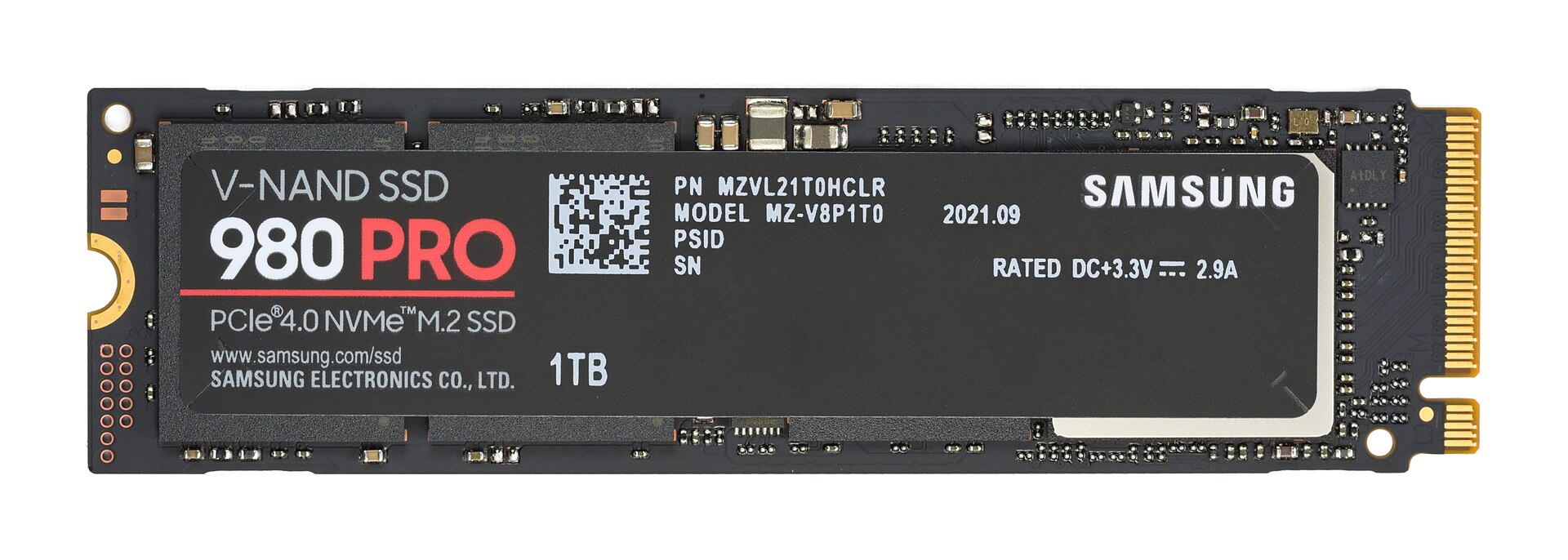
Figure 20.4 — A Samsung 980 PRO NVMe SSD (M.2 stick). stornvme.sys talks to the controller chip on this board over PCIe, using queues in RAM and DMA. Photo: D-Kuru, CC BY-SA 4.0, via Wikimedia Commons.

(More about the SSD itself is in Chapter 18.)
6.4 When Things Go Wrong: Resets and Timeouts
Drivers are also the place where hardware trouble shows up.
| Symptom | What probably happened |
|---|---|
| Whole PC freezes for seconds, then continues | A request timed out and storport reset the device |
| Event Viewer shows disk event "The device, \Device\Harddisk1\DR1, did not respond within the timeout period" | Disk or cable not answering; try another cable or port |
| Event Viewer shows "reset to device, \Device\RaidPort0, was issued" | Storport reset the controller (a "RaidPort" is the name storport uses for its ports) |
| Disk disappears and returns | Hot-unplug or power glitch noticed by Plug and Play |
Blue screen mentioning storport.sys | A miniport or filter driver misbehaved; update the vendor driver |
Tip: Press
Win + X, choose Event Viewer, then open Windows Logs → System and filter by source disk, storahci or stornvme. Repeated entries are an early warning that a drive or cable is failing. Back up first.
Summary
| Term | Plain meaning |
|---|---|
Class driver (disk.sys) | Treats every disk as numbered blocks; builds standard commands |
Port driver (storport.sys) | Shared engine: queues, timeouts, resets, power |
| Miniport driver | Small driver for one controller type |
storahci.sys / AHCI | SATA driver; 1 queue, 32 commands |
stornvme.sys / NVMe | PCIe SSD driver; many queues, very deep |
| Submission / completion queue | Orders going in / answers coming out |
| Doorbell | Register write that says "new work is waiting" |
| DMA + MSI-X | Device moves data itself, then interrupts the right core |