The Big Picture: What Is a Bus?
A bus is a set of wires that carries data between parts of the computer. Think of it as a road. Some roads are wide and fast (a highway), some are narrow and slow (a village lane). The motherboard has many roads, each built for a different job.
Two things decide how good a road is:
| Property | Meaning | Road example |
|---|---|---|
| Width | How many bits travel side by side | Number of lanes |
| Speed | How many times per second data moves | Speed limit |
Data moved per second = width × speed. That is why a wide, slow bus can match a narrow, fast one.
2.1 The System Bus / Front-Side Bus (FSB)
What it is: In older computers, the front-side bus was the one big road between the CPU and the northbridge chip (Section 1). RAM and graphics traffic went along it too.
The problem: Everyone shared it. The CPU, RAM and graphics all waited their turn on the same road, and it was a parallel bus (many wires side by side), which becomes hard to speed up because the wires interfere with each other.
The fix: Move the traffic off the shared road.
Year   What replaced the FSB                      Who
────   ─────────────────────────────────────      ─────────
2003   HyperTransport (point-to-point links)      AMD
2008   QPI - QuickPath Interconnect               Intel
2017+  Infinity Fabric                            AMD (Ryzen/EPYC)
today  Memory controller is INSIDE the CPU        both
2.2 CPU-to-CPU and CPU-to-chipset links (QPI, Infinity Fabric)
These new links are point-to-point: each link joins exactly two things, like a private phone line, not a party line. Nobody has to wait. On servers with two CPUs, a QPI or Infinity Fabric link lets one CPU read the other CPU's RAM. On desktops, the same idea links the different pieces ("chiplets") inside a Ryzen processor.
2.3 PCIe (PCI Express) — The Main Road for Fast Parts
What it is: PCIe is the standard link for graphics cards, NVMe SSDs, network cards and more. It replaced the older PCI and AGP slots.
Here is a real board with several slot types:
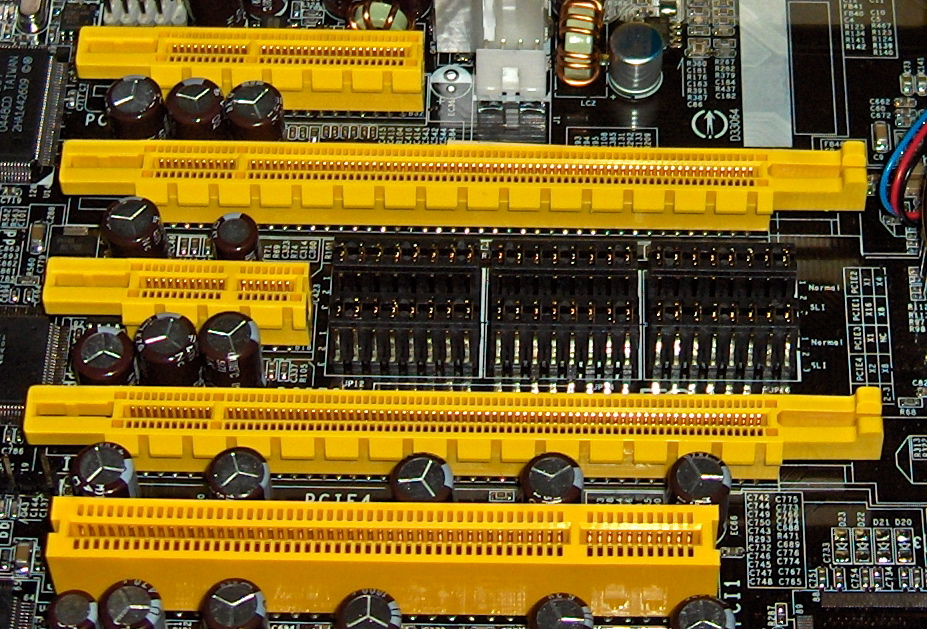
Figure 4.5 — Slots on a real motherboard. From the top: a short slot (x4), a long slot (x16), a very short slot (x1), another x16, and an old white PCI slot at the bottom. Longer slot = more lanes. Photo: snickerdo, CC BY-SA 3.0, via Wikimedia Commons.
.jpg)
Lanes. One PCIe lane is two pairs of wires: one pair to send, one pair to receive. Both work at the same time. A slot can have 1, 4, 8 or 16 lanes. That is what "x1", "x4", "x16" mean.
x1 slot  :  ═  (1 lane)
x4 slot  :  ═══════  (4 lanes)
x16 slot :  ═══════════════════════════════  (16 lanes)
A card also fits in a longer slot than it needs (an x4 card works in an x16 slot). The slot's electrical lanes can be fewer than its physical length, so always read the board manual.
Speed by generation. Each new version doubles the speed per lane:
| Version | Per lane (each direction) | x4 slot | x16 slot | Typical year |
|---|---|---|---|---|
| PCIe 1.0 | 250 MB/s | 1 GB/s | 4 GB/s | 2003 |
| PCIe 2.0 | 500 MB/s | 2 GB/s | 8 GB/s | 2007 |
| PCIe 3.0 | about 985 MB/s | about 3.9 GB/s | about 15.8 GB/s | 2010 |
| PCIe 4.0 | about 1.97 GB/s | about 7.9 GB/s | about 31.5 GB/s | 2017 |
| PCIe 5.0 | about 3.94 GB/s | about 15.8 GB/s | about 63 GB/s | 2019 |
| PCIe 6.0 | about 7.5 GB/s | about 30 GB/s | about 121 GB/s | 2022 |
Both ends agree to use the fastest version and widest width both support. An old card in a new slot works, just at the old speed.
How devices are named. Every PCIe device has an address made of three numbers: Bus : Device : Function (written B:D.F, like 01:00.0). The operating system uses it to find each device. Windows shows it in Device Manager (see the Lab).
Splitting lanes. The CPU has a fixed number of lanes. One x16 graphics slot can sometimes split into two x8 slots (this is called bifurcation). That is how a board gives two graphics cards half the lanes each, or lets a cheap card hold four NVMe SSDs.
2.4 USB Architecture (Hubs and Cascading)
What it is: USB (Universal Serial Bus) is the "plug anything in" connection. Unlike PCIe, one USB controller feeds many devices through hubs.
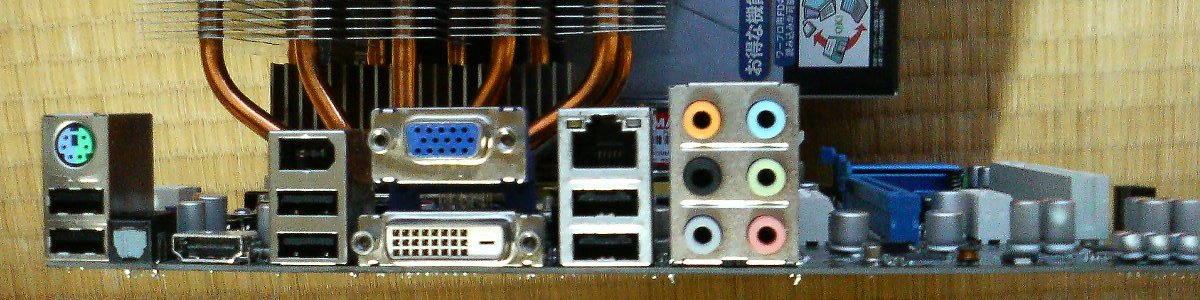
Figure 4.6 — The back panel (called the I/O panel) of a real motherboard. You can see USB, network (Ethernet), video (VGA, DVI, HDMI), six audio jacks and two old round PS/2 sockets for keyboard and mouse. Photo: Hitachi-Train, public domain, via Wikimedia Commons.

Who is in charge? The host controller (inside the PCH or CPU) is the boss. A USB device never speaks first. The host asks each device in turn: "Do you have anything for me?" (this is called polling).
The tree. Devices connect in a tree shape through hubs:
        Host controller (in the PCH)
                  │
             Root hub
         ┌────────┼────────┐
      Mouse    Hub A      Keyboard
             ┌───┴────┐
         Flash drive  Hub B
                     ┌─┴──┐
                  Webcam  Printer
| Limit | Value |
|---|---|
| Devices per host controller | up to 127 |
| Hub levels (cascade depth) | up to 5 hubs deep |
| Power per port (USB 2.0) | 5 V, 0.5 A |
Speeds:
| Name | Top speed | Connector you may see |
|---|---|---|
| USB 2.0 | 480 Mbit/s (60 MB/s) | Rectangle (Type-A), mini, micro |
| USB 3.0 / 3.2 Gen 1 | 5 Gbit/s | Blue Type-A |
| USB 3.2 Gen 2 | 10 Gbit/s | Type-A / Type-C |
| USB4 / Thunderbolt 3, 4 | 40 Gbit/s | Type-C only |
(Divide Gbit/s by 8 to get GB/s. So 5 Gbit/s is about 0.6 GB/s.)
Practical tip: All devices behind one hub share that hub's speed. Plug your fast external SSD into a port of its own, not into a crowded hub.
2.5 SATA and SAS Controllers
What it is: SATA and SAS are the buses for storage drives (hard drives and 2.5-inch SSDs).
SATA (Serial ATA):
- One drive per port, with a thin cable. (Older IDE ribbon cables shared one cable between two drives.)
- Controller lives in the PCH. It follows a standard called AHCI that the operating system understands.
| SATA version | Speed | Real-world MB/s |
|---|---|---|
| SATA I | 1.5 Gbit/s | about 150 |
| SATA II | 3 Gbit/s | about 300 |
| SATA III | 6 Gbit/s | about 600 |
SAS (Serial Attached SCSI) is the "business" version used in servers. It has two paths to each drive (so a drive keeps working if one cable fails) and supports many more drives through expanders. A SAS controller can also run SATA drives; the reverse does not work.
NVMe is different. An NVMe SSD does not use SATA at all. It plugs into an M.2 slot and talks over PCIe lanes (usually x4). That is why NVMe SSDs are 5 to 20 times faster than SATA SSDs.
SATA SSD:   CPU ── PCH ── SATA cable ── SSD          (about 550 MB/s)
NVMe SSD:   CPU ───────── PCIe x4 ───── SSD          (about 3,500 – 14,000 MB/s)
2.6 I²C and SMBus (The "Whisper" Buses)
What it is: Not every message is big. Sensors, fan controllers and tiny chips only need to say things like "temperature is 52 °C". They use a very simple two-wire bus:
| Wire | Job |
|---|---|
| SDA | The data |
| SCL | The clock (the beat) |
Every device on the bus has its own address. The master chip calls an address; only that device answers. SMBus is a slightly stricter version of I²C used on PCs.
Where you meet it:
- RAM sticks carry a tiny memory chip called SPD. At boot the board reads it over SMBus to learn the RAM's size and speed. (Chapter 3 mentioned this.)
- Temperature and fan chips.
- Battery and power chips on laptops.
- Lighting (RGB) controllers.
Summary
| Bus | Used for | Speed range |
|---|---|---|
| FSB (old) | CPU ↔ northbridge | replaced by QPI / Infinity Fabric |
| PCIe | Graphics, NVMe SSDs, fast cards | 250 MB/s per lane up to 7.5 GB/s per lane |
| USB | Anything you plug in | 60 MB/s to 5 GB/s |
| SATA | Hard drives, 2.5" SSDs | up to 600 MB/s |
| SAS | Server drives | up to 3 GB/s and more |
| I²C / SMBus | Sensors, RAM info chips | very slow (kilobytes per second) |