4.1 What Is DMA?
What it is: DMA (Direct Memory Access) lets a device move data straight to or from RAM without the CPU copying every byte.
Story time. You are a manager (the CPU). A truck arrives with 1,000 boxes (data from a disk). Two ways to unload it:
- Without DMA: You carry all 1,000 boxes yourself, one by one. You can do nothing else.
- With DMA: You tell a warehouse worker: "Put these boxes on shelf 7. Call me when you're done." You go back to your own work.
WITHOUT DMA (the CPU does the copying)

Disk ──► CPU ──► RAM        CPU is busy for the whole transfer
         ▲
         └── copies every byte, one by one

WITH DMA (the device writes to RAM by itself)

Disk ═══════════► RAM       CPU is free to run your programs
         ▲
CPU:  "start"        (a short setup)
CPU:  ........ free ........
Disk: "finished!"    (an interrupt, from Section 3)
4.2 Why DMA Matters
| Without DMA (called PIO, Programmed I/O) | With DMA |
|---|---|
| CPU is stuck copying | CPU is free |
| Slow: the CPU is the bottleneck | Fast: devices run at full speed |
| 100% CPU usage for a big copy on very old PCs | A big copy uses almost no CPU |
This is why a modern PC can download a file, play music and let you type all at once. Every fast device — disk, network card, graphics card, sound card — uses DMA.
4.3 The DMA Controller
What it is: The thing that does the moving.
The old way: a shared chip. Early PCs had a DMA controller chip that served all devices. It had a few channels, each used by one device (one for the floppy drive, one for sound, and so on).
Here is a real one:
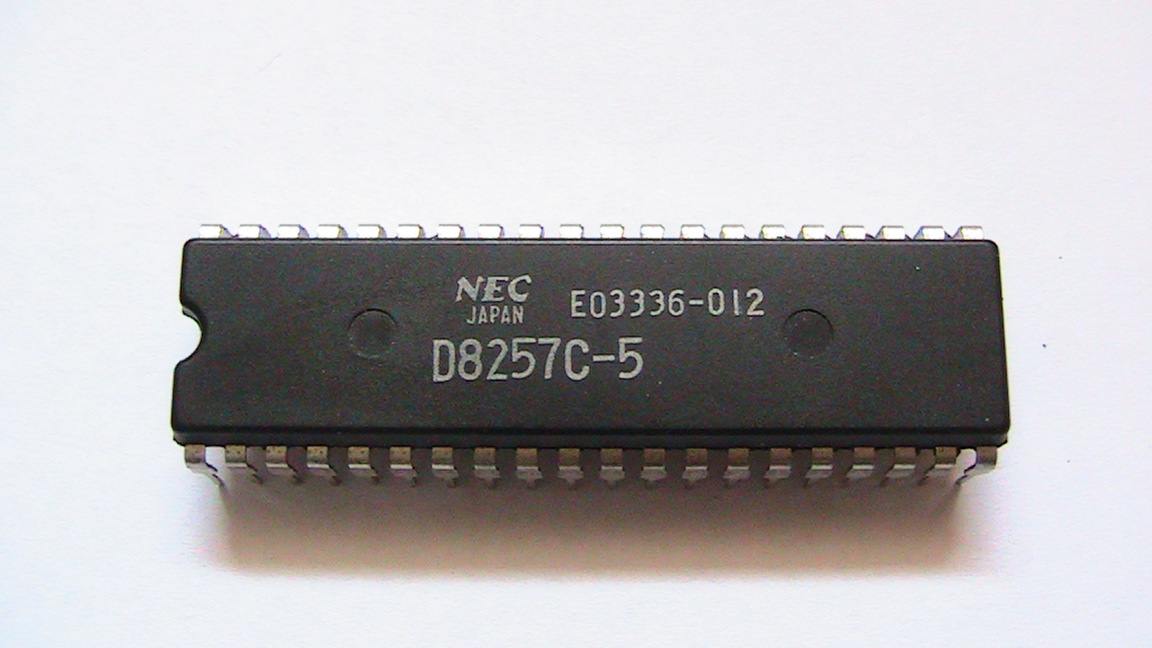
Figure 4.7 — A DMA controller chip (an NEC D8257C-5, a copy of Intel's 8257). It has 4 channels. The original IBM PC used the similar Intel 8237. Photo: JWBE, CC BY-SA 3.0, via Wikimedia Commons.

You told the chip three things: where in RAM, how many bytes, and which direction. Then it did the job.
The modern way: every device is its own boss. Today, fast devices have a DMA engine built into themselves. The device becomes a bus master: it can take control of the bus (PCIe) and read or write RAM on its own. The old shared chip is almost gone.
4.4 DMA Descriptors
What it is: A descriptor is a small "work order" saved in RAM. It says: "Move N bytes from here to there."
┌──────────────── one descriptor ────────────────┐
│ Address in RAM : 0x7F3A_0000                    │
│ Length         : 4,096 bytes                    │
│ Direction      : device → RAM                   │
│ Flags          : "raise an interrupt when done" │
└─────────────────────────────────────────────────┘
Scatter-gather. Your data in RAM is often not in one piece. (Chapter 3: virtual memory splits it into 4 KB pages scattered around.) With scatter-gather, the CPU writes a list of descriptors, one per piece. The device follows the list by itself.
 Descriptor list                 RAM
┌─────────────┐                ┌────────┐
│ piece 1 ────┼───────────────►│ chunk A│
│ piece 2 ────┼───────┐        ├────────┤
│ piece 3 ────┼──┐    └───────►│ chunk B│
└─────────────┘  │             ├────────┤
                 └────────────►│ chunk C│
                               └────────┘
Rings. Real devices use a circular list called a ring (or queue). The CPU adds work at one end, the device takes work from the other, and they chase each other round and round. Network cards and NVMe SSDs work like this. An NVMe SSD can have thousands of queued jobs at once. That is part of why it is so fast.
4.5 DMA and Cache Coherency
The problem: The CPU keeps recent data in its cache (Chapter 2). A device can change RAM without the CPU knowing. Then the cache holds an old copy, and the CPU reads stale data.
1. CPU has a copy of "X = 5" in its cache.
2. A network card uses DMA and writes "X = 9" into RAM.
3. CPU reads X from its cache and gets 5.   ← WRONG! (stale data)
How it is solved:
| Method | Idea |
|---|---|
| Snooping (x86 PCs) | The hardware watches DMA writes and throws away or updates matching cache copies automatically. You never notice. |
| Manual (some other chips) | The driver must "flush" or "invalidate" the cache by hand before and after a DMA transfer. |
Safety: the IOMMU. DMA is powerful: a device can write anywhere in RAM. A faulty or malicious device (for example, a bad USB or Thunderbolt gadget) could read your passwords out of memory. An IOMMU (Intel VT-d, AMD AMD-Vi) is like the MMU from Chapter 3, but for devices: each device only sees the pages it was given. On Windows this protection is called Kernel DMA Protection (you can see it in msinfo32, see the Lab).
Summary
| Term | Plain meaning |
|---|---|
| DMA | Devices move data to RAM without the CPU copying |
| PIO | The old way: the CPU copies every byte |
| Bus master | A device allowed to drive the bus itself |
| Descriptor | A "move this" work order stored in RAM |
| Scatter-gather | A list of descriptors for data in many pieces |
| Ring / queue | A circular list shared by the CPU and the device |
| Cache coherency | Making sure the CPU doesn't read stale cached data |
| IOMMU | Keeps each device inside its own memory area |