5.1 Power Distribution: From the Wall to the Chips
Your PC parts need different kinds of electricity. The power supply (PSU) turns the wall power (AC) into a few steady low voltages (DC), and sends them through cables. Here are the real connectors:
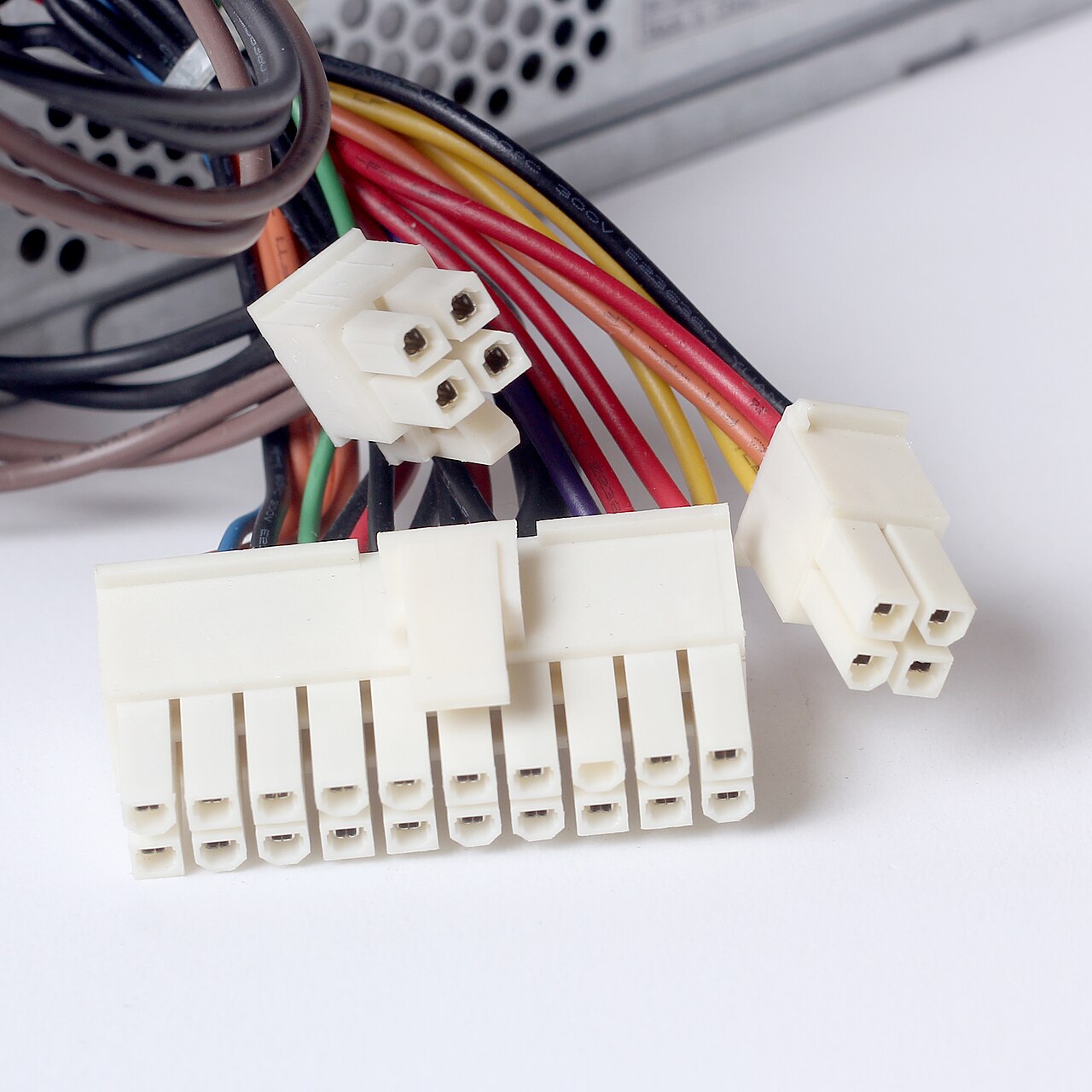
Figure 4.8 — Plugs from a power supply. The large one on the left is the main motherboard connector (20 or 24 pins). The smaller ones feed the CPU, graphics cards and drives. Photo: Dmitry Makeev, CC BY-SA 4.0, via Wikimedia Commons.

| Connector | Goes to | Notes |
|---|---|---|
| 24-pin ATX (20+4) | Motherboard | Main power, plus the on/off and standby signals |
| 8-pin (or 4+4) EPS/CPU | Near the CPU socket | Feeds the VRM from Section 1 |
| 6 / 8-pin PCIe | Graphics card | Extra power for powerful cards |
| SATA power | Drives | 3.3, 5 and 12 V |
Colour code (the same on almost every PSU):
| Wire colour | Voltage | Used for |
|---|---|---|
| Yellow | +12 V | CPU, graphics card, fans, motors |
| Red | +5 V | USB ports, drives, some chips |
| Orange | +3.3 V | RAM-related chips, M.2 slots |
| Purple | +5 V standby | Always on, even when the PC is "off" |
| Black | 0 V (ground) | The return path |
| Green | "turn on" signal | Short to ground to switch the PSU on |
5.2 Multiple Voltage Rails
A rail is one power line at one voltage. A PC has several, because different chips need different voltages: a chip that runs at 1 V would be destroyed by 12 V.
        PSU                        Motherboard turns these into many more
   ┌─────────┐
   │  +12 V ─┼──► VRM ───► ~1 V   CPU core
   │         │──► VRM ───► 1.2 V  RAM (DDR4)
   │   +5 V ─┼──► USB ports, drives
   │ +3.3 V ─┼──► M.2 slots, small chips
   │ +5 VSB ─┼──► always on: power button, Wake-on-LAN
   └─────────┘
Why most power is on +12 V: Power = volts × amps. At higher voltage, the same power needs less current, so thinner wires stay cool. That's why modern CPUs and graphics cards are fed from +12 V.
5.3 Voltage Regulators
You saw the VRM in Section 1.3. There are two types of regulator, and a motherboard has both:
| Type | How it works | Good | Bad |
|---|---|---|---|
| Switching (buck converter) | Rapid on/off switching plus coil | Efficient (90%+), little heat | A bit of electrical "noise" |
| Linear (LDO) | Burns off the extra voltage as heat | Very clean, simple | Wastes power as heat |
The CPU's VRM is switching (it must move 100+ amps efficiently). Small, delicate things like clocks and audio often use linear regulators to stay clean.
5.4 ACPI (Advanced Configuration and Power Interface)
What it is: ACPI is the standard way for the operating system to control power. It splits the job:
- The BIOS/UEFI firmware supplies tables describing the hardware ("this device can sleep, here is how to turn it off").
- Windows reads those tables and decides when to sleep, slow down or shut off parts.
Windows (the policy: "the lid closed, sleep now")
   │ reads
   ▼
ACPI tables from the firmware (the how-to for THIS motherboard)
   │ runs small programs written in AML (ACPI Machine Language)
   ▼
Hardware actually changes power state
Before ACPI, the BIOS decided power matters alone (called APM). ACPI gave the OS control, which is how laptops got their long battery life.
5.5 Power States (S0, S3, S4, S5)
The whole PC has S-states (S = "sleep state"):
| State | Name | What is on | Wake time | Where your work is |
|---|---|---|---|---|
| S0 | Working | Everything | — | RAM |
| S1 | Light sleep | CPU stopped; RAM and fans on | instant (rare today) | RAM |
| S3 | Sleep (suspend to RAM) | Only RAM is powered | 1–3 s | RAM |
| S4 | Hibernate | Nothing | 10–30 s | Disk (hiberfil.sys) |
| S5 | Soft off | Almost nothing (standby power only) | full boot | — |
S0 working ──► S3 sleep  : RAM kept alive by a tiny trickle of power
S0 working ──► S4 hibernate: RAM copied to hiberfil.sys, then power fully off
S0 working ──► S5 shut down: nothing saved
Modern Standby (S0ix): Many new laptops don't use S3. They stay in a very low-power S0 (like a phone) so they can wake instantly and still get updates. Check yours with:
powercfg /a
It lists which sleep states your PC supports.
Fast Startup (Windows). "Shut down" in Windows 10/11 is actually a partial hibernate: Windows saves the kernel to disk, so the next boot is faster. A full clean boot happens with Restart.
Two more kinds of state inside the CPU:
| Name | Meaning |
|---|---|
| C-states | CPU idle depth. C0 = running, C1–C10 = progressively deeper "naps" that save power |
| P-states | CPU speed levels while running. P0 = fastest. Lower numbers of GHz save power |
Summary
| Term | Plain meaning |
|---|---|
| PSU | Converts wall power into +12, +5, +3.3 V |
| Rail | One power line at one voltage |
| VRM | Steps +12 V down to about 1 V for the CPU |
| ACPI | OS-controlled power management using firmware tables |
| S3 / S4 / S5 | Sleep (RAM) / Hibernate (disk) / Off |
| C-states / P-states | CPU idle depth / CPU speed level |