The Big Picture: How Does the CPU Talk to a Device?
The CPU only knows how to do math and read or write memory. But it has to control a keyboard, a network card, a screen. I/O (Input/Output) is how it does that. There are two basic "languages":
- Memory-mapped I/O — the device's controls look like memory addresses.
- Port I/O — the device has its own separate set of numbered ports.
And there are two ways to move data: Programmed I/O (the CPU does it) and DMA (the device does it, Section 4).
All the sockets you can see on a PC's back panel end up as devices that the CPU controls in one of these ways:
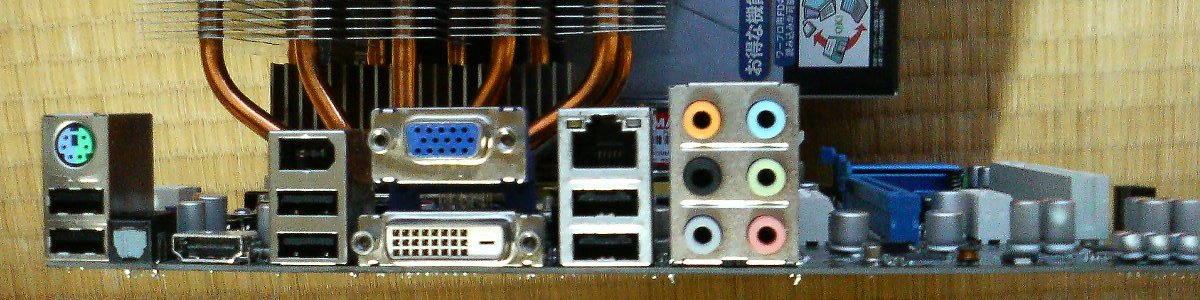
Figure 4.9 — Each socket here (USB, network, audio, video) is a doorway to a controller chip that the CPU talks to with I/O. Photo: Hitachi-Train, public domain, via Wikimedia Commons.

6.1 Programmed I/O (PIO)
What it is: The CPU itself copies each piece of data between the device and RAM, one at a time.
Loop, for every byte:
   CPU: "Is the device ready?"   (asks the device)
   CPU: "Yes. Take this byte."   (writes it)
   ... repeat thousands of times ...
Simple, but the CPU is busy the whole time. It was fine for old, slow devices (the first IDE disks used "PIO modes"). Today it is used only for small things like setting a register or reading a status, never for big data. Big data uses DMA.
6.2 Memory-Mapped I/O (MMIO)
What it is: The device's control registers are given ordinary-looking memory addresses. The CPU reads and writes them with normal MOV instructions. But the address does not go to RAM. It goes to the device.
 Physical address space (the CPU's "map")

 0x0000_0000 ┌────────────────┐
             │ RAM            │   ← real memory
             ├────────────────┤
             │ (hole)         │
 0xFE00_0000 ├────────────────┤
             │ Device A regs  │   ← writing here talks to the device
             ├────────────────┤
             │ Device B regs  │
 0xFFFF_FFFF └────────────────┘
How the device gets its address: Each PCIe device has BARs (Base Address Registers). A BAR says "I need 16 MB of address space." The firmware picks a free area and writes it back. Now the device has its own "window".
Important: MMIO memory is marked uncacheable. If the CPU cached it, reading a device status register might return an old value from the cache instead of asking the real device.
Example: Your graphics card exposes a big window (the frame buffer and control registers) as MMIO. The CPU writes pixels into that window, and they appear on screen.
6.3 I/O Ports (x86)
What it is: x86 CPUs also have a separate small address space just for devices: 65,536 ports (numbered 0 to 65,535). Two special instructions use it:
| Instruction | Meaning |
|---|---|
IN | Read from a port |
OUT | Write to a port |
A few historic ports:
| Port | Device |
|---|---|
0x60, 0x64 | Keyboard controller |
0x3F8 | First serial port (COM1) |
0x1F0 | First IDE hard-drive controller |
0xCF8, 0xCFC | PCI configuration (used to look up devices, see 6.4) |
Port I/O is the older way. New devices prefer MMIO because it is faster and more flexible. Only x86 has ports; most other CPU types (like ARM) use MMIO only.
See them on Windows: Device Manager → View → Resources by type → Input/output (IO). Each device lists its port range, such as 0060 - 0060.
6.4 Device Enumeration (Finding What Is Plugged In)
What it is: At boot, the computer has to discover which devices exist. This is enumeration.
For PCIe devices, the firmware (and later Windows) "knocks on every door":
for each bus 0..255
  for each device 0..31
    for each function 0..7
       read the "Vendor ID" of that address
       if it is 0xFFFF  →  nobody there (empty slot), move on
       else            →  a device! read more: Device ID, class, BARs
Every device must answer with:
| Field | Meaning | Example |
|---|---|---|
| Vendor ID | Who made it | 8086 = Intel, 10DE = NVIDIA, 1002 = AMD |
| Device ID | Which product | A model number |
| Class code | What kind of thing | "Network", "Storage", "Display" |
| BARs | How much address space it wants | 16 MB, 256 MB... |
Windows uses these to pick a driver. Open Device Manager → right-click a device → Properties → Details → Hardware Ids. You will see text like PCI\VEN_8086&DEV_xxxx ("VEN" = vendor, "DEV" = device).
For USB, the host sees a new device, gives it an address, and asks it to describe itself (this is also called enumeration).
For built-in basics (clock, keyboard, power buttons), the firmware's ACPI tables (Section 5.4) list them.
Summary
| Term | Plain meaning |
|---|---|
| I/O | How the CPU talks to devices |
| PIO | CPU copies every byte (slow, CPU busy) |
| MMIO | Device registers appear as memory addresses (uncached) |
| BAR | A device's "I need this much address space" register |
| Port I/O | x86's separate 65,536-port space using IN / OUT |
| Enumeration | Boot-time discovery of every device |
| Vendor ID | Who made the device; FFFF means empty |