The Big Picture: The Beat of the Computer
A band needs a drummer so everyone plays in time. A computer needs a clock: a signal that goes up and down at a steady speed. Each "tick" tells chips "now move to the next step". Without it, parts would act at random moments and data would get lost.
Clock:   ┌─┐ ┌─┐ ┌─┐ ┌─┐ ┌─┐
         ┘ └─┘ └─┘ └─┘ └─┘ └─
         tick tick tick tick
One up-and-down is one cycle. 1 Hz is one cycle per second. 1 GHz is a billion per second.
7.1 Crystal Oscillators
What it is: Where does a perfectly steady beat come from? From a tiny slice of quartz crystal. When you apply electricity to quartz, it vibrates at one very exact frequency, like a tuning fork. A circuit counts those vibrations. That is the crystal oscillator.
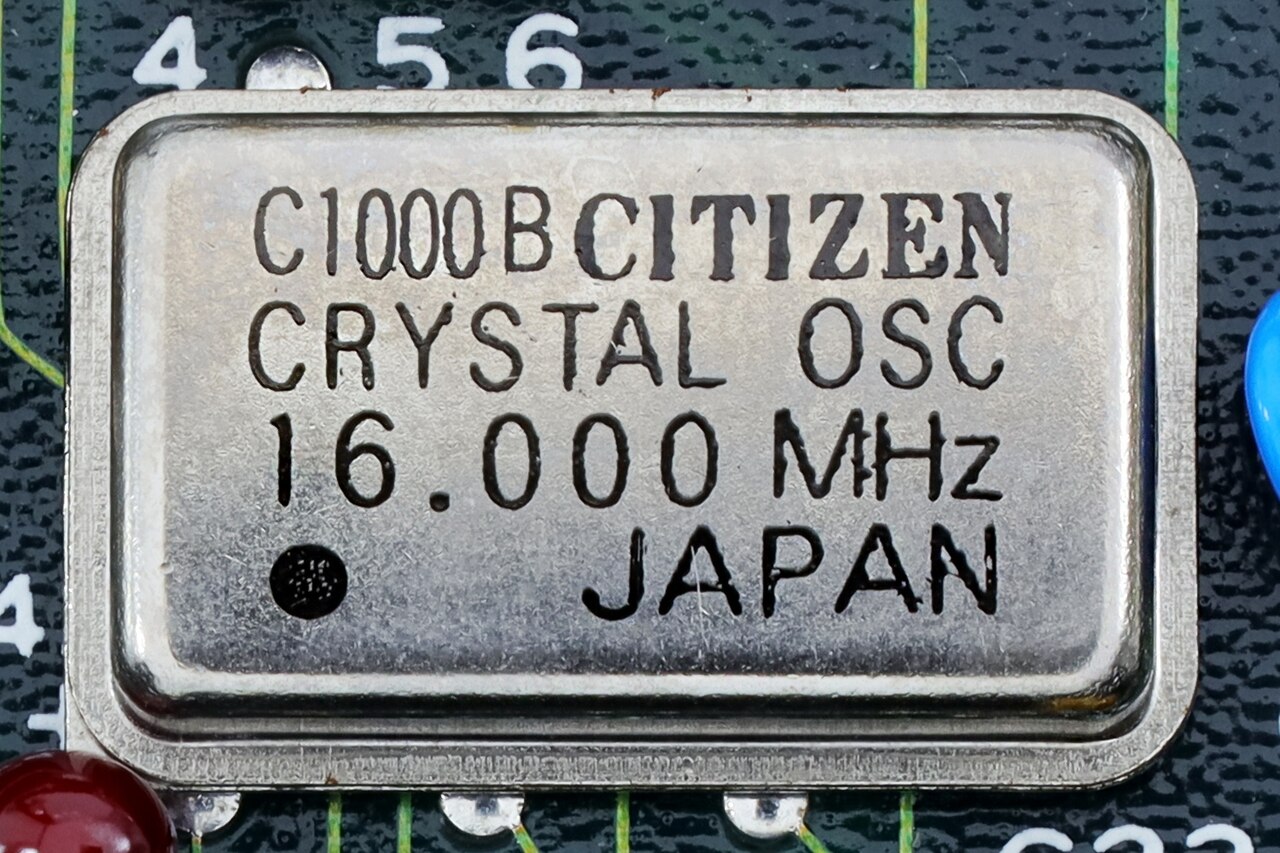
Figure 4.10 — A real crystal oscillator in a metal can. The printed number, 16.000 MHz, is its frequency. Photo: Mister rf, CC BY-SA 4.0, via Wikimedia Commons.

A motherboard has a few of these:
| Crystal | Frequency | Used for |
|---|---|---|
| Real-time clock | 32.768 kHz | Keeps the date and time while the PC is off (that is the CMOS battery's job, Section 8) |
| Main clock | 25 MHz (some use 24) | Source of the PCIe, USB and chipset clocks |
| Old PCs | 14.31818 MHz | Original PC timing (a leftover) |
Why 32.768 kHz? It equals 2¹⁵. A simple chip that halves the signal 15 times gets exactly 1 tick per second.
7.2 The CPU Clock Domain
What it is: A clock domain is a group of parts that share one clock. The CPU has its own.
The CPU doesn't use a crystal that runs at 4.5 GHz (quartz can't do that). Instead:
 Crystal 25 MHz ─► clock generator ─► BCLK = 100 MHz   (the "base clock")
                                         │
                                         ▼
                              × multiplier (set by the CPU)
                                         │
                                         ▼
                                  100 MHz × 45 = 4,500 MHz = 4.5 GHz
This is the "CPU speed" from Chapter 2. The multiplier changes all the time (that is the P-state from Section 5). When you "overclock", you raise the multiplier. Unlocked CPUs (Intel "K", AMD Ryzen) let you change it.
Inside the CPU, a circuit called a PLL (Phase-Locked Loop) multiplies the slow clock into the fast one.
7.3 Other Clock Domains: PCI and PCIe
The rest of the board runs at its own, much slower speeds:
| Domain | Clock | Notes |
|---|---|---|
| Old PCI slots | 33 MHz | Slow and shared |
| PCIe slots | 100 MHz reference | Each device's fast serial speed is made from this |
| USB | 48 MHz (internal) | Made from the main crystal |
| RAM | Its own (e.g. 1600 MHz for DDR4-3200) | Set by the memory controller |
The PCIe 100 MHz reference clock is often "spread spectrum": it wobbles by a tiny 0.5% so its radio noise spreads out and doesn't disturb nearby devices.
7.4 Clock Distribution
One crystal has to reach dozens of chips at the same moment. The board does this with:
- Clock generator / buffer chips that copy the clock to many outputs.
- Equal wire lengths. The copper wires from the clock chip to each target are made the same length, so the tick arrives at the same instant everywhere. (Sometimes you can see odd zig-zag traces on a board. They are slowing a short wire to match a long one.)
          ┌──────────────┐
Crystal ─►│ clock        │──► CPU       (same length)
          │ generator    │──► Chipset   (same length)
          │ + buffers    │──► PCIe slot (same length)
          └──────────────┘──► Memory
7.5 Clock Skew and Jitter
Even with care, clocks aren't perfect:
| Problem | What it means | Everyday example |
|---|---|---|
| Skew | The tick arrives at different times at different chips | Two clocks in one house that are 1 second apart |
| Jitter | The tick isn't perfectly regular; each tick is a bit early or late | A drummer who isn't perfectly steady |
Why they matter. A chip must see its input steady for a tiny moment before the tick (called setup time) and after it (hold time). If skew or jitter move the tick too far, the chip reads the wrong value. Engineers leave a safety margin, and that margin is why a CPU has a maximum safe speed. When you overclock too far, the margin disappears and the PC crashes.
Crossing between clocks. When data moves between two parts that use different clocks (CPU ↔ PCIe), it can arrive at a bad moment and be read as neither 0 nor 1 (a problem called metastability). The fix is a small FIFO buffer (First In, First Out queue) at the border. It takes the data in with one clock and hands it out with the other. Every chip is full of these.
Summary
| Term | Plain meaning |
|---|---|
| Clock | The steady beat that keeps chips in step |
| Crystal | Quartz that vibrates at one exact frequency |
| BCLK × multiplier | How the CPU gets 4.5 GHz from 100 MHz |
| PLL | Circuit that multiplies a slow clock into a fast one |
| Clock domain | A group of parts that share one clock |
| Skew | Tick arrives at different times in different places |
| Jitter | Tick timing wobbles |
| FIFO | Buffer for safely crossing between two clocks |